Reference Manual 23
Modem
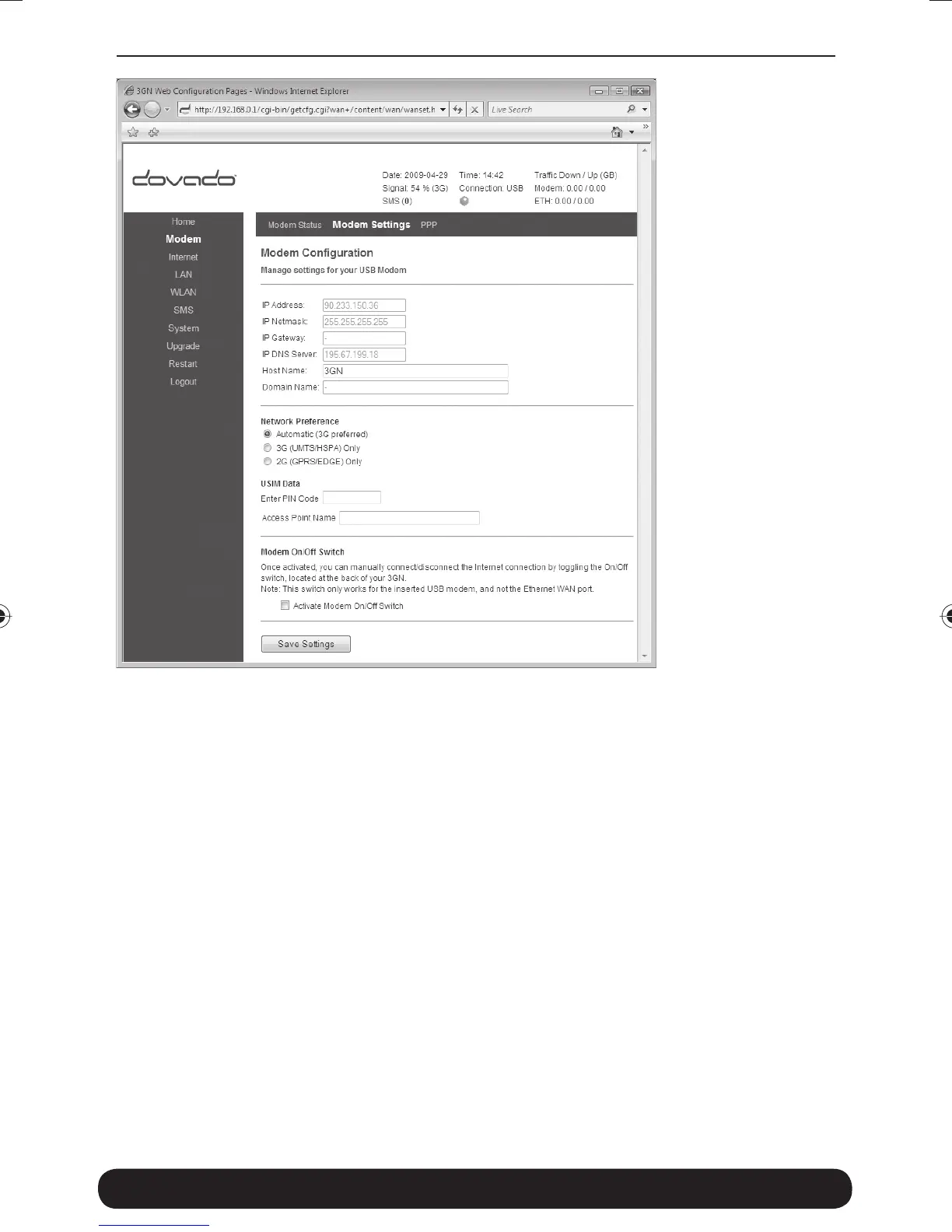
On the Modem->Modem Settings page, you will be able to insert all
the valid inputs in order to access the internet via your mobile operator.
There are several relevant bits of information which are necessary in
order to complete this task successfully:
•
APN (Access Point Name). If you are not sure what your mobile operator’s
APN is, please contact them or check with your modem manual.
•
PIN code. This is your PIN code provided with your SIM card which
resides in your USB modem.
•
Username & Password: Some operators may require you to insert
a username and password along with APN information in order
to authenticate towards the mobile network. If you haven’t been
provided this, then using only an APN might be suffi cient. If not,
then please contact your operator.
8388 3GN manual hopslagn.indd Avs1:148388 3GN manual hopslagn.indd Avs1:14 2010-01-04 14.092010-01-04 14.09


 To Next Page