Encryption
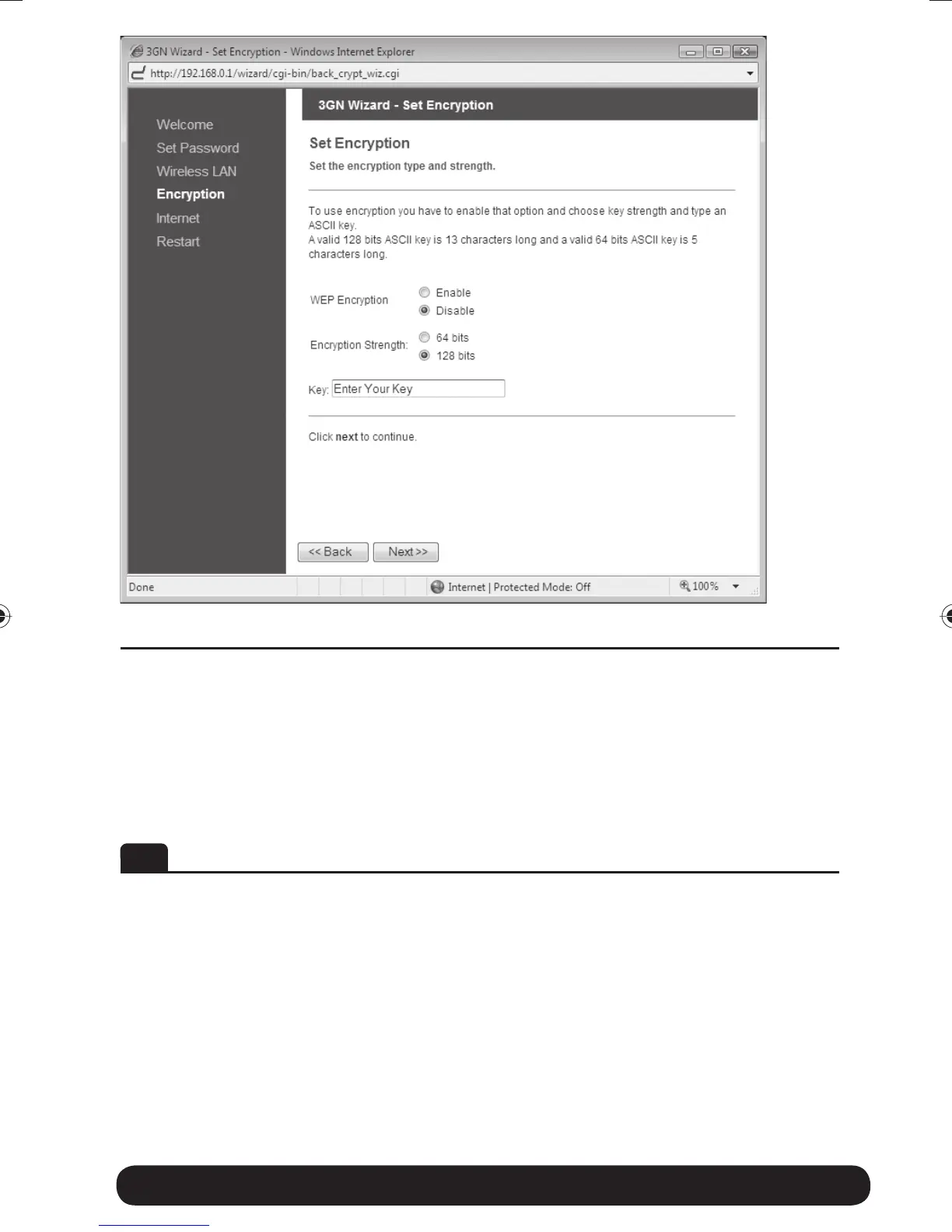
Here you can activate encryption if you would like to restrict access of
wireless users onto your private network. Choose Enable to enable
encryption, it is recommended that you select 128 bits as Encryption
Strength and then type in a key. The key is needed by all Wireless LAN
clients to access your private network. Click on Next to continue.
DE Encryption (Verschlüsselung/Kryptierung)
Hier können Sie die Verschlüsselung aktivieren, wenn Sie den Zugriff von
anderen Benutzern des drahtlosen Netzwerkes auf Ihr privates Netzwerk
unterbinden wollen. Wählen Sie Enable, um die Verschlüsselung zu aktivie-
ren. Wir empfehlen Ihnen 128 bits als Encryption Strength. Geben Sie
anschließend Ihren Verschlüsselungscode ein. Dieser Verschlüsselungscode
wird von allen Wireless LAN Clients für den Zugriff auf Ihr privates
Netzwerk benötigt. Auf Next klicken, um fortzufahren.
Quick Wizard Guide 12
8388 3GN manual hopslagn.indd 128388 3GN manual hopslagn.indd 12 2010-01-04 14.092010-01-04 14.09


 To Next Page