Instruction Manual
Seven Keys:
DOWN, MODE, SNOOZE/LIGHT, CHANNEL, UP, ALERTS, ALARM.
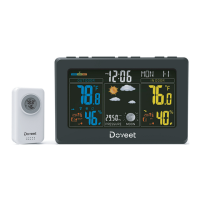
1. Display Unit
• 12/24 h Time and Date.(Press “DOWN” key to switch)
• Dual alarms.
• Snooze function (snooze interval optional from 3 minutes to 20 minutes,default:
5 minutes).
• RCC: WWVB(US) [ One product only have one RCC channel ].
• °C/°F switch over.(Press “UP” key to switch)
• Weather forecast.
• Indoor temperature range: 0°C-50°C (32°F-122°F), accurate range: ±1°C( ±1.8°F), display
scope: 0°C - 50°C (32°F-122°F).
• Indoor humidity range: 25%-95% accurate range: ± 5%, humidity display scope: 20%-99%.
• Outdoor tem
perature range: -35°C-60°C (-31°F-140°F), accurate range: ±1°C( ±1.8°F),
temperature display scope: -40°C-70°C(-40°F-158°F).
• Outdoor humidity range: 25%-95%, accurate range: ±5%, humidity display scope: 20%-
99%.
• Temperature alert for both highest and lowest indoor and outdoor temperature.
• RF 433MHz outdoor Temperature/Humidity signal transmission, up to 3 outdoor
transmitters receivable( Product only come with 1 outdoor transmitter, please contact the
seller if you need more outdoor transmitters).
• Battery low-power i
ndicator.
• Comfort level.
• Adjustable backlight (High light, mid-bright, turn off).
• Color backlight function (Light on for 8 seconds when powered by batteries).
• Color backlight (Sound control).
2. Operation Instruction
Insert battery (AAA) or connect adapter after a few seconds, LCD shows full segment,
after sound beep, it will enter the common display mode.
• On Default:
WWVB: Default 12-hour system at 12:00, temperature unit default°F.
3. Key Function
3.1 Time Setting
• Under normal mode, press and hold “MODE” for a few seconds to set the time (Hold until
the dis
play flashes). And then press “MODE” key to choose the item for setting.The steps
when in time setting mode:
Time zone→Hour→Minute→Year—Month—Day—Week—>Exit.
A. Press "UP" key, the number will go up; press and hold for 3 seconds, the number will
continually going up.
B. Press "DOWN" key, the number will go down; press and hold for 3 seconds,the number
will continually going down. Finish setting when no keys are pressed for 10 seconds, and
set numbers will be saved.
3.2 Temperature and Humidity Function
• Under normal mode, press the “CHANNEL” key to switch the channel of the o
utdoor
display, switch in sequence: CH1 temperature and humidity→CH2 temperature and
humidity→CH3 temperature and humidity→cycle display,(symbol appears on the LCD
display). Press and hold “CHANNEL" key for a few seconds to connect/reconnect the
outdoor temperature sensor in 3 minutes.
-1-


 To Next Page
 Loading...