5
Control panel
1. Increase temperature
2. Reduce temperature
3. Temperature display
4. Power
5. Speed display
6. Speed up
7. Speed down
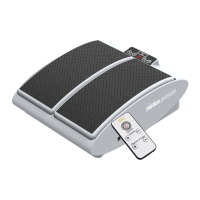
Remote control
1. Power
2. Speed up
3. Increase temperature
4. Speed down
5. Reduce temperature
A. Press the
button to turn on,
press it again to turn o.
The appliance will cause your foot
and ankle to pivot up and down to
simulate the motions of walking.
The rapid repeating pivotal motions
will help to loosen the joints in
your foot and ankle while causing
movement in the calf muscles which
helps to promote circulation in your
legs and feet. The pivotal motion
created by the MotionCiser simulates
the motion of the foot, ankle, and calf
muscles just like when a person is
walking.
The MotionCiser has a
preprogrammed mode which
automatically turns o after 30
minutes.
Advice:
It is advised to use the MotionCiser
for 20 to 30 minutes each time, two
to three times a day if you don’t go
out for a daily walk.
FEATURES
USE OF CONTROL PANEL
1 2 3 4 5 6 7
1
2 4
3 5
A B C D E


 To Next Page