10. - To stop the Manual Start Engine, move the Throttle to the Slow (Turtle) position to allow the Engine to idle and turn the
On/Off Switch to the “OFF” position (Figure 9a).
- To stop the Electric Start Engine, move the Throttle to the Slow (Turtle) position allowing the Engine to idle and turn the Key
to the “OFF” position (Figure 9b).
Important Processing Information
Follow all Danger, Warning, Caution and Notice labels when using your machine. For best performance and safety, pay close
attention to the Caution Label on the inside of the Shredder Hopper.
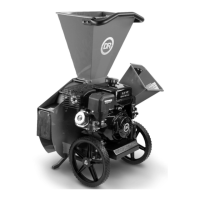
Using the Chipper Chute
The Chipper can chip twigs and branches ranging in size from 1/2" to 3" (PREMIER 320) or 3/4″ to 4″ (PRO 420) in diameter. Cut
your materials into manageable lengths before feeding them into the Chipper Chute. The revolving Chipper Knife mounted on a
Flywheel turns branches fed into the Chute into “chips”. NOTE: Use the Shredder Hopper as described in the next section for
hard wood branches less than 3/4" in diameter and softer organic material up to 4-1/2" in diameter.
• Hold onto and slowly feed material into the Chipper Chute. Do not force material or allow material to be pulled too quickly into
the Chipper.
• Larger diameter hardwood or extremely hard knots may not process as well as other materials. Discard larger diameter or
harder branch stubs before they become too short to control their feed rate.
• Keep a moderate feed rate to prevent overloading the machine. Overloading the Chipper Chute will cause the Engine speed to
decrease and may stress and damage the machine.
• Your Chipper can process dry or green material. Green material will process quicker and easier than dry material. Soft wood
processes easier than hard wood.
• If the machine does not chip well, the Chipper Knife may need to be sharpened or replaced.
• It is best to trim off any side twigs from the main branch that you are chipping.
• When chipping branches, sometimes a tail will remain at the end of a branch. To avoid this, rotate the branch while feeding it
into the Chipper Chute. Rotating the branch as you feed it into the machine will improve chipping performance.
• Use caution with small diameter green saplings and branches less than 1" in diameter. Chip these grouped or bundled
together to provide support for each other. If the material is 1" or larger, feed only one at a time into the Chipper Chute.
• Shred green or very leafy material smaller than 3/4" diameter (like pine boughs) through the Shredder Hopper instead of the
Chipper Chute.
Using the Shredder Hopper
The Shredder Hopper can process hard wood branches up to 1/2″ (PREMIER 320) or 3/4"(PRO 420) in diameter and softer
organic material up to 4-1/2" in diameter. You can shred most organic materials. A Guard (flap) is attached to the Hopper.
Material must go past this flap in order to enter the main Shredding Chamber where revolving steel Hammers do the shredding.
Use a Stick to push the material past the flap if needed.
• Due to the wide variety of materials that you can shred (see next page) and their different physical characteristics, only feed
limited quantities of any material into the Shredder Hopper at first. Increase the amount and length of material if you find that
the material is processing without any difficulty. Your judgment and operator experience is very important.
• ALWAYS pay attention to the discharge to confirm that material is exiting the machine at the same rate it is entering. If
material builds up inside the cutting chamber instead of discharging - stop feeding more material and wait for the material to
discharge. If the material does not discharge, see the “Removing a Clog” section on the next page.
• Be sure not to overload the machine by feeding too much material into the Hopper at one time. If you hear the speed of the
Engine decreasing, stop feeding material into the machine at once. Do not resume feeding the machine until the Engine has
returned to full speed.


 To Next Page
 Loading...