14 DR
®
PRO CHIPPER SHREDDER
Upper Screen
Bolt and
Locknut
• You can feed several small branches into the Shredder Hopper at once providing their combined diameter is less than 3/4".
Cut branches so they are shorter than 3 feet long to make them more manageable.
• Allow green materials to dry before processing or alternate processing and discharging green/wet materials with dry materials
to avoid clogging. If wet materials begin to clog, shred a stick to clear the material through. If the clog still is not cleared, see
the “Removing a Clog” section on the next page.
MATERIALS BEST SUITED FOR SHREDDING
Branches smaller than 3/4"
General Warnings
Removing a Clog
1. Remove any material left in the Chipper Chute and Shredder Hopper with a
wooden stick.
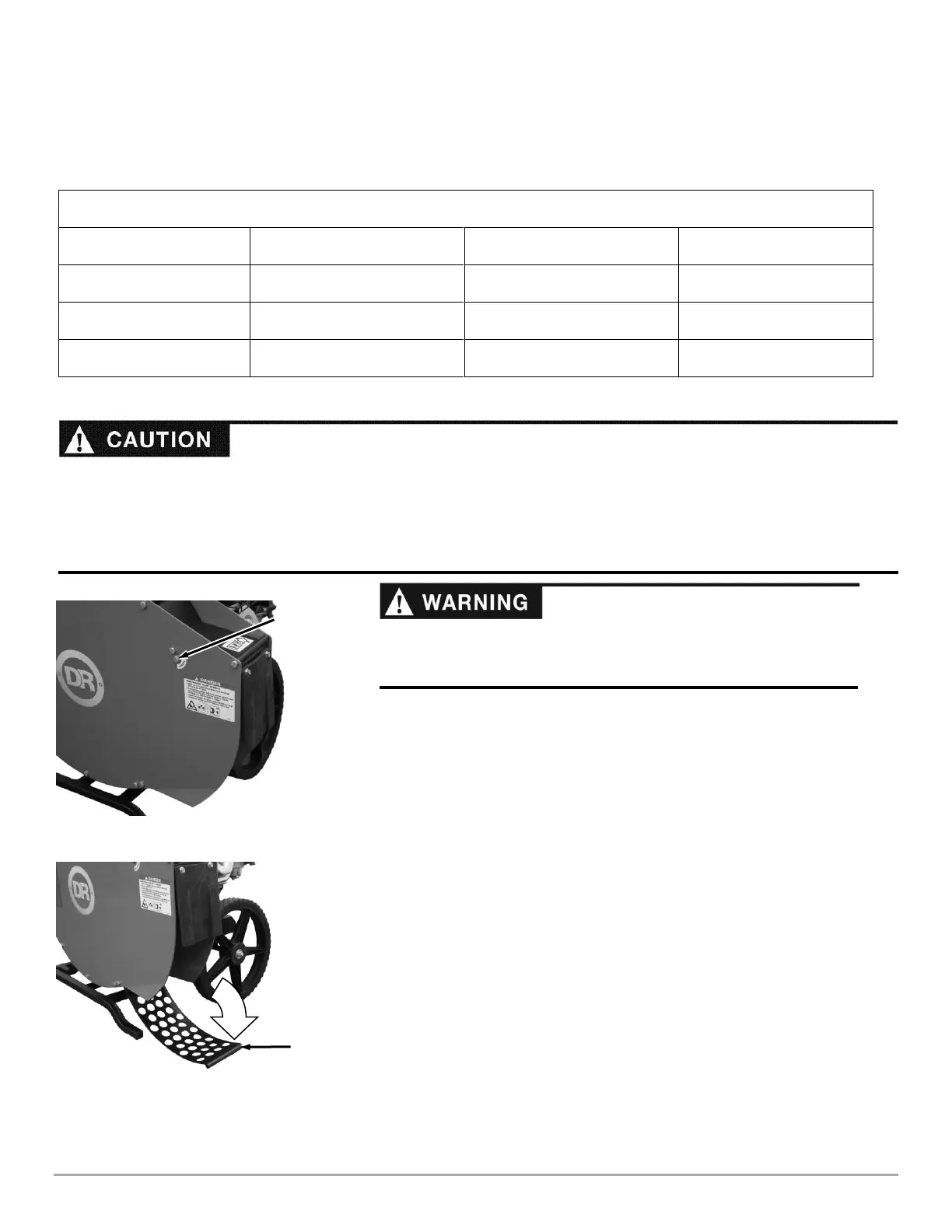
2. Remove the Upper Screen Bolt and Locknut using two 1/2" Wrenches
(Figure 10).
3. Rotate the Screen down to gain access to the cutting chamber (Figure 11).
Note: If the Screen will not rotate down freely, the nearby bolts can be loosened
slightly.
4. Clear all clogged material from the machine.
5. Rotate the Screen back into the operating position and reinstall the
hardware. Note: Make sure the bolt goes through the screen rather than just
behind it.
6. Start the machine and allow any remaining material to discharge.
7. If you have been shredding wet/green materials the clog may be near the
shredder housing inlet. Shred a wood stick of up to 1" diameter to clear the
clogged wet material.
8. If the clog does not clear repeat the above process.
9. Be certain the cutting chamber is clear before trying to process more
material.
• NEVER allow processed material to build up within 3" of the Discharge opening. Move the DR CHIPPER SHREDDER or the
pile as needed. Failure to do so could result in unnecessary jamming of the machine.
• To move a pile of processed material, first shut off the Engine, and use a spade, rake, or long handle tool; NEVER use your
hands or feet!
• Make sure the DR CHIPPER SHREDDER finishes processing and discharging material before shutting the Engine off.
Before performing any maintenance procedure or inspection, stop the
Engine, wait five minutes to allow all parts to cool. Disconnect the Spark
Plug Wire, keeping it away from the Spark Plug.


 To Next Page
 Loading...