What does a scale failure alarm mean on Dräger Medical Equipment?
- SSarah LopezSep 23, 2025
If a scale failure alarm is activated on your Dräger Medical Equipment, a scale malfunction has occurred. Turn the incubator off and remove it from service.
What does a scale failure alarm mean on Dräger Medical Equipment?
If a scale failure alarm is activated on your Dräger Medical Equipment, a scale malfunction has occurred. Turn the incubator off and remove it from service.
Why won't the variable height adjustable stand move on my Dräger Medical Equipment?
If the variable height adjustable stand of your Dräger Medical Equipment won't move, there are a few potential causes: * The Main Power switch at the stand might not be turned on. Turn it on. * The power cord at the UPS electronic module could be unplugged. Plug the power cord into an appropriate power source. * The AC supply power rating might be incorrect, or the power cord is unplugged. Ensure the power cord is connected to the correct AC power source at the UPS electronic module.
What to do if the Low Air/Skin Temperature alarm activates on Dräger Medical Equipment?
If the Low Air /Skin Temperature alarm activates on your Dräger Medical Equipment, it could be due to: * An open access door or iris entry port. Make sure all access doors and iris entry ports are closed. * In Skin mode, the skin probe might not be properly secured. Check the skin probe connection.
What causes the Low Humidity alarm on Dräger Medical Equipment?
If the Low Humidity alarm is activated on your Dräger Medical Equipment, the humidity reservoir is likely empty. Refill the reservoir. If the alarm continues after refilling, turn the incubator off and remove it from service.
What does the Too Much Weight alarm mean on Dräger Medical Equipment?
If the Too Much Weight alarm activates on your Dräger Medical Equipment, it means: * There's weight exceeding 7 Kg (15 lb) on the mattress. Remove the excess weight. * When zeroing the scale, there's weight exceeding 3500g on the mattress. Remove the excess weight.
What does the Key Stuck alarm mean on Dräger Medical Equipment?
If the Key Stuck alarm is activated on your Dräger Medical Equipment, a controller key malfunction has occurred. Turn the incubator off and remove it from service.
What does a heater failure alarm mean on Dräger Medical Equipment?
If a heater failure alarm is activated on your Dräger Medical Equipment, it means either the fan motor malfunctioned or the heater failed. Turn the incubator off and remove it from service.
What to do if a controller failure alarm is activated on Dräger Medical Equipment?
If a controller failure alarm is activated on your Dräger Medical Equipment, it indicates that an internal malfunction occurred. Turn the incubator off and remove it from service. If this is the first time the unit was installed or new software was loaded onto the controller, press the Alarm Silence/Reset key. If the failure continues, turn the incubator off and remove it from service.
What does the Not Installed message mean on Dräger Medical Equipment?
If the Not Installed message is displayed on your Dräger Medical Equipment, it indicates that the servo-controlled oxygen and/or humidity system(s) is/are not installed. Install the oxygen and/or humidity system(s). It could also mean that the servo-controlled oxygen and/or humidity system(s) is/are not activated. Set up the oxygen and/or humidity system at the System Configuration Menu.
What does the Remove Skin 2 Probe alarm mean on Dräger Medical Equipment?
If the Remove Skin 2 Probe alarm is activated on your Dräger Medical Equipment, it means: * While in Skin mode, a second probe is connected to the sensor module. Remove the second probe or switch to Air mode. * While in Air mode, with two probes connected, you're trying to enter Skin mode. Remove the second probe and press the Alarm Silence/Reset key.
Provides detailed explanations of terms like incubator temperature, control temperature, and temperature variability.
Specifies the manual's purpose and outlines that the incubator should be used by trained personnel.
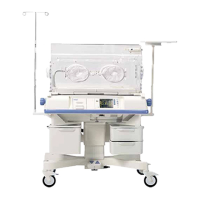
Describes the Isolette® Infant Incubator as a modular, controller-based system for infant care.
Details the physical, electrical, and environmental characteristics of the C2000 and C2000e models.
Highlights warnings and hazards related to electrical shock, grounding, and power handling.
Details important safety measures and warnings concerning the use of supplemental oxygen.
Provides general warnings and best practices for safe operation and handling of the incubator.
Outlines the steps for setting up and assembling the incubator and its components.
Describes procedures to verify the correct functioning of the incubator's systems after installation or maintenance.
Identifies and explains the function of the incubator's various controls, indicators, and connection ports.
Provides step-by-step instructions for powering the incubator on and off safely.
Explains how to set and control the incubator's air temperature.
Details the procedure for setting and monitoring infant skin temperature.
Guides on activating and setting the oxygen concentration for infant respiratory support.
Provides critical safety instructions and procedures for transporting the incubator with a patient.
Details the approved methods for cleaning various components of the incubator.
Outlines essential maintenance tasks and schedules for authorized personnel.
Lists available part numbers for essential components, accessories, and consumables.
Provides a guide to identify and resolve common issues encountered with the incubator.
| Type | Infant Incubator |
|---|---|
| Application | Neonatal Care |
| Airflow | Adjustable |
| Incubator Type | Closed |
| Power Supply | 100-240 V, 50/60 Hz |
| Temperature Control | Servo-controlled |
| Humidity Control | Servo-controlled |
| Humidity Range | 30% to 95% RH |
| Monitoring | Temperature, Humidity, Oxygen |
| Access | Front and rear access |
| Access Ports | Multiple |
| Alarms | Audible and visual alarms for temperature, humidity, power failure, etc. |


Loading...