EasyManua.ls Logo

Dräger Alcotest 6820 - User Manual

Dräger Alcotest 6820
8 pages
Print Icon
To Next Page IconTo Next Page
Loading...
Dräger Alcotest
®
6820
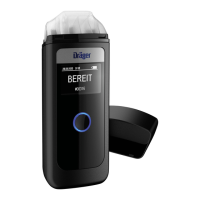
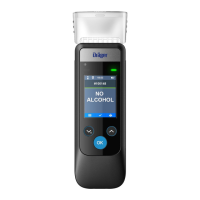
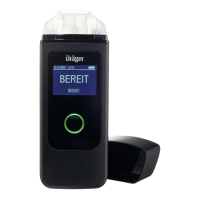
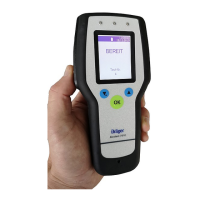
Alcohol Screening Device
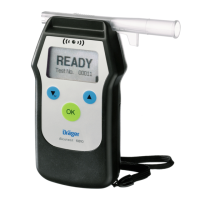
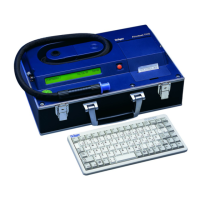
Dräger Alcotest
®
6820 is the logical successor to the successful Alcotest
®
6810. The compact hand-held measuring instrument Alcotest
®
is quickly ready
for use and is adaptable to international guidelines. With an even more sturdy
enclosure and the proven Dräger sensor, Alcotest
®
6820 is a reliable partner
for breath alcohol analyses. FOR LAW ENFORCEMENT PURPOSES OR
USE IN DOT-REGULATED INDUSTRIES ONLY.

Other manuals for Dräger Alcotest 6820

Questions and Answers

  • R
    Raymond LeeAug 20, 2025
    What to do if Dräger Test Equipment shows 'Accuracy check error'?
    • J
      John McdowellAug 20, 2025
      If your Dräger Test Equipment displays an 'Accuracy check error', it means the accuracy check was not successful. Repeat the accuracy check. If the fault reappears, contact DSDI.
  • C
    Chloe ToddAug 22, 2025
    What to do if Dräger Test Equipment shows 'Calibration error'?
    • N
      Nicole BakerAug 22, 2025
      If your Dräger Test Equipment displays a 'Calibration error', it means the calibration was not successful. Calibrate again, but note that this should only be done by authorized service personnel.
  • B
    Brad BarrettAug 25, 2025
    What to do if the Dräger Test Equipment displays 'Calibration Test incorrect' error message?
    • A
      Anthony OrtizAug 25, 2025
      If you see the "Calibration Test incorrect" error on your Dräger Test Equipment, it means the calibration test was not successful. You should repeat the calibration test. It can also mean that the measured value exceeds the display area, so you should use lower concentrations.
  • J
    Jennifer BenderAug 26, 2025
    What to do if Dräger Test Equipment displays 'no battery charge'?
    • J
      Julie ColemanAug 26, 2025
      If your Dräger Test Equipment displays "no battery charge", it means that there are no rechargeable NiMH batteries in the device. Remove the batteries, insert rechargeable NiMH batteries, and then charge them.
  • J
    Judy PriceAug 27, 2025
    What to do if Dräger Test Equipment shows 'Internal System ERROR'?
    • D
      davidconleyAug 28, 2025
      If your Dräger Test Equipment displays an 'Internal System ERROR', it means the instrument has encountered an error and measuring is not possible. Try removing the batteries for a few seconds, then replace them. If the error message continues to appear, contact Dräger for further assistance.
  • M
    Martin PerezAug 29, 2025
    What to do if Dräger Test Equipment cannot be switched on?
    • K
      krojasAug 29, 2025
      If your Dräger Test Equipment won't switch on, it's likely due to low batteries. Replace the batteries to resolve this.
  • A
    Angela MillerAug 31, 2025
    What to do if Dräger Alcotest 6820 Test Equipment shows no text in the display?
    • J
      Julia SilvaAug 31, 2025
      If your Dräger Test Equipment display shows no text, it indicates an instrument error. Remove the batteries for at least 2 seconds and then reinsert them. If the issue persists, contact Draeger Safety Diagnostics.
  • B
    Brittney BrownSep 2, 2025
    Why does Dräger Alcotest 6820 leave menu-mode automatically?
    • A
      Anthony OneillSep 2, 2025
      The Dräger Test Equipment automatically returns to measuring mode from the menu after 120 seconds. To continue in the menu, reselect the menu item.
  • T
    Tina KramerSep 4, 2025
    What to do if Dräger Alcotest 6820 Test Equipment measures beyond range?
    • U
      urobertsonSep 4, 2025
      If the measured BAC exceeds the measuring range, wait 15 minutes and then perform the test again. The only way a conscious human can exceed the measuring range is with copious amounts of mouth alcohol.
  • G
    Gwendolyn SanchezSep 6, 2025
    What to do if Dräger Alcotest 6820 Test Equipment displays 'Internal System ERROR'?
    • T
      Thomas StevensSep 6, 2025
      If your Dräger Test Equipment displays the "Internal System ERROR" message with an error number, it indicates a device fault, making measurement impossible. To resolve this, remove the batteries for at least 2 seconds, then re-insert them. If the problem persists, consider contacting DrägerService.

Summary

Benefits

Dependable Under Harsh Conditions

Device withstands extreme environments, dust, and water.

Easy to Use, Easy to Read

Simple operation with full-text display, LED, and acoustic signals.

Practical Design

Compact, one-handed operation with intuitive mouthpiece insertion.

Ready for Use Within Four Seconds

Fast response time with precise electrochemical sensor.

Slide n Click Mouthpiece

Patented mouthpieces prevent manipulation and reduce contamination.

Improved Data Management Capabilities

Optimized software for configuration and data transfer via USB.

Stores Up to 5000 Test Results, Prints Onsite

Large memory capacity and wireless data transfer to mobile printer.

Rechargeable Batteries

Option for NiMH rechargeable batteries or disposable AA batteries.

Accessories

Dräger Mobile Printer

Prints breath alcohol and drug test results wirelessly.

USB Cable

For data transfer to PC and device configuration.

Mouthpieces (Slide n Click)

Available in packs with or without non-return valve.

NiMH Rechargeable Batteries

Set of rechargeable batteries for the device.

Charger

Power supply for charging rechargeable batteries.

System Case

Protective case for storing and transporting the device.

Services

Dräger Service

Comprehensive support and advantage for breath alcohol screening equipment.

Related Products

Dräger Alcotest 5510

Handheld screener with quality, accuracy, and reliability for preliminary testing.

Dräger Alcotest 7510

Evidential breath tester listed on NHTSA CPL, OIML certified.

Technical Data

Ordering Information

Mobile Printer for Law Enforcement Applications

Dedicated printer for law enforcement use.

PSU (power source) 600 mA, 11 V, for charging NiMH batteries

Power supply unit for charging the device.

Diagnostics Software

Software for device diagnostics and analysis.

USB cable for downloading data

Cable for transferring data from the device.

Notes

Dräger Alcotest 6820 Specifications

General IconGeneral
Operating Temperature-5 to +50 °C
DisplayBacklit LCD
Sensor TypeElectrochemical sensor
Storage Temperature-20 to +60 °C
Data Storage5000 test results
Humidity Range10 to 95 % RH, non-condensing
Battery LifeApproximately 1500 tests
InterfaceUSB
Warm-up TimeApproximately 6 seconds
Sample MethodBreath sampling

Related product manuals