EasyManua.ls Logo

Dräger MQG 0020 - User Manual

Dräger MQG 0020
288 pages
Go to English
Print Icon
To Next Page IconTo Next Page
Loading...
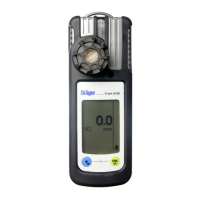
Dräger X-am
®
5100
(MQG 0020)
Software 6.n ( 6.9)
i
de
Gebrauchsanweisung
3
fi
Käyttöohjeet
109
cs
Návod na použití
208
en
Instructions for Use
15
no
Bruksanvisning
121
bg
Ръководство за работ
220
fr
Notice d’utilisation
29
sv
Bruksanvisning
133
ro
Instruciuni de utilizare
234
es
Instrucciones de uso
42
pl
Instrukcja obsługi
145
hu
Használati útmutató
246
pt
Instruções de utilização
56
ru
Руководство по зксплуатации
158
el
Οδηγίες Χρήσης
259
it
Istruzioni per l'uso
70
hr
Upute za uporabu
172
tr
Kullanma talimatları
273
nl
Gebruiksaanwijzing
84
sl
Navodilo za uporabo
184
da
Brugsanvisning
97
sk
Návod na použitie
196

Table of Contents

Other manuals for Dräger MQG 0020

Questions and Answers

  • T
    Taylor JacobsSep 23, 2025
    What to do if Dräger MQG 0020 Security Sensors display error 355?
    • C
      Catherine WashingtonSep 23, 2025
      If error code 355 appears, it indicates that the temperature is too low. Operate the instrument within the allowed temperature range.
  • M
    Melissa DayAug 25, 2025
    What to do if Dräger Security Sensors database is full?
    • J
      Joshua MoranAug 25, 2025
      If error code 154 appears, it indicates that the database is full. To resolve this, read the database and clear the memory.
  • J
    John JamesAug 25, 2025
    What to do if Dräger MQG 0020 Security Sensors database is 90% full?
    • W
      williejeffersonAug 26, 2025
      If error code 153 appears, it indicates that the database is 90% full. To resolve this, read the database soon and then clear the memory.
  • N
    nicolefisherAug 27, 2025
    Why Dräger Security Sensors display '– –'?
    • L
      Lisa Long MDAug 27, 2025
      The display showing '– –' on your Dräger Security Sensors indicates that the measuring range may be calibrated incorrectly. Recalibrate the measuring range. If the issue persists, the electronics or sensors could be defective, requiring repair by DrägerService.
  • L
    Lori SnowAug 27, 2025
    What to do if Dräger MQG 0020 bump test interval has elapsed?
    • J
      John GoodmanAug 27, 2025
      If error code 155 appears, it indicates that the interval for the bump test has elapsed. Perform the bump test.
  • R
    Rebecca PhillipsSep 14, 2025
    What to do if Dräger Security Sensors display error 304?
    • R
      rbakerSep 14, 2025
      If error code 304 appears, it indicates that the Dräger Sensor XS EC1 is not inserted or is defective. Check DrägerSensor XS EC1.
  • M
    Molly FoxSep 12, 2025
    What does error 301 mean on Dräger MQG 0020?
    • K
      Kelly MaySep 12, 2025
      Error code 301 indicates no valid zero point adjustment of the Dräger Sensor XS EC1. Perform a fresh air calibration.
  • R
    Rebecca DaughertySep 13, 2025
    What does error 302 mean on Dräger MQG 0020?
    • J
      Jennifer MillerSep 13, 2025
      Error code 302 indicates no valid sensitivity adjustment of the Dräger Sensor XS EC1. Perform sensitivity adjustment or fresh air adjustment.
  • A
    Alan PruittSep 5, 2025
    How to fix error 305 on Dräger Security Sensors?
    • T
      Tiffany RobinsonSep 5, 2025
      Error code 305 indicates an error during the bump test of Dräger Sensor XS EC1. Repeat the bump test. If necessary, adjust or replace the Dräger Sensor XS EC1.
  • S
    stevenwilkinsSep 2, 2025
    What does error 159 mean on Dräger MQG 0020 Security Sensors?
    • W
      whiteraymondSep 2, 2025
      Error 159 means adjustment is not possible because a message is preventing the function (e.g., sensors in warm-up phase). Identify the message code via the info menu and switch off the device, if necessary.

Summary

For Your Safety

Definitions of alert icons

Explains the meaning and use of alert icons in the document.

Description

Product overview

Provides a visual overview of the instrument's components and their labels.

Use

Replacing the Batteries; Rechargeable Batteries

Step-by-step guide for safely replacing batteries or rechargeable battery packs.

Before entering the workplace

Important checks and safety precautions to perform before using the instrument in a work environment.

Identifying Alarms

Explains how to recognize and interpret different types of alarms displayed by the instrument.

Battery main alarm

Details the indication of the main battery alarm and automatic shutdown.

Configuration

Performing the bump test

Bump test with documentation of results in the instrument memory

Concentration pre-alarm A1

Concentration main alarm A2

STEL; TWA exposure alarm

Calibrating the instrument

Maintenance

Dräger MQG 0020 Specifications

General IconGeneral
Operating Temperature-20 °C to +50 °C
WeightApprox. 300 g
Measurement Range0-100% LEL
Resolution1 %LEL
Response Time<15 s
Humidity Range15 to 95 % RH, non-condensing
Output Signal4-20 mA

Related product manuals