FLIGHT OPERATION GUIDE
HEADLESS MODE
Press the Headless Mode button to activate. In this mode, the drone will fly in the
direction as controlled by your right joystick regardless of the position of your
drone's head or the tail. Press the same button to exit this mode.
ONE-KEY RETURN
Press the One-key Return button, the drone will roughly fly back along its original
take-off path. Press the button again to exit the mode.
360° FLIP
Fly the drone to a height of over 3 meters, press the Flip button, and move the
right joystick to flip the drone 360° accordingly.
TRAJECTORY FLIGHT
Tap to activate the Trajectory Flight mode. Draw a path in the blank area on
the screen and the drone will fly following the path. Tap again to exit this
mode.
SPEED SWITCH
The drone's default speed is low speed. Press the Speed Switch button once for
medium speed, press again for high speed. A third press will revert back to low
speed.
ALTITUDE HOLD/HOVER
This is one of the default settings on the drone. When you release the Left Joystick
after an ascending/descending action, the drone will hover at the current flight
height.
GESTURES FOR PHOTO
Tap to activate. Facing 2-3m from the camera, make a V sign and the
camera will take a photo.
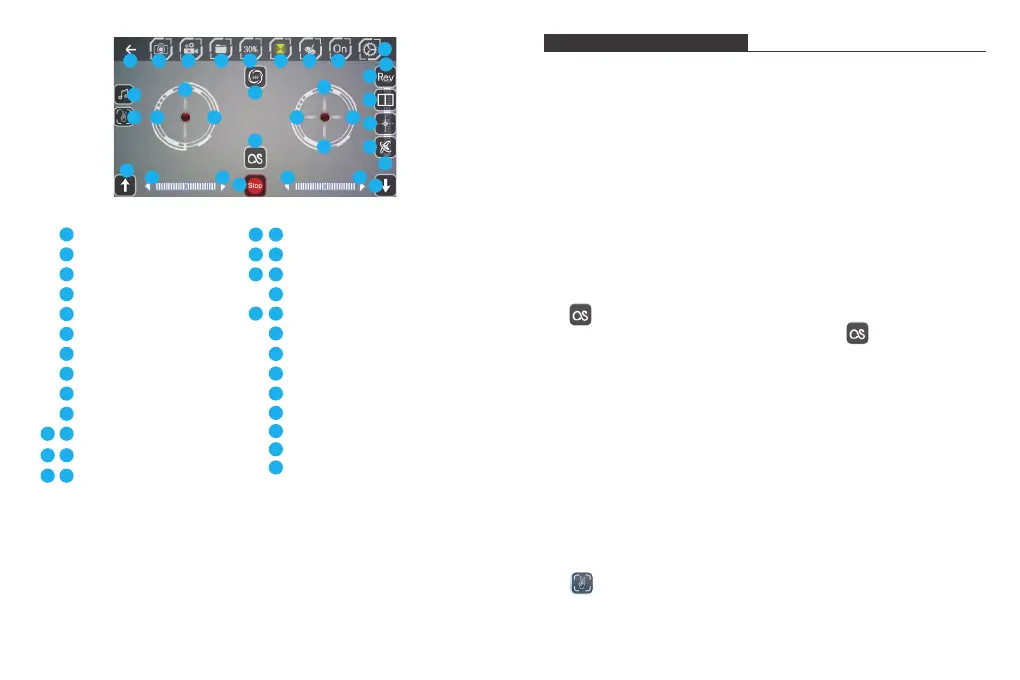
1 2 3 4 5 6 7 8
9
10
24
12
28
29
11
19
20
23
26
27
21
22
18
25
30
31
32
33
15
13 14
16
Back
Photo
Video
Files
Speed Switch
Altitude Hold
Gravity Induction
App ON/OFF
More Settings
Left Joystick (Accelerator)
Left/Right Flip and Roll
Left/Right Sideward
Forward/Backward
Forward/Backward Fine-tuning
Left/Right Flip and Roll Fine-tuning
Left/Right Sideward Fine-tuning
360° Flip&Roll
One-key Takeoff/Landing
Trajectory Flight
Emergency Stop
Music
Gestures For Photo
Camera Reverse
3D Display
Headless Mode
Calibration
17
1
2
3
4
5
6
7
8
9
10
1211
13 14
15
16
1817
19
20
21 22
24
23
25
26
27
28
29
30
31
32
33
9 10


 To Next Page