EasyManua.ls Logo

Dragon Touch DT50 - Lullabies; Feeding Timer

Dragon Touch DT50
13 pages
Print Icon
To Next Page IconTo Next Page
To Previous Page IconTo Previous Page
Loading...
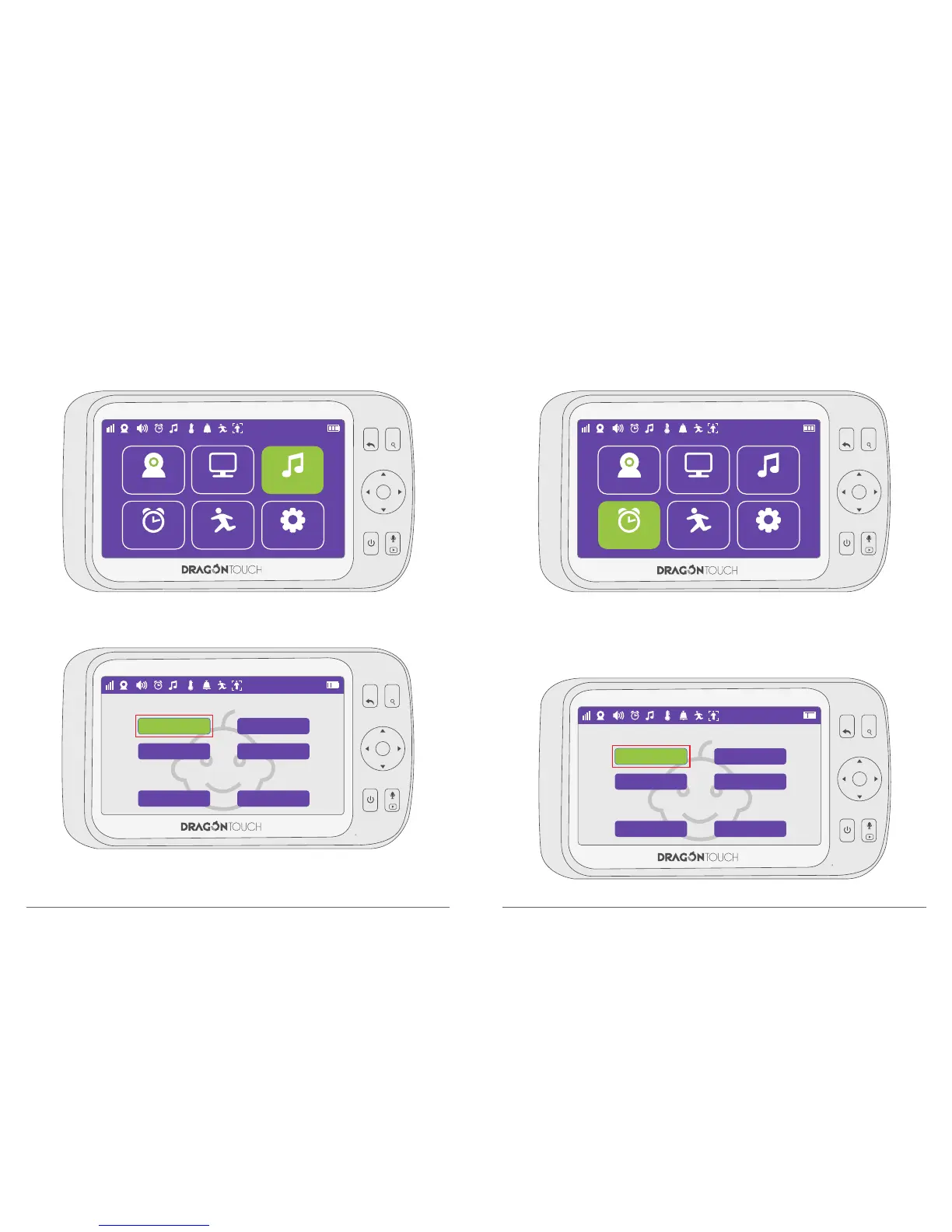
4. Lullabies
Press Menu button to enter to the function interface, choose “Lullabies”.
5.Feeding Timer
Press Menu button to enter to the function interface, choose “Feeding Timer.
Press “OK” button to choose the time to remind for feeding kids.
After selected, count down bar will appear in video view interface, when up to predefined
time, monitor will alarm for 5 seconds.
Choose the internal lullaby to Soothe your baby.
09
10

22°C
Camera
Feeding Timer
Setting
1
1
Auto Tracking
View
Lullabies
MENU
OK
VOL+
VOL-
MENU
OK
VOL+
VOL-
1
22°C
1
Mochart
Baha
All
Vrtoven
Brahms
Stop
22°C
Camera
Setting
1
1
Auto Tracking
View
Lullabies
Feeding Timer
MENU
OK
VOL+
VOL-
MENU
OK
VOL+
VOL-
1
22°C
1
2. hours
4. hours
Cancel
3. hours
5. hours
Setting

Related product manuals