CONTENTS
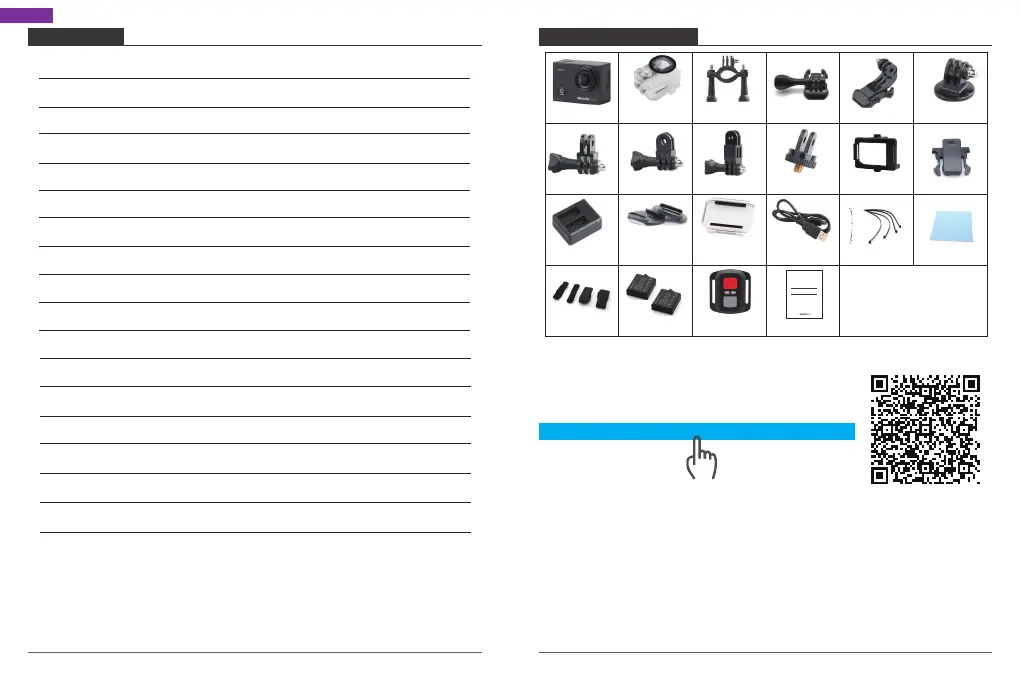
What’s in the Box
Your Vision 3 Pro
Getting Started
Overview of Modes
Customizing Your Vision 3 Pro
Connecting to The XDV App
Playing Back Your Content
Deleting Videos and Photos on Your Vision 3 Pro
Offloading Your Content
Adjusting the Zoom Level
Reformatting Your Microsd Card
Maintenance Your Camera
Maximizing Battery Life
Battery Storage and Handling
2.4G Remote
Mounting Your Camera
Contact US
2
3
5
6
11
15
15
16
17
19
19
20
20
20
21
23
25
English
How to use all sorts of accessories of action camera?
Scan the following QR code or enter the
website to watch the video.
Unboxing: 00:00-00:19
How to remove the camera from the box it's mounted on? : 00:20-00:31
How to remove the camera from the waterproof case? : 00:32-01:05
How to mount the camera to a tripod? : 01:17-01:49
How to mount the camera to your body? : 01:50-02:08
How to mount the camera to a self stick? : 02:09-02:55
How to mount the camera to a bike? : 02:56-04:34
How to mount the protective backdoor? : 04:35-04:59
How to mount the camera to a helmet? : 05:03-11:16
Waterproof
Housing
Handele Bar/
Pole Mount
Protective
Backdoor
Mount 1
Mount 6
Mount 3
Mount 5Mount 4 Mount 7
Helmet
Mounts
Tethers
Mount 2
Bandages Remote
Quick Start Guide
Changer
Battery
USB Cable
WHAT'S IN THE BOX
Lens Cloth
www.youtube.com/watch?v=UqKtElRXqI8&feature=youtu.be
Clip 1
Clip 2
Vision 3 Pro
Quick Start Guide
AKASO Vision 3 Pro Action Camera
01 02


 To Next Page