EasyManua.ls Logo

DRAKE R8A - Page 11

DRAKE R8A
43 pages
Print Icon
To Next Page IconTo Next Page
To Previous Page IconTo Previous Page
Loading...
9
Front
Panel
Description
‘SCAN
ust
TE
1
BBB
A-B
CARR
VFO
(A)
=(B),
(PRE)
(ATTN)
AGC(B)
[F)
|
ante
1)(2)VHE)
|
(NOTCH)
NB
(NW)
(NAME)
MHz
‘®8W)
(MODE)
AUTO
AM
SYNC
kHz
$0
as
ise
Use
12
ON
OFF
TIMER
|
ster
PASSBAND
on
SQUELCH
VOL—@)-—AF
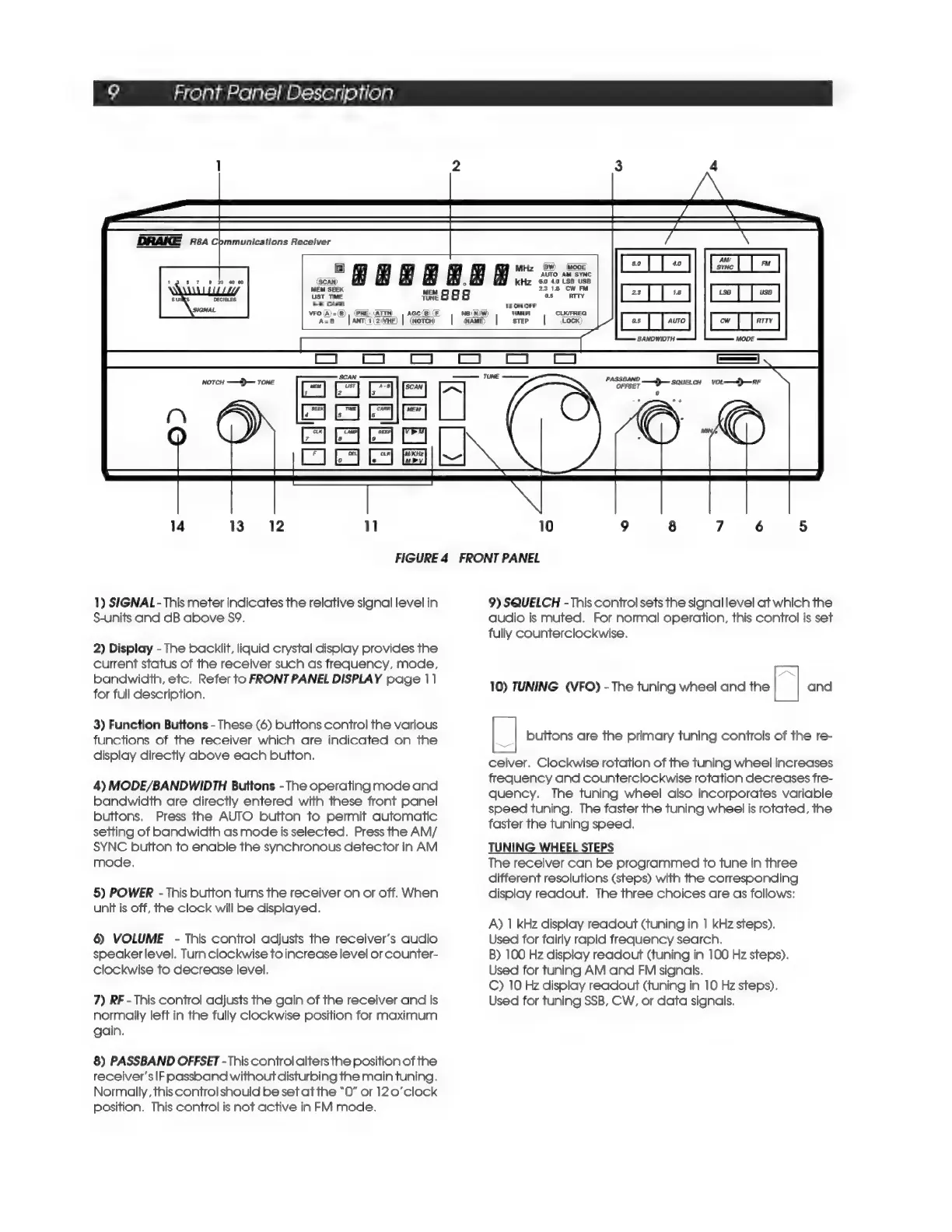
FIGURE
4
FRONT
PANEL
1)
SIGNAL
-
This
meter
indicates
the
relative
signal
level
in
S-units
and
dB
above
S9.
2)
Display
-
The
backlit,
liquid
crystal
display
provides
the
current
status
of
the
receiver
such
as
frequency,
mode,
bandwidth,
etc.
Refer
to
FRONT
PANEL
DISPLAY
page
11
for
full
description.
3)
Function
Buttons
-
These
(6)
buttons
control
the
various
functions
of
the
receiver
which
are
indicated
on
the
display
directly
above
each
button.
4)
MODE/BANDWIDTH
Buttons
-
The
operating
mode
and
bandwidth
are
directly
entered
with
these
front
panel
buttons.
Press
the
AUTO
button
to
permit
automatic
setting
of
bandwidth
as
mode
is
selected.
Press
the
AM/
SYNC
button
to
enable
the
synchronous
detector
in
AM
mode.
5)
POWER
-
This
button
turns
the
receiver
on
or
off.
When
unit
is
off,
the
clock
will
be
displayed.
6)
VOLUME
-
This
control
adjusts
the
receiver's
audio
speaker
level.
Turn
clockwise
to
increase
level
or
counter-
clockwise
to
decrease
level.
7)
RF
-
This
control
adjusts
the
gain
of
the
receiver
and
is
normally
left
in
the
fully
clockwise
position
for
maximum
gain.
8)
PASSBAND
OFFSET
-
This
control
alters
the
position
of
the
receiver's
IF
passband
without
disturbing
the
main
tuning.
Normally,
this
control
should
be
set
at
the
“O”
or
12
0’clock
position.
This
control
is
not
active
in
FM
mode.
9)
SQUELCH
-
This
control
sets
the
signal
level
at
which
the
audio
is
muted.
For
normal
operation,
this
control
is
set
fully
counterclockwise.
10)
TUNING
(VFO)
-
The
tuning
wheel
and
the
a
and
|_|
buttons
are
the
primary
tuning
controls
of
the
re-
ceiver.
Clockwise
rotation
of
the
tuning
wheel
increases
frequency
and
counterclockwise
rotation
decreases
fre-
quency.
The
tuning
wheel
also
incorporates
variable
speed
tuning.
The
faster
the
tuning
wheel
is
rotated,
the
faster
the
tuning
speed.
TUNING
WHEEL
STEPS
The
receiver
can
be
programmed
to
tune
in
three
different
resolutions
(steps)
with
the
corresponding
display
readout.
The
three
choices
are
as
follows:
A)
1
kHz
display
readout
(tuning
in
1
kHz
steps).
Used
for
fairly
rapid
frequency
search.
B)
100
Hz
display
readout
(tuning
in
100
Hz
steps).
Used
for
tuning
AM
and
FM
signals.
C)
10
Hz
display
readout
(tuning
in
10
Hz
steps).
Used
for
tuning
SSB,
CW,
or
data
signals.

Related product manuals