EasyManua.ls Logo

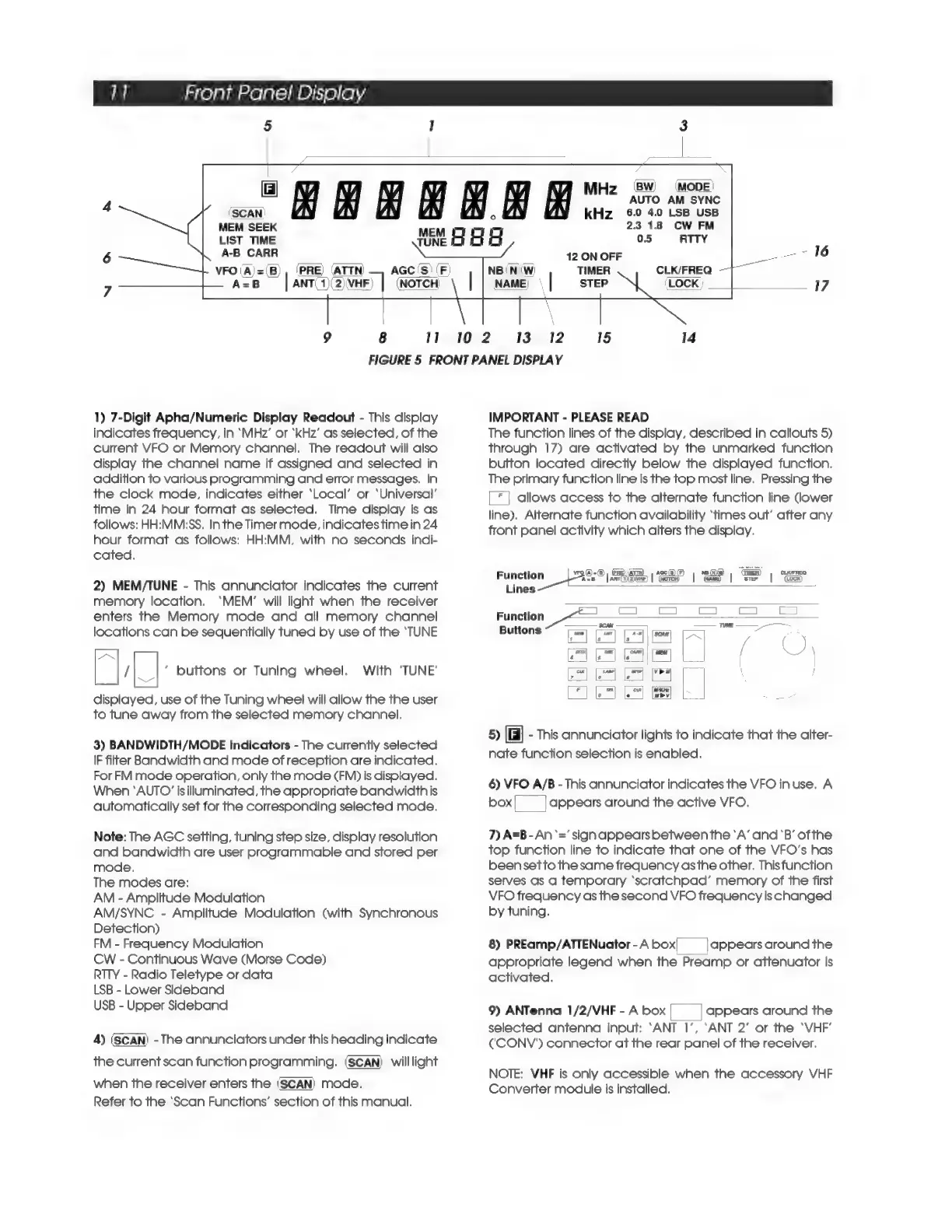
DRAKE R8A - Front Panel Display; 7-Digit Apha;Numeric Display Readout

DRAKE R8A
43 pages
Print Icon
To Next Page IconTo Next Page
To Previous Page IconTo Previous Page
Loading...
1]
Front
Panel
Display
5
1
MEM
SEEK
LIST
TIME
A-B
CARR
VFO
(A)=(B),
(PRE)
(ATTN)
9
8
11
B
AGC(S)
(F
A=B
|
ANT
1\2)\VHF)
|
(NOTCH
MHz
(®8W)
(Mode)
AUTO
AM
SYNC
(SCAN)
kHz
2
+
LSB
USB
fis
cW
FM
RTTY
12
ON
OFF
CLK/FREQ
|
102
13
12
15
14
FIGURE
5
FRONT
PANEL
DISPLAY
1)
7-Digit
Apha/Numeric
Display
Readout
-
This
display
indicates
frequency,
in
‘MHz’
or
‘kHz’
as
selected,
of
the
current
VFO
or
Memory
channel.
The
readout
will
also
display
the
channel
name
if
assigned
and
selected
in
addition
to
various
programming
and
error
messages.
In
the
clock
mode,
indicates
either
‘Local’
or
‘Universal’
time
in
24
hour
format
as
selected.
Time
display
is
as
follows:
HH:MM:SS.
Inthe Timer
mode,
indicates
time
in
24
hour
format
as
follows:
HH:MM,
with
no
seconds
indi-
cated.
2)
MEM/TUNE
-
This
annunciator
indicates
the
current
memory
location.
‘MEM’
will
light
when
the
receiver
enters
the
Memory
mode
and
all
memory
channel
locations
can
be
sequentially
tuned
by
use
of
the
‘TUNE
a
|_|
buttons
or
Tuning
wheel.
With
'TUNE'
displayed,
use
of
the
Tuning
wheel
will
allow
the the
user
to
tune
away
from
the
selected
memory
channel.
3)
BANDWIDTH/MODE
Indicators
-
The
currently
selected
IF
filter
Bandwidth
and
mode
of
reception
are
indicated.
For
FM
mode
operation,
only
the
mode
(FM)
is
displayed.
When
‘AUTO’
is
illuminated,
the
appropriate
bandwidth
is
automatically
set
for
the
corresponding
selected
mode.
Note:
The
AGC
setting,
tuning
step
size,
display
resolution
and
bandwidth
are
user
programmable
and
stored
per
mode.
The
modes
are:
AM
-
Amplitude
Modulation
AM/SYNC
-
Amplitude
Modulation
(with
Synchronous
Detection)
FM
-
Frequency
Modulation
CW
-
Continuous
Wave
(Morse
Code)
RTTY
-
Radio
Teletype
or
data
LSB
-
Lower
Sideband
USB
-
Upper
Sideband
4)
(SCAN)
-
The
annunciators
under
this
heading
indicate
the
current
scan
function
programming.
(SCAN)
willlight
when
the
receiver
enters
the
(SCAN)
mode.
Refer
to
the
‘Scan
Functions’
section
of
this
manual.
IMPORTANT
-
PLEASE
READ
The
function
lines
of
the
display,
described
in
callouts
5)
through
17)
are
activated
by
the
unmarked
function
button
located
directly
below
the
displayed
function.
The
primary
function
line
is
the
top
most
line.
Pressing
the
|
*
|
allows
access
to
the
alternate
function
line
(lower
line).
Alternate
function
availability
‘times
out’
after
any
front
panel
activity
which
alters
the
display.
VFQ(A)=(5),
[PRE
|
)
,
A@c(S)
(F)
NBN
‘Gwe
CLKIFREQ
in
lie
aka
©
ae
|
SSP
|
ae
|
SS
|
aS
Lines
i
c=
“E
Function
Pia
=a
=
Buttons
wen]
[usr]
[—a-a]
|
[scan]
[=
ae
1
jz__|
|s
|
(
)
we)
[awe]
[eam]
|
Pama]
{
NX
\
4
is
|
ile
|
}
5)
-
This
annunciator
lights
to
indicate
that
the
alter-
nate
function
selection
is
enabled.
6)
VFO
A/B
-
This
annunciator
indicates
the
VFO
in
use.
A
box!
|appears
around
the
active
VFO.
7)
A=B
-
An
‘=’
sign
appears
between
the
‘A’
and
‘B’
ofthe
top
function
line
to
indicate
that
one
of
the
VFO’s
has
been
setto
the
same
frequency
asthe
other.
Thisfunction
serves
as
a
temporary
‘scratchpad’
memory
of
the
first
VFO
frequency
as
the
second
VFO
frequency
is
changed
by
tuning.
8)
PREamp/ATTENuator
-
A
box
appears
around
the
appropriate
legend
when
the
Preamp
or
attenuator
is
activated.
9)
ANTenna
1/2/VHF-Abox|
|
appears
around
the
selected
antenna
input:
‘ANT
1’,
‘ANT
2’
or
the
‘VHF’
C'CONV')
connector
at
the
rear
panel
of
the
receiver.
NOTE:
VHF
is
only
accessible
when
the
accessory
VHF
Converter
module
is
installed.

Related product manuals