EasyManua.ls Logo

DRAKE R8A - Page 35

DRAKE R8A
43 pages
Print Icon
To Next Page IconTo Next Page
To Previous Page IconTo Previous Page
Loading...
Jo
RS232C
Interface
cont'd.
Setting
Strings
used
in
Quick
Set,
Block
Store,
and
Block
Read
commands:
Some
commands
work
with
‘setting
strings’.
These
allow
fast
and
direct
setting
or
reading
of
certain
radio
information,
They
are
intended
for
use
within
a
computer
program
only,
All
operations
using
these
can
be
done
manually
with
other
commands
using
much
less
cryptic
formats.
Note
that
invalid
settings
will
be
overridden
in
most
cases
without
warning.
Since
these
commands
use
hexadecimal
data
in
the
command
strings,
it
is
important
that
the
host
terminal
use
an
RS232
receiver
program
that
does
not
attempt
to
translate
control
characters
into
their
respective
actions,
For
example,
some
programs
intended
for
modem
communications
translate
a
data
byte
received
as
hex
08
into
the
destructive
backspace
action.
Such
programs
usually
supply
option
settings
to
select
whether
control
characters
are
translated
or
not.
Translation
of
data
into
control
actions
will
result
in
unpredictable
results,
since
some
of
the
setting
information
will
be
lost
or
changed.
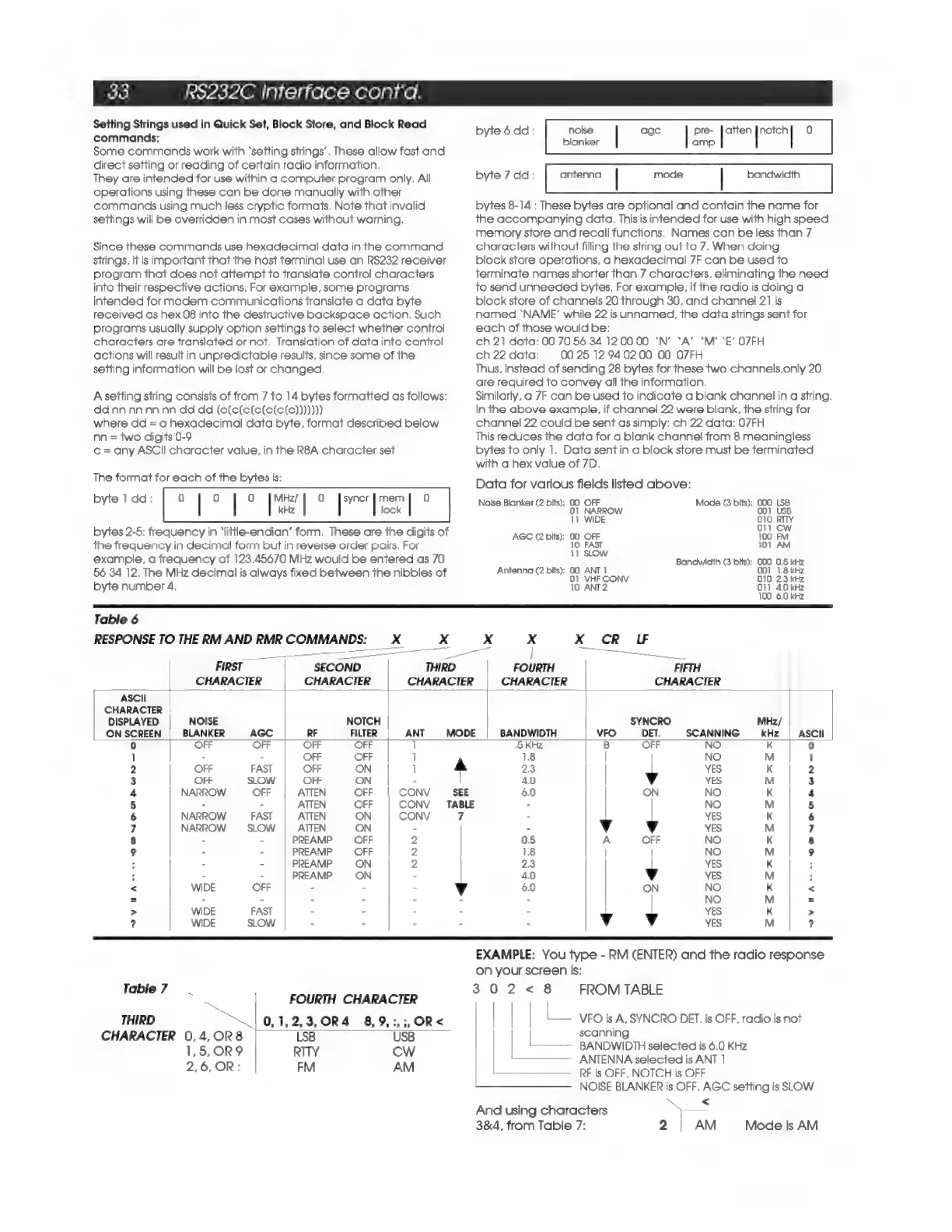
A
setting
string
consists
of
from
7
to
14
bytes
formatted
as
follows:
dd
nn
nn
nn
nn
dd dd
(c(c(e(e(e(e(e)))))))
where
dd
=
a
hexadecimal
data
byte,
format
described
below
nn
=
two
digits
0-9
¢
=
any
ASCII
character
value,
in
the
R8A
character
set
The
format
for
each
of
the
bytes
is:
byte
1
dd: 0)
|
0
|
0
[hee
|
)
haga
ee
rc)
byte
6dd:
noise
age
pre-
Jatten}notch]
0
blanker
amp
byte
7
dd:
bandwidth
antenna
|
mode
|
bytes
8-14
:
These
bytes
are
optional
and
contain
the
name
for
the
accompanying
data.
This
is
intended
for
use
with
high
speed
memory
store
and
recall
functions.
Names
can
be
less
than
7
characters
without
filling
the
string
out
to
7.
When
doing
block
store
operations,
a
hexadecimal
7F
can
be
used
to
terminate
names
shorter
than
7
characters,
eliminating
the
need
to
send
unneeded
bytes.
For
example,
if
tne
radio
is
doing
a
block
store
of
channels
20
through
30,
and
channel
21
is
named
‘NAME’
while
22
is
unnamed,
the
data
strings
sent
for
each
of
those
would
be:
ch
21
data:
00
70
56
34
120000
‘N’
‘A’
‘M’
‘E’
O7FH
ch22
data:
0025
12940200
00
O7FH
Thus,
instead
of
sending
28
bytes
for
these
two
channels,only
20
are
required
to
convey
all
the
information.
Similarly,
a
7F
can
be
used
to
indicate
a
blank
channel
in
a
string.
In
the
above
example.
if
channel
22
were
blank,
the
string
for
channel
22
could
be
sent
as
simply:
ch
22
data:
07FH
This
reduces
the
data
for
a
blank
channel
from
8
meaningless
bytes
to
only
1.
Data
sent
in
a
block
store
must
be
terminated
with
a
hex
value
of
7D.
Data
for
various
fields
listed
above:
Noise
Blanker
(2
bits):
00
OFF
Mode
(3
bits):
000
LSB
01
001
USI
kHz
lock
NARROW
iB
11
WIDE
O10
RITY
bytes
2-5:
frequency
in
‘little-endian’
form.
These
are
the
digits
of
AGC
©
bits):
00-OFF
Neca.
the
frequency
in
decimal
form
but
in
reverse
order
pairs,
For
10
EAST
101
AM
example,
a
frequency
of
123.45670
MHz
would
be
entered
as
70
;
Bandwidth
(3
bits);
000
0.5
kHz
56
34
12.
The
MHz
decimal
is
always
fixed
between
the
nibbles
of
alee
li
hia
ae
ace}
aes
po
ett
byte
number
4,
10
ANT2
O11
4.0
kHz
100
6.0
kHz
Table
6
RESPONSE
TO
THE
RM
AND
RMR
COMMANDS:
x
x
».¢
x
X
CR
IF
oo
|
—__.,
ee
ath
H
ea
FIRST
SECOND
THIRD
FOURTH
FIFTH
CHARACTER CHARACTER
CHARACTER CHARACTER
CHARACTER
ASCII
CHARACTER
DISPLAYED
NOISE
NOTCH
SYNCRO
MHz/
ON
SCREEN
BLANKER
AGC
RF
FILTER
ANT
MODE
BANDWIDTH
VFO
DET.
SCANNING
kHz
ASCII
0
OFF
OFF OFF OFF
1
‘5
KHz
B
OFF
NO
K
0
1
-
-
OFF OFF
]
18
NO
M
1
2
OFF
FAST
OFF
ON
]
2.3
YES
K 2
3
OFF
SLOW
OFF
ON
-
4.0
v
YES
M
3
4
NARROW
OFF
ATTEN
OFF
CONV
6.0
ON
NO
K
4
5
- -
ATTEN
OFF
CONV
TABLE
-
NO
M
5
6
NARROW
FAST
ATTEN
ON
CONV
-
YES
K
6
7
NARROW
SLOW
ATTEN
ON
-
-
Vv
v
YES
M
7
8
- =
PREAMP
=
OFF
2
0.5
A
OFF
NO
K 8
9
-
-
PREAMP
OFF
2
1.8
NO
M
9
:
-
-
PREAMP
ON
2
2.3
YES
K
:
;
- -
PREAMP
ON
-
4.0
Vv
YES
M
;
<
WIDE
OFF
-
- -
6.0
ON
NO
K
<
=
-
:
:
-
Ee
NO
M
=
>
WIDE
FAST
- - -
-
YES
K
>
?
WIDE
SLOW
. ,
:
:
v
Vv
YES
M
2
EXAMPLE:
You
type
-
RM
(ENTER)
and
the
radio
response
on
your
screen
is:
Table
7
302<
8
FROM
TABLE
FOURTH
CHARACTER
THIRD
“|
0,1,2,3,OR4
8,9,:,;,OR<
_
VFO
is
A,
SYNCRO
DET.
is
OFF,
radio
is
not
CHARACTER
0,4,OR8
LSB
USB
scanning
;
1,5,OR9
RTTY
CW
BANDWIDTH
selected
is
6.0
KHz
2,6,
OR:
EM
AM
ANTENNA
selected
is
ANT
|
RF
is
OFF,
NOTCH
is
OFF
NOISE
BLANKER
is
OFF,
AGC
setting
is
SLOW
And
using
characters
=
3&4,
from
Table
7:
2
AM
Mode
Is
AM

Related product manuals