EasyManua.ls Logo

DRAKE R8A - Troubleshooting; R8 A Special Display Messages

DRAKE R8A
43 pages
Print Icon
To Next Page IconTo Next Page
To Previous Page IconTo Previous Page
Loading...
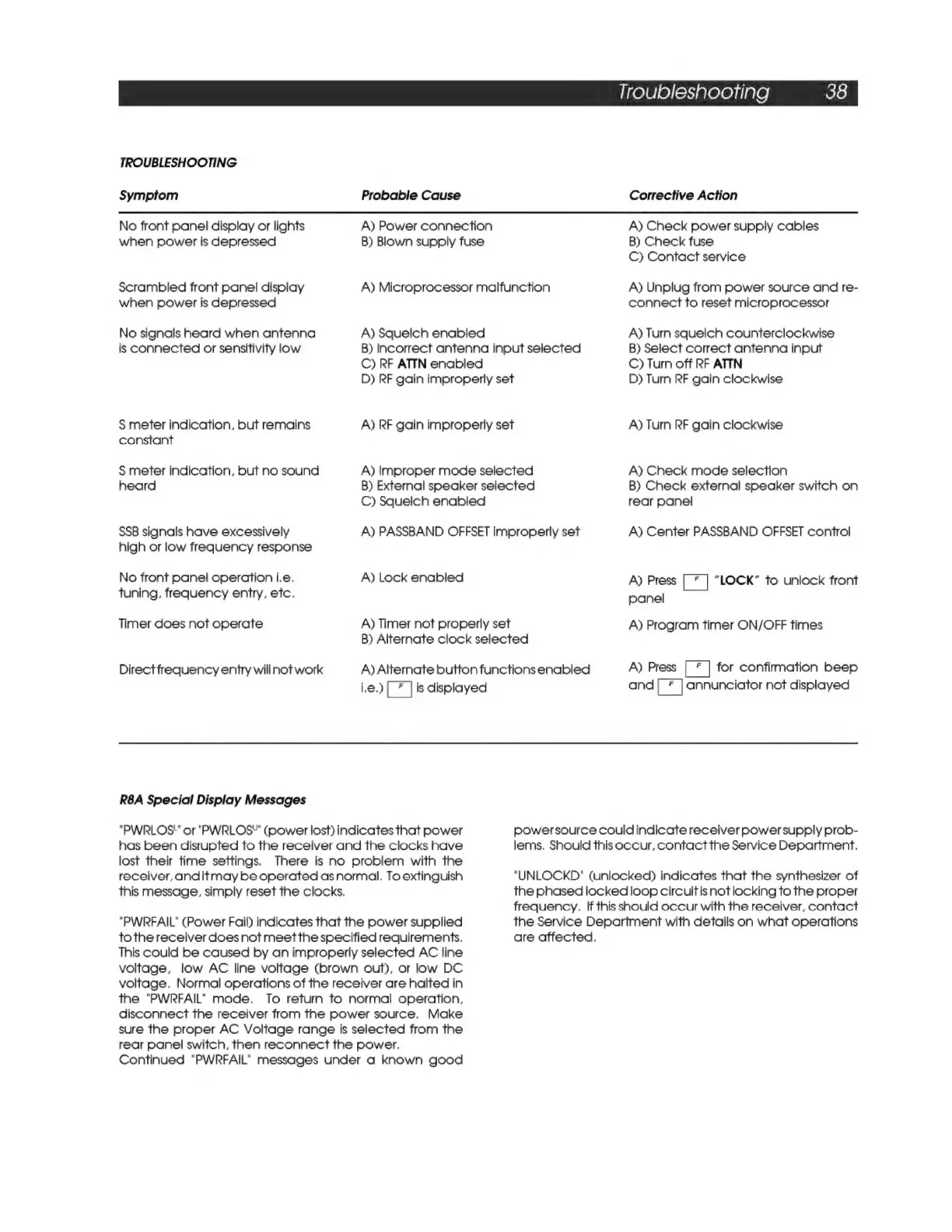
TROUBLESHOOTING
Symptom
No
front
panel
display
or
lights
when
power
is
depressed
Scrambled
front
panel
display
when
power
is
depressed
No
signals
heard
when
antenna
is
connected
or
sensitivity
low
S$
meter
indication,
but
remains
constant
S
meter
indication,
but
no
sound
heard
SSB
signals
have
excessively
high
or
low
frequency
response
No
front
panel
operation
i.e.
tuning,
frequency
entry,
etc.
Timer
does
not
operate
Direct
frequency
entry
will
not
work
R8A
Special
Display
Messages
Probable
Cause
A)
Power
connection
B)
Blown
supply
fuse
A)
Microprocessor
malfunction
A)
Squelch
enabled
B)
Incorrect
antenna
input
selected
C)
RF
ATTN
enabled
D)
RF
gain
improperly
set
A)
RF
gain
improperly
set
A)
Improper
mode
selected
B)
External
speaker
selected
C)
Squelch
enabled
A)
PASSBAND
OFFSET
improperly
set
A)
Lock
enabled
A)
Timer
not
properly
set
B)
Alternate
clock
selected
A)
Alternate
button
functions
enabled
i.e.)
is
displayed
Troubleshooting
38
Corrective
Action
A)
Check
power
supply
cables
B)
Check
fuse
C)
Contact
service
A)
Unplug
from
power
source
and
re-
connect
to
reset
microprocessor
A)
Tum
squelch
counterclockwise
B)
Select
correct
antenna
input
C)
Turn
off
RF
ATTN
D)
Turn
RF
gain
clockwise
A)
Turn
RF
gain
clockwise
A)
Check
mode
selection
B)
Check
external
speaker
switch
on
rear
panel
A)
Center
PASSBAND
OFFSET
control
A)
Press
[Eel
“LOCK”
to
unlock
front
panel
A)
Program
timer
ON/OFF
times
A)
Press
[
*
|
for
confirmation
beep
and
annunciator
not
displayed
"PWRLOS"
or
"PWRLOS”
(power
lost)
indicates
that
power
has
been
disrupted
to
the
receiver
and
the
clocks
have
lost
their
time
settings.
There
is
no
problem
with
the
receiver,
anditmay
be
operated
as
normal.
To
extinguish
this
message,
simply
reset
the
clocks.
"PWRFAIL"
(Power
Fail)
indicates
that
the
power
supplied
tothe
receiver
does
not
meetthe
specified
requirements.
This
could
be
caused
by
an
improperly
selected
AC
line
voltage,
low
AC
line
voltage
(brown
out),
or
low
DC
voltage.
Normal
operations
of
the
receiver
are
halted
in
the
"PWRFAIL"
mode.
To
return
to
normal
operation,
disconnect
the
receiver
from
the
power
source,
Make
sure
the
proper
AC
Voltage
range
is
selected
from
the
rear
panel
switch,
then
reconnect
the
power.
Continued
"PWRFAIL"
messages
under
a
known
good
powersource
couldindicate
receiver
power
supply
prob-
lems,
Should
this
occur,
contact
the
Service
Department.
"UNLOCKD"
(unlocked)
indicates
that
the
synthesizer
of
the
phased
locked
loop
circuit
is
not
locking
to
the
proper
frequency.
If
this
should
occur
with
the
receiver,
contact
the
Service
Department
with
details
on
what
operations
are
affected.

Related product manuals