EasyManua.ls Logo

DRAKE R8A - Front Panel Description

DRAKE R8A
43 pages
Print Icon
To Next Page IconTo Next Page
To Previous Page IconTo Previous Page
Loading...
7
Installation
UNPACKING
Carefully
remove
the
receiver
from
the
shipping
carton
and
examine
it
for
evidence
of
damage.
If
any
damage
is
noted,
immediately
contact
the
transportation
com-
pany
responsible
for
delivery
or
return
the
unit
to
the
dealer
from
whom
it
was
purchased.
Keep
the
shipping
carton
and
all
packing
material
for
the
transportation
company
to
inspect.
The
original
carton
and
packing
material
should
be
retained
for
repackaging
should
it
be
necessary
to
return
the
unit.
Inspect
the
packing
material
for
any
accessories
or
printed
material
before
storing
the
box.
Locate
the
registration
card,
fill
out,
and
immedi-
ately
return
to
the
R.
L.
Drake
Company
to
insure
registra-
tion
and
validation
of
warranty.
LOCATION
The
location
of
the
receiver
is
not
critical
so
long
as
adequate
clearance
is
provided
to
allow
air
circulation
in
and
around
the
unit.
Do
not
cover
any
ventilation
slots
in
top
cover
or
overheating
may
result.
The
ventilation
slots
also
double
as
a
speaker
grill
and
any
blockage
may
resultin
poor
sound
quality.
Foradded
operating
conven-
ience,
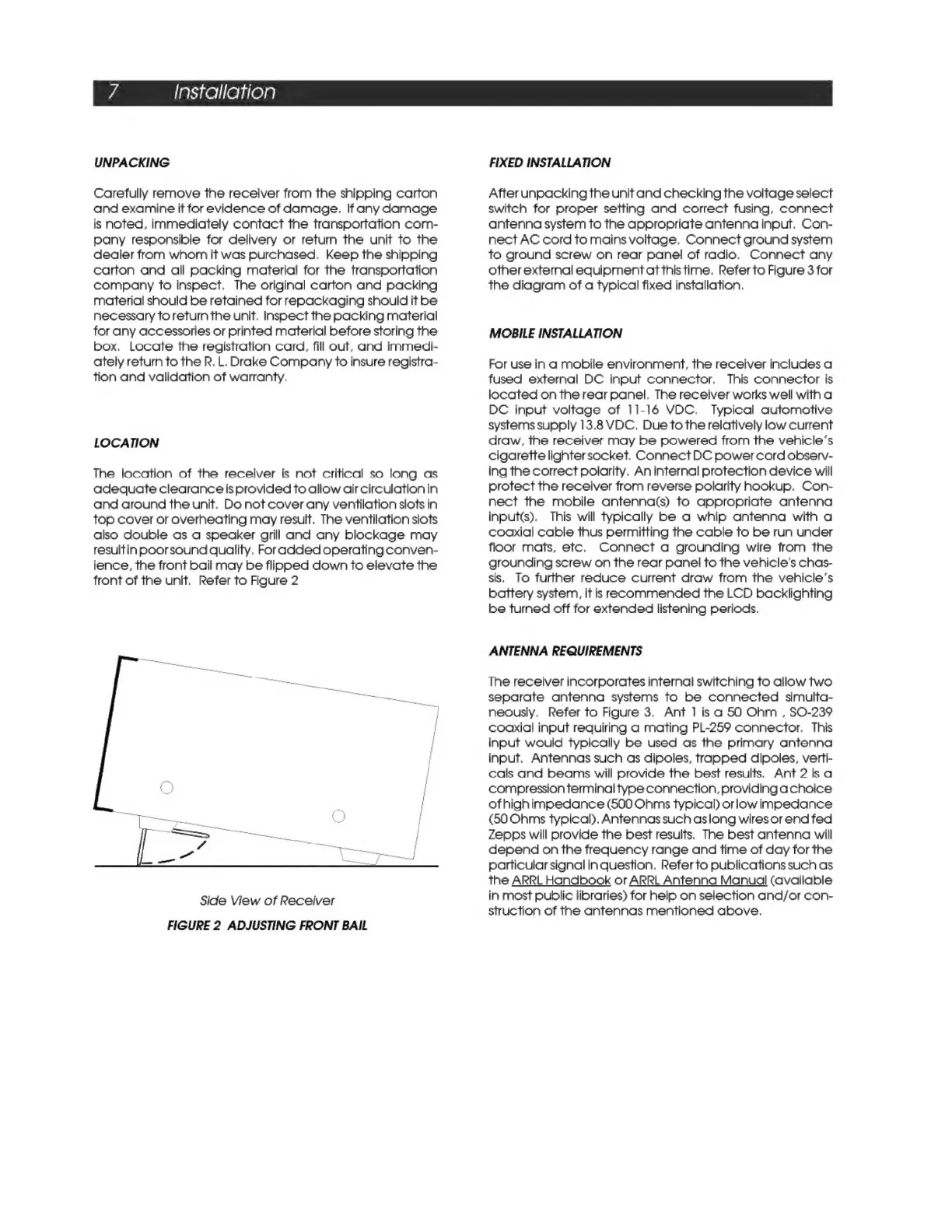
the
front
bail
may
be
flipped
down
to
elevate
the
front
of
the
unit.
Refer
to
Figure
2
Side
View
of
Receiver
FIGURE
2
ADJUSTING
FRONT
BAIL
FIXED
INSTALLATION
After
unpacking
the
unit
and
checking
the
voltage
select
switch
for
proper
setting
and
correct
fusing,
connect
antenna
system
to
the
appropriate
antenna
input.
Con-
nect
AC
cord
to
mains
voltage.
Connect
ground
system
to
ground
screw
on
rear
panel
of
radio.
Connect
any
other
external
equipment
at
this
time.
Refer
to
Figure
3
for
the
diagram
of
a
typical
fixed
installation.
MOBILE
INSTALLATION
For
use
in
a
mobile
environment,
the
receiver
includes
a
fused
external
DC
input
connector.
This
connector
is
located
on
the
rear
panel.
The
receiver
works
well
with
a
DC
input
voltage
of
11-16
VDC.
Typical
automotive
systems
supply
13.8
VDC.
Due
to
the
relatively
low
current
draw,
the
receiver
may
be
powered
from
the
vehicle’s
cigarette
lighter
socket.
Connect
DC
power
cord
observ-
ing
the
correct
polarity.
An
internal
protection
device
will
protect
the
receiver
from
reverse
polarity
hookup.
Con-
nect
the
mobile
antenna(s)
to
appropriate
antenna
inputs).
This
will
typically
be
a
whip
antenna
with
a
coaxial
cable
thus
permitting
the
cable
to
be
run
under
floor
mats,
etc.
Connect
a
grounding
wire
from
the
grounding
screw
on
the
rear
panel
to
the
vehicle's
chas-
sis.
To
further
reduce
current
draw
from
the
vehicle’s
battery system,
it
is
recommended
the
LCD
backlighting
be
turned
off for
extended
listening
periods.
ANTENNA
REQUIREMENTS
The
receiver
incorporates
internal
switching
to
allow
two
separate
antenna
systems
to
be
connected
simulta-
neously,
Refer
to
Figure
3,
Ant
1
isa
50
Ohm
,
SO-239
coaxial
input
requiring
a
mating
PL-259
connector.
This
input
would
typically
be
used
as
the
primary
antenna
input.
Antennas
such
as
dipoles,
trapped
dipoles,
verti-
cals
and
beams
will
provide
the
best
results.
Ant
2
is
a
compression
terminal
type
connection,
providing
achoice
of
highimpedance
(500
Ohms
typical)
orlow
impedance
(50
Ohms
typical).
Antennas
such
aslong
wires
or
end
fed
Zepps
will
provide
the
best
results.
The
best
antenna
will
depend
on
the
frequency
range
and
time
of
day
for
the
particular
signal
in
question,
Refer
to
publications
such
as
the
ARRL
Handbook
or
ARRL
Antenna
Manual
(available
in
most
public
libraries)
for
help
on
selection
and/or
con-
struction
of
the
antennas
mentioned
above.

Related product manuals