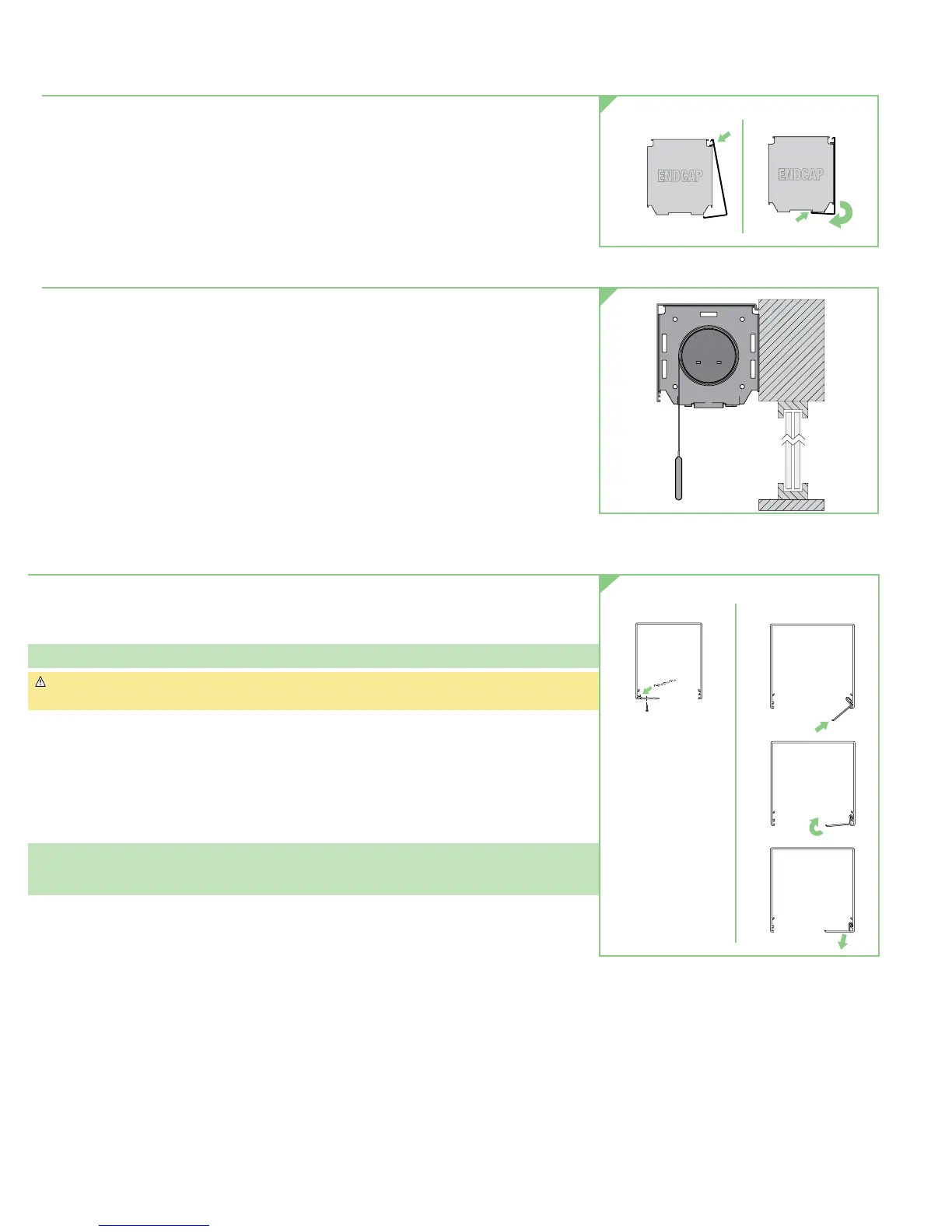
Section 3.2 - Attaching Fascia to Endcaps
1. Place groove along top of fascia over endcaps, and snap into place (see Fig. 5).
Endcaps must be installed the correct distance apart for fascia to be properly attached with full
engagement. Fascia is not fully seated until it clicks into place on both ends. Once in place,
check for secure fit. If not secure, secure with appropriate fastener (not included).
Section 3.3 - Reverse Roll Fascia
1. Mark mounting points.
2. Slide endcaps into extrusions.
3. Using pre-drilled holes in endcaps, mark the fascia for drilling.
4. Attach endcaps to fascia using included hardware.
5. Mount Endcaps
/
Reverse Roll Fascia.
6. Install roller
/
fabric
/
operator assembly according to relevant instructions.
7. Attach endcap covers to endcaps. Use double-sided tape to help secure in place.
Section 4 - Surface Headbox or Pocket Headbox
1. Snap endcap covers onto endcaps. (See Section 3.2 - Attaching Fascia to Endcaps: Step 1)
2. Place endcaps into back
/
top portion of wall
/
ceiling headbox or into pocket extrusion of
large pocket headbox. Using pre-drilled holes in endcaps, mark the headbox for drilling.
Please Note: The installer is responsible for selecting mounting hardware appropriate for site conditions.
Caution: Before mounting shades, verify measurements on the card provided with the shade,
and ensure the endcaps are installed at the correct width.
3. Drill holes in back or top, depending on whether you will be mounting the headbox to the
wall or ceiling, or in a pocket.
4. Attach endcaps and Surface Headbox back
/
top or Large Pocket Headbox extrusion to wall,
ceiling or pocket using mounting hardware appropriate for site conditions.
5. Install shade (See Section 3.1 - Mounting Endcaps for Fascia.
6. Attach headbox fascia or pocket closure (see Fig. 7).
Note on surface style headbox:
Fascia is not fully seated until it clicks into place on both ends. Once in place,
check for secure fit. If not secure, secure with appropriate fastener (not included).
Figure 6
Large Pocket Headbox
Secure to Endcap
with Screw
Small Pocket Headbo
STEP 1
STEP 2
STEP 3
Secure to Endcap
with Screw
Insert
Closure
Panel
ATTACHING CLOSURE PANEL
Figure 7
STEP 2:
Clicks into place
Fascia Attachment Small & Large Endcaps
ENDCAP
ENDCAP
Figure 5
ATTACHING FASCIA
page 4 of 8
Motorized FlexShade
®





 To Next Page