* Use horizontal indicator to check.
• Product Management Schedule
Component Weekly
Clean
Clean
Inspect
Inspect
Inspect
Clean
Clean / Inspect
Clean
Clean
Clean
Clean
*Inspect
Monthly
Common
Inspect
Inspect
Inspect / Adjust
Vacuum Clean
Twice a YearQuarterly
Inspect
Inspect
Inspect
Inspect
Inspect
Inspect
Inspect
Inspect
Inspect
Inspect
Inspect
Yearly
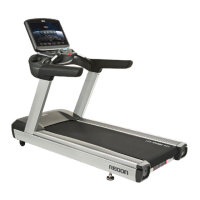
Display
Switch
USB, Audio port
Cup holder
E-Stop Switch
Front Handle
Side Handrail
Moto Cover
Motor Room
Motor Belt
Level Foot
Running Belt
Front Roller
Rear Roller
Running Deck
Sensor
Bolts / Nuts
Frame, Rear Cover
Belt Alignment
Machine horizontal
Please use a soft, light cloth when you clean the exterior of product.
R
ather than cleaning the product directly, clean it by using a vacuum
cleaner after using a cloth.
Notice
21


 To Next Page