5
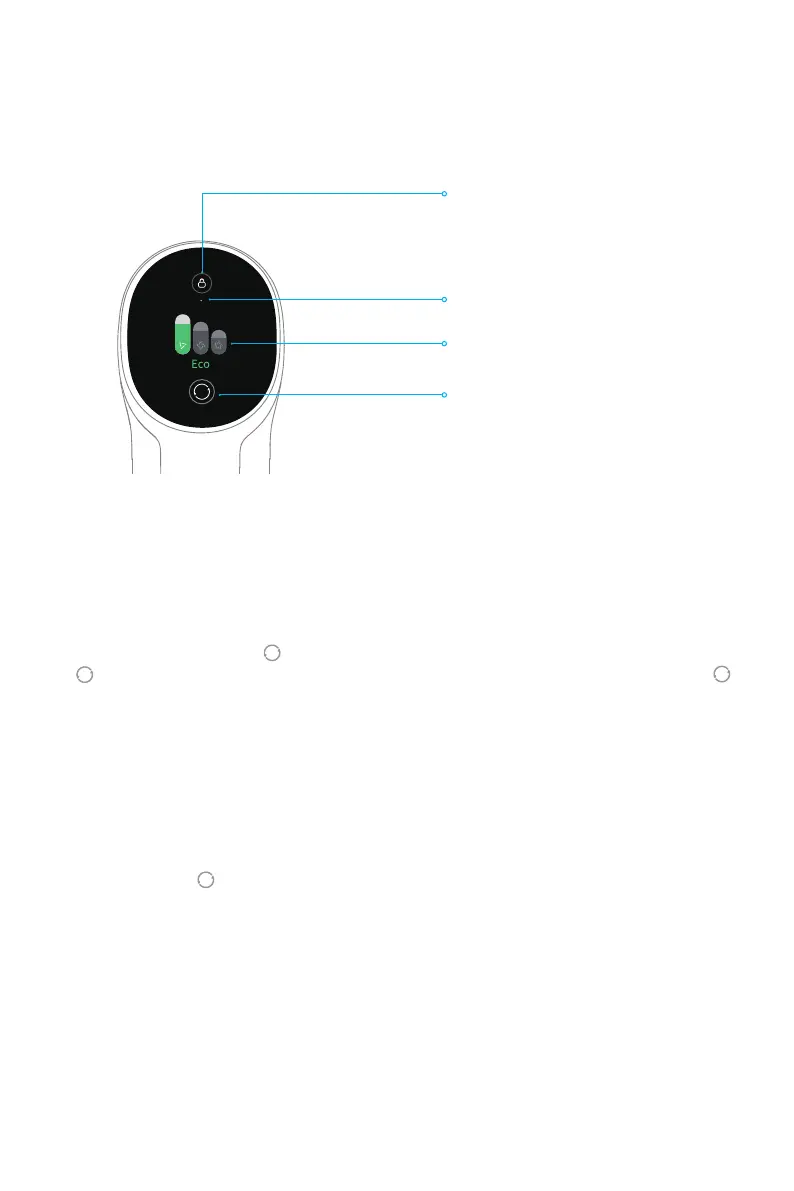
Introduction of Display Screen
Electronic Lock/Reset Filter
• Press briey to enter/exit lock
• Press and hold for 1.5 seconds to
enter the lter reset interface
Suction Level Status
Lock Status
Switching Suction Level
• Press briey to switch the suction
levels
Setting Language
Switching Suction Level
Note: If the vacuum is not working properly, the screen display will produce an error
message. Please refer to the troubleshooting section to nd your solution.
Note: The display screen will return the main page if there is no operation for more than 15
seconds.
Note:
• Stop the vacuum at any time while cleaning. Then it will continue to use the last selected
suction level when started again.
• Connecting the smart multi-brush bar to the vacuum will activate the Auto Mode. In this
mode, the vacuum can automatically adjust its suction level depending on the surface
type.
Press and hold the button for 3 seconds to open the language list, then press the button
to scroll through the language to select the desired one. Press and hold the button
for 3 seconds to use the selected language.
Press the button to switch between three suction levels of eco, med/auto, and turbo.
The corresponding suction level will be highlighted on the display screen.
Auto Mode will be activated and "Auto" will appear on the display screen only when using
the smart multi-brush bar. The vacuum will then automatically switch the suction level
between the oor/tile and the carpet.
Product Overview


 To Next Page