19
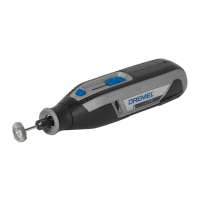
Model number . . . . . . . . . . . . . . .7350
Voltage rating . . . . . . . . . . . . . . . .3.6V / 4V Max
Rated Speed (n) . . . . . . . . . . . . .12,000/min
Collet Capacities . . . . . . . . . . . . .1/32", 1/16", 3/32", 1/8"
Allowed ambient temperature
– during charging . . . . . . . . . . . . .32...113 °F (0...+45 °C)
– during operation/ storage . . . .–4...122 °F (–20...+50 °C)
Battery
Chemistry . . . . . . . . . . . . . . . . . . .Li-ion
Capacity . . . . . . . . . . . . . . . . . . . .2.0Ah
Charge time . . . . . . . . . . . . . . . . .2 Hr 45 min. approx.
Functional Description & Specifications
Charging the Tool
Your Dremel 7350 does not come completely charged from the
factory. Be sure to charge tool prior to initial use.
1. Charge tool using Listed Class 2 5V/1A minimum USB power
adapter (not included).
2. Plug power adapter into standard power outlet.
3. Open Micro USB port cover 8 and plug micro USB plug into
Micro USB port 7.
The battery charge indicator 6 indicates the charging progress.
During the charging process, the indicator will glow green. The
battery is fully charged when the indicator light turns off. Charge
time is approximately 2 hours and 45 minutes.
It is normal for the handle of the tool to get warm during charg-
ing.
Note: charging function stops while tool is running and resumes
again after tool is turned off.
When the battery is fully charged, disconnect the Micro USB end
of the cable 9 from the tool and close the cover 8.
Unplug the power adapter from the power outlet (unless you are
charging another tool).
1605A000DGAB 02-21 7350_7300-PGT 6/2/21 9:21 AM Page 19


 To Next Page