The Dritech HT-901 is a portable dehumidifier designed to extract moisture from a room, thereby lowering humidity, improving comfort, and protecting sensitive equipment and stored goods from mould and mildew growth. It is described as neat, compact, high quality, and easy to operate.
Important Safety Instructions
Before operation, users must ensure the power supply is 220-240V / 50Hz. The unit should be placed in a position with unrestricted airflow. It is crucial not to cut off the power supply by pulling the power cable or to directly plug/unplug the power plug to start/stop the unit. Users should avoid sticking fingers into the grille. Before cleaning or maintenance, the unit must be switched off and unplugged. Repairs should only be performed by qualified professionals.
Schematic and Components
The HT-901 dehumidifier features several key components:
- Filter panel: For air filtration.
- Air outlet grille: Where dehumidified air is expelled.
- Castor wheel: For easy portability.
- Water outlet pipeline: For continuous drainage.
- Air inlet grid panel: Where air enters the unit.
- Digital control panel: For operating and monitoring the unit.
Operation
The digital control panel includes:
- Humidity Display: Shows the current or set humidity level.
- Operation Indicator: Lights up when the unit is running.
- Defrost Indicator: Lights up when the unit is in defrost mode.
- Memory Indicator: Shows if the memory function is active.
- Power / ON/OFF button: To switch the unit on or off.
- Humidity UP / DOWN buttons: To adjust the desired humidity level.
- Memory button: To activate or deactivate the memory function.
- ON/OFF: Switches the unit ON/OFF. The unit cycles through "ON-OFF-ON" with each press.
- Humidity Up/Down: Pressing once increases or decreases humidity by 1%. Holding for 1.5 seconds increases the rate of adjustment.
- Memory: Activates or deactivates the memory function. The Memory Indicator shows its status. This function stores the last user-set humidity setting. If power is interrupted while active, the unit will revert to this setting upon power restoration.
Start Up
- Plug in the power cable and turn on the power. A beep confirms correct operation.
- Press "ON/OFF". The Operation Indicator will light up, and the Humidity Display will show the humidity setting. The default is 60%. If the Memory function is active, the saved setting will be restored. After 3 seconds, the display shows the current humidity reading.
- Adjust humidity using the Up/Down keys. The unit activates/deactivates if the setting is above/below the current reading by a 3% threshold.
- Setting humidity below 30% puts the unit into continuous mode, indicated by "CO" on the Humidity Display.
Shut Down
Press "ON/OFF" while the unit is running. The unit will stop, and all indicators will switch off. Any stored humidity setting in the memory function will be erased.
Notes on Operation
- The unit will not run if the set humidity is higher than the current humidity, unless the current humidity reading is at least 3% lower than the set humidity.
- When the tank is full, the Full Tank indicator lights up. The compressor and fan motor shut off automatically, and the unit beeps twice. Operation resumes once the tank is emptied and replaced.
- Once the dehumidifier starts operation, the fan motor and compressor run for at least 3 minutes before any shutdown. After shutting down, it will not restart operation for at least another 3 minutes. This delayed start/stop feature protects the compressor and improves its lifespan.
- In low temperatures, the unit gauges the system temperature and defrosts if necessary. When defrosting, the Defrost Indicator lights up. In this mode, the fan motor runs, but the compressor is switched off.
- The humidity display range is 30% to 90%.
- If the unit is not used for extended periods, drain the water and dry the unit to prevent mould and mildew.
Maintenance and Safety
- Electrical Safety: Do not overload power adapters or extensions. Do not use in an environment with volatile chemicals (risk of fire, electric shock, gas leaks). When cleaning, switch off and unplug the unit (risk of electric shock). Do not plug in the power plug while the switch is on (risk of fire and electric shock). Clean any dirt off the power plug and plug it in fully (risk of fire and electric shock).
- Placement and Usage: Do not use outdoors, under strong sunlight, wind, or rain (unit is for indoor use only). Do not put the unit near stoves or heaters (resin may melt and fire may occur). If not using for an extended period, unplug the power. Do not damage or twist power cables (risk of fire and electric shock). Place the dehumidifier on a stable and flat position. If the unit tilts or turns over, water may spill or seepage, causing damage to nearby objects and electric shocks.
- Overload/Malfunction: If there are unusual burning smells or noises, switch off the power and unplug the unit. Seek technical advice from Dritech or your vendor (fire, electric shock, or component damage may occur).
- Continuous Drainage: In continuous draining mode, put the drainer well for smooth draining. If the ambient temperature is near freezing point, do not use direct drainage.
- Filter Maintenance: To extend the lifespan of the filter, place it in a plastic bag when the unit is not used for extended periods.
- Power Source: Use a rated power source of 220V-240V (risk of fire and electric shock if incorrect power source is used).
- Water Sources: Do not use the unit near water sources.
- Disassembly: Do not disassemble or repair the unit unless your technicians are qualified.
Important Notes
- When moving the unit, do not tilt it over 45° to avoid damaging the compressor.
- The operating temperature range is 5° - 32°C. Ensure the room environment meets this requirement.
- A slight rise in room temperature due to heat generated by the compressor and fan motor during operation is normal.
- Do not run the dehumidifier below 10°C or in low absolute humidity, as it will not extract much water.
- Maintain at least 6 inches of clearance for the air inlet and outlet from walls or obstructions.
- Seal the room to improve humidity control; otherwise, the dehumidifier will struggle to extract moisture faster than fresh humidity entering the room.
- Clogged filters reduce extraction capacity and can cause malfunctions. In dusty environments, clean the filter more frequently by removing it from behind the front panel.
Troubleshooting
| Malfunction | Cause | Solution

 Need help?
 General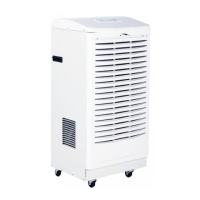

 To Next Page