EasyManua.ls Logo

Drive CIRRUS - User Manual

Drive CIRRUS
24 pages
Print Icon
To Next Page IconTo Next Page
Loading...
Cirrus Powerchair Owners Handbook Page 1 of 24 Doc Code: PCC_IFU (02/15)
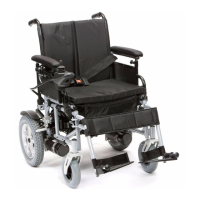
CIRRUS POWERCHAIR
OWNER’S HANDBOOK

Questions and Answers

  • B
    brownmiguelJul 27, 2025
    What to do if my Drive CIRRUS Wheelchair does not move with the joystick?
    • H
      huntershannonJul 27, 2025
      If your Drive Wheelchair doesn't move when you use the joystick, first ensure the powerchair is turned on and that the batteries are fully charged. Also, verify that all connections are correctly linked and that the manual brakes are not applied. Lastly, check that the motors are engaged.
  • M
    Mr. Robert HartAug 4, 2025
    Why doesn't the controller light up on my Drive CIRRUS Wheelchair?
    • E
      Elizabeth HowardAug 4, 2025
      If the controller on your Drive Wheelchair doesn't light up when you turn it on, make sure that the powerchair is turned on first. If it still doesn't light up, check that the batteries are charged. Finally, check that all the connections are correctly linked.
  • D
    Dr. Gregory Moody Jr.Aug 11, 2025
    What to do if my Drive CIRRUS won't move when pushed?
    • T
      tammy27Aug 11, 2025
      If your Drive Wheelchair doesn't move when you push it, check that the manual brakes are not applied and verify that the motors are set to freewheel.
  • T
    thompsoncurtisAug 19, 2025
    Why does my Drive CIRRUS Wheelchair move in the wrong direction?
    • C
      Charles ValenciaAug 19, 2025
      If your Drive Wheelchair moves in the opposite direction to what you intended, check that the leads from the controller to the motors are connected correctly. Try swapping the leads over.

Summary

Introduction

Personal Safety

General Operating Safety Procedures

General safety procedures for operating the powerchair, including posture, visibility, and avoiding modifications.

Emergency Braking

Explanation of automatic and manual parking brakes and their use in normal and emergency situations.

Turning and Using on a Gradient Guidelines

Guidelines for safe turning and driving on gradients, including speed and user attributes.

Emergency Freewheel

Warning about the freewheel option and the importance of re-engaging it after use.

Obstacles and Kerbs

Advice on safely navigating obstacles and kerbs to prevent damage or injury.

Electromagnetic Interference (EMI)

Explains EMI sources, immunity levels, and precautions to prevent interference with powerchair controls.

Parts Description

Control Functions Operation

Joystick Operation

How to use the joystick to control speed and direction, and automatic braking.

On;Off Button and Battery Gauge

Function of the on/off button and how to interpret the battery gauge.

Speed and Profile Settings

How to adjust speed, understand profile settings, indicators, and locking functions.

Horn Operation

How to use the horn button.

Battery Gauge and Indicators

Understanding the battery gauge LEDs, their meaning, and troubleshooting indicators.

Adjustments for Comfort

Armrest and Controller Adjustments

How to adjust armrest height, flip them, and reposition the controller unit.

Foot Rest Adjustment

Instructions for using, storing, and adjusting the height of the foot rests.

Back and Seat Adjustments

How to adjust the back height and the tautness of the seat and back canvas.

Assembly, Disassembly and Transportation

Assembly Procedures

Step-by-step guide for assembling the powerchair, including connecting components and initial checks.

Disassembly Procedure

Instructions for taking apart the powerchair, in reverse order of assembly.

Transportation Guidelines

Advice on how to safely fold, secure, and transport the powerchair.

Battery Charging

Battery Charging Procedures

Detailed instructions on how to charge the batteries, charger operation, and best practices.

Care and Maintenance

Cleaning the Powerchair

Instructions for cleaning the powerchair chassis and motors.

Tyre Wear and Pressures

How to check tyre wear and maintain correct air pressure for pneumatic tyres.

Other Items to Check

Checklist of other components to inspect, including electrics, upholstery, and the charger.

Battery Care

Maintenance-free battery care, charging frequency, and avoiding full discharge.

Regular Servicing

Recommendation for annual servicing by an approved Drive Medical service agent.

Service Record

Troubleshooting

Powerchair Movement Issues

Troubleshooting steps for when the chair does not move or moves in the wrong direction.

Wheels Squeaking

Possible cause and solution for squeaking wheels.

Controller Not Lighting Up

Steps to resolve issues with the controller not turning on.

Specification

Warranty

Warranty Coverage and Claims

Details on the 12-month warranty, how to make a claim, and exclusions.

Specific Component Warranties

Information on warranties for second-hand units and frames.

Drive CIRRUS Specifications

General IconGeneral
Overall Height36"
Overall Length42"
Back Height16"
UpholsteryNylon
Rear Wheel Size24"
Front Caster Size8"
Backrest Height16"
FoldableYes
Seat Depth16"
Product Weight36 lbs
Arm StyleDesk Length
Leg StyleSwing-away
Seat Width18", 20"

Related product manuals