Cirrus Powerchair Owners Handbook Page 10 of 24 Doc Code: PCC_IFU (02/15)
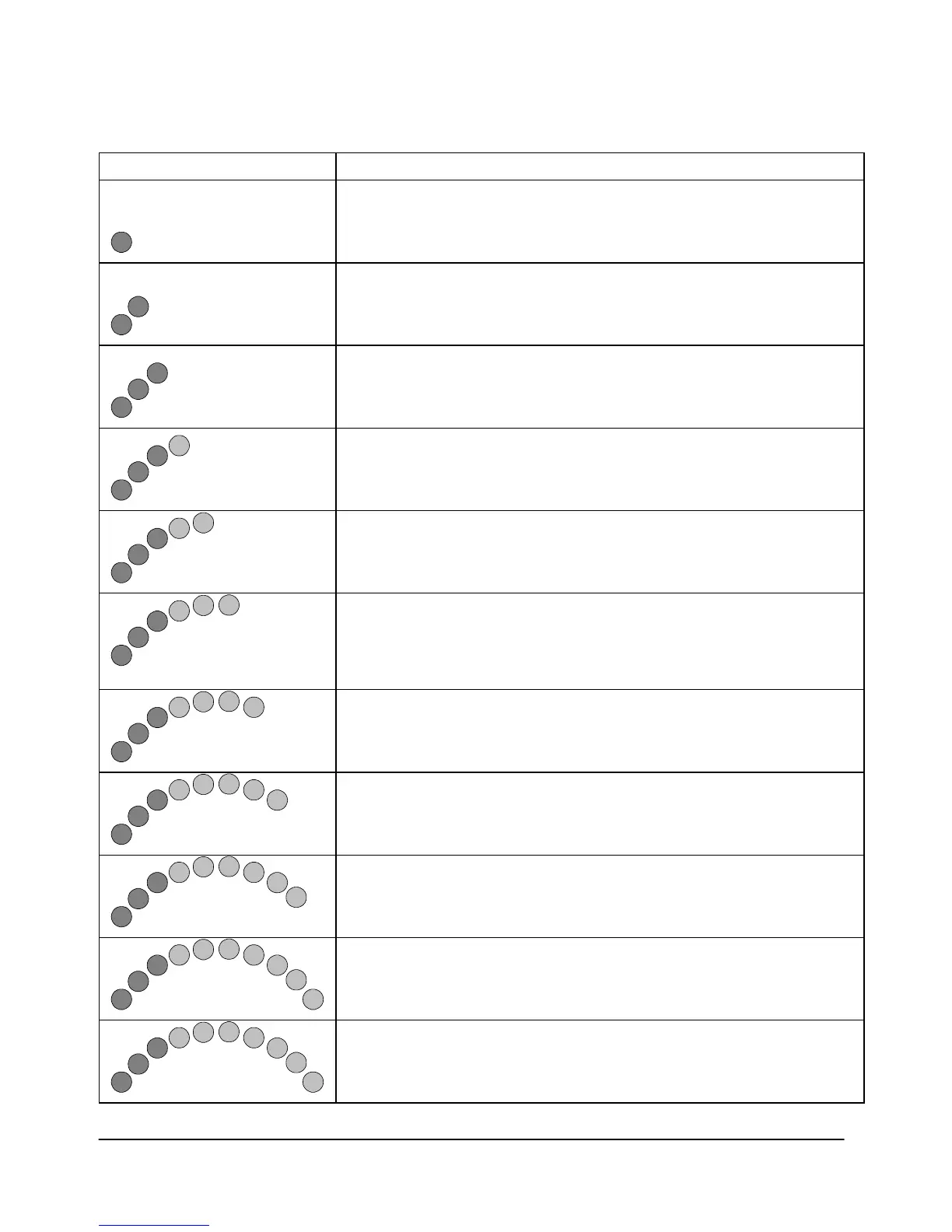
The battery needs charging or there is a bad connection to
the battery. Check the connections to the battery. If the
connections are good, try charging the battery.
The left hand motor has a bad connection. Check the
connections to the left hand motor.
The left hand motor has a short circuit to a battery
connection. Contact your service agent.
The right hand motor has a bad connection. Check the
connections to the right hand module.
The right hand motor has a short circuit to a battery
connection. Contact your service agent.
The wheelchair is being prevented from driving by an
external signal. The exact cause will depend on the type of
wheelchair you have, one possibility is the battery charger is
connected.
A joystick fault is indicated. Make sure that the joystick is in
the centre position before switching on the control system.
A control system fault is indicated. Make sure that all
connections are secure.
The parking brakes have a bad connection. Check the
parking brake and motor connections. Make sure the control
system connections are secure.
An excessive voltage has been applied to the control system.
This is usually caused by a poor battery connection. Check
the battery connections.
This is where the Speed Indicator and 10 bars are lit.
A communication fault is indicated. Make sure that joystick
cable is securely connected and not damaged.








 To Next Page