7
Operating
Remote controller
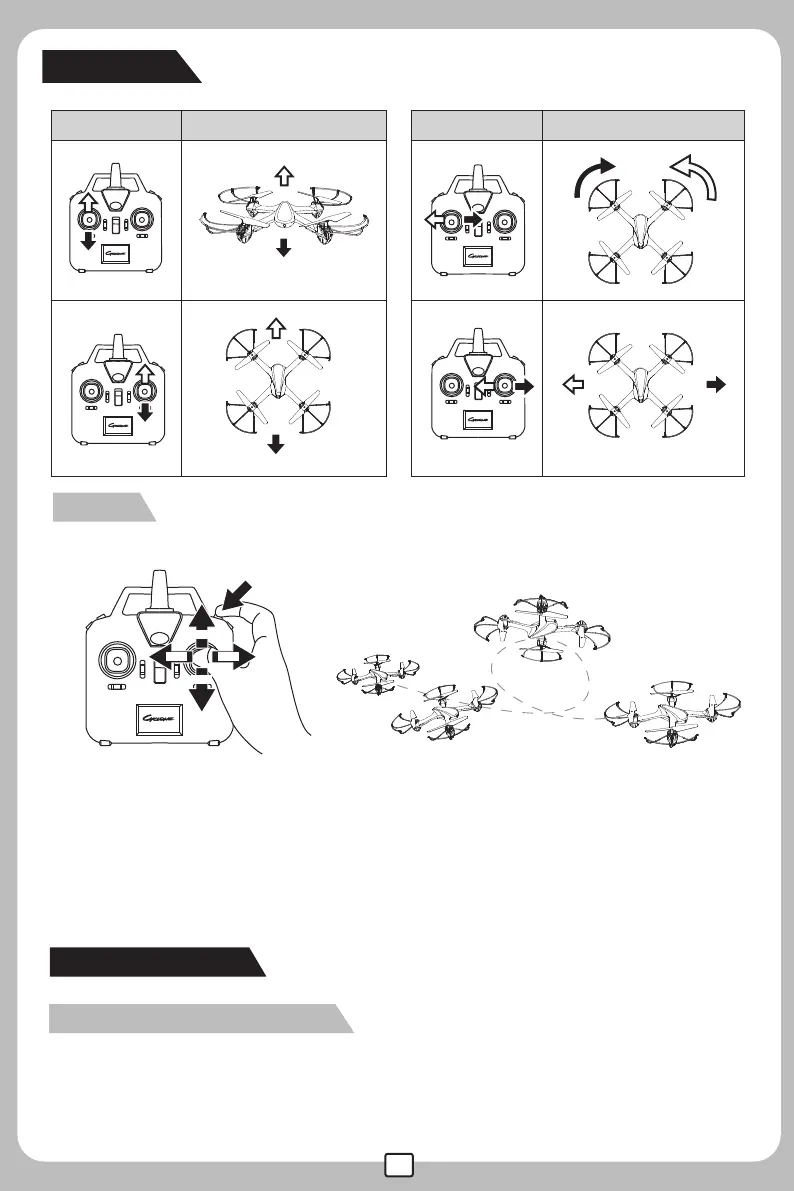
Remote controller Aircraft
Aircraft
3D Roll
Warm tips:
To flip and roll, please press down the 3D rolling button and push the direction control stick to the
edge at the same time.If not, the aircraft will not perform the flip & roll actions as per norm.
Rightward
flips & rolls
Leftward
flips & rolls
Forward
flips &rolls
Backward
flips & rolls
Enter headless mode:
When the transmitter signal connection is completed, press the function button at the top left corner for
2 secs, and a“beep beep” sound will follow. After which the lights of the drone will come on and then
start flashing, this indicates that the drone has entered headless mode.
Headless aircraft:
Down
Up
Forward
Backward


 To Next Page