NOTE: Exporting can only be done with one device at a time. Attempting to
export files simultaneously from a DroneView camera to two devices may cause
the transfer to freeze.
TROUBLESHOOTING
FLYING PROBLEMS
PROBLEM: The Dromida XL will not respond to the controller.
SOLUTION: (1) Charge or change the battery in the Dromida XL. (2) Turn off the
controller and disconnect the battery for the Dromida XL. Re-link the
Dromida XL and controller.
PROBLEM: Red controller LED light flashing after linking.
SOLUTION: Replace with new AAA batteries.
PROBLEM: Unable to flip.
SOLUTION: Battery voltage too low.
PROBLEM: Stabilization not working properly.
SOLUTION: (1) Battery voltage low. (2) Re-link. (3) Recalibrate the sensors.
PROBLEM: Will not take off.
SOLUTION: Rotor blades incorrectly installed. See Blade Replacement section.
PROBLEM: Dromida XL is shaking.
SOLUTION:
Check the canopy, chassis, motors and rotor blades for damage.
PROBLEM: The balance charger charge status LED blinks when attempting to
charge the battery.
SOLUTION: The battery voltage is too low to charge. The battery voltage may
recover on its own with time in order to be safely charged. Wait 1
hour and try charging again. If the charger LED still blinks then you
may need to replace the battery.
PROBLEM: The Dromida XL does not maintain altitude when the throttle stick
is in the center position.
SOLUTION: Recalibrate the sensors.
VIDEO PROBLEMS
PROBLEM: There are missing or corrupt files on the memory card.
SOLUTION: Refer to RECORDING VIDEO AND PICTURES WITHOUT THE APP for
information regarding camera initialization and closing of files.
SOLUTION: Allow 2-3 seconds between taking pictures.
PROBLEM: The video button on the controller does not work or works intermittently.
SOLUTION: The video button must be pressed and quickly released. The controller
will beep when the button works properly.
SOLUTION: The video button on the controller toggles between start/stop video.
If using both the app and the video button to control video recording,
you may need to press the video button a second time in some
instances to get the correct start or stop command.
PROBLEM: The WiFi connection is lost during flight.
SOLUTION: There may be interference in the area. Try flying in a different location.
SOLUTION: You are exceeding the WiFi range of the DroneView camera. Maintain
a closer proximity to your device during flight.
PROBLEM: The app does not re-establish connection after the connection has
been lost.
SOLUTION: Close the DroneView app and remove it from the background tasks.
Restart the DroneView app.
PROBLEM: Exporting files was interrupted and the export function cannot be
restarted.
SOLUTION: Close the DroneView app and remove it from the background tasks.
Restart the DroneView app. Run the export function again.
PROBLEM: You recorded videos/pictures but there are no files on the memory card.
SOLUTION: The memory card was incorrectly inserted into the camera. Refer to
RECORDING VIDEO AND PICTURES WITHOUT THE APP for instructions
on the proper installation of the memory card.
PROBLEM: Horizontal scrolling lines appear in video or pictures.
SOLUTION: Avoid aiming the camera directly into the sun or reflected sunlight.
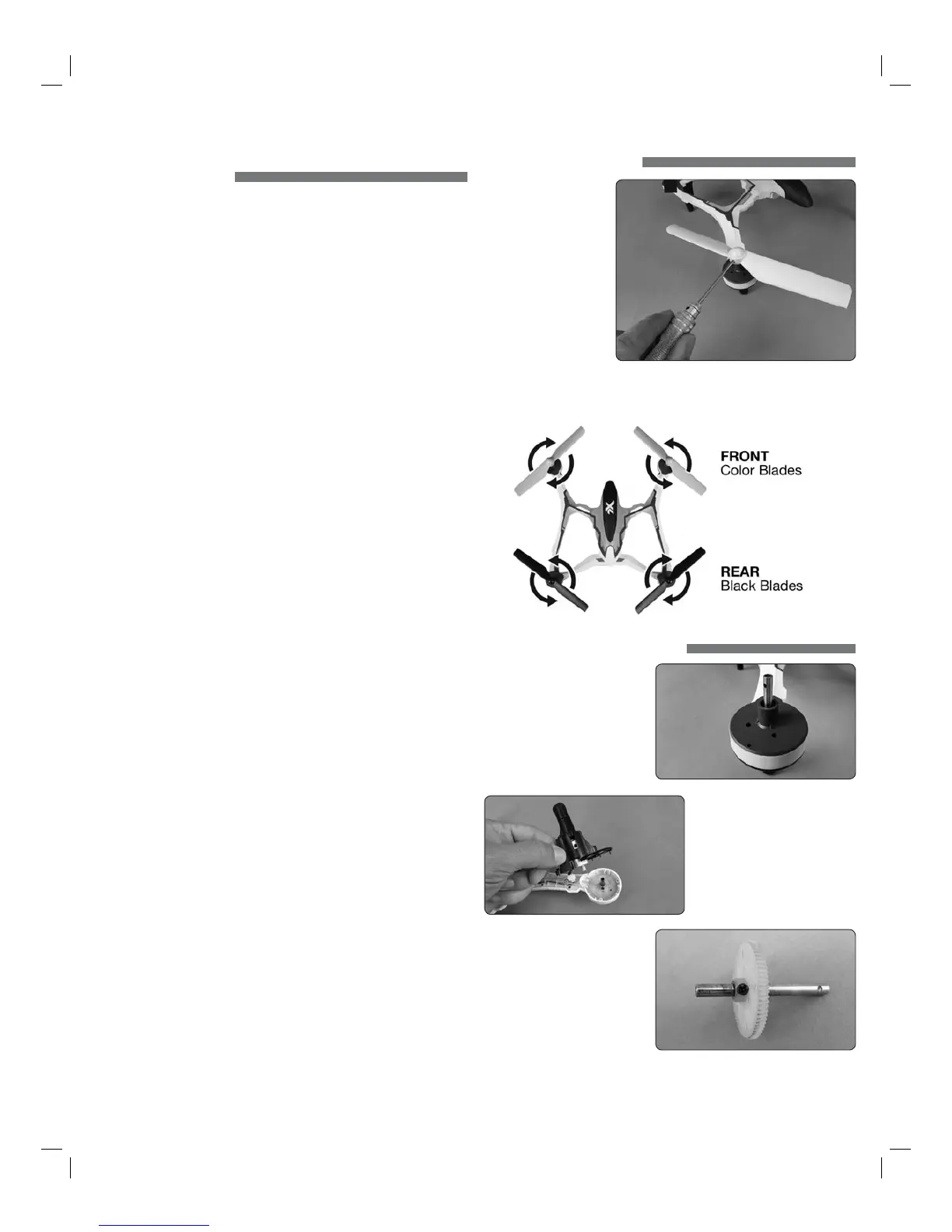
BLADE REPLACEMENT
1. Remove the screw that
secures the rotor blade
to the gear shaft.
2. Pull the prop off the
gear shaft.
3. Install the new rotor
blade and secure it
with the screw.
NOTE:
The rotor blades have arrows that indicate which direction they rotate.
Please refer to this diagram to verify that the correct replacement rotor blade
is installed.
PROP SHAFT REPLACEMENT
1. Remove the rotor blade from
the prop shaft.
2. Remove the four screws from
the black motor cover and lift
it off the frame (if installed, the
prop guard will also need to
be removed before the motor
cover can be removed). You do
not need to disconnect the
motor wires.
3. Slide the motor shaft out out of
the frame. Remove the screw
securing the gear to the shaft.
Slide the gear off the shaft.
4. Reinstall the parts in the
same order in which they
were removed.
NOTE: While the gear is out, check it carefully for any cracks or damage
to the teeth.
6


 To Next Page
 Loading...