5 - CROSSOVER / CRUCE
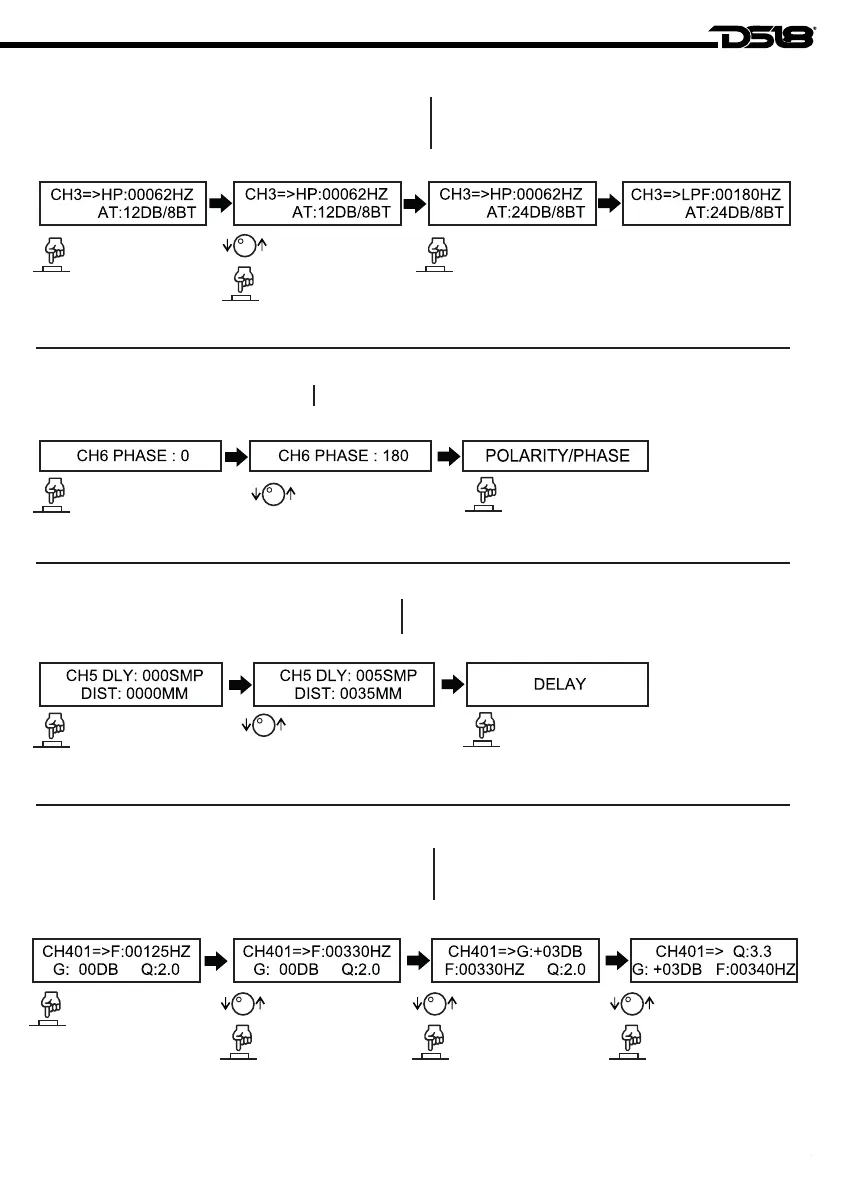
Allow eliminate the frequencies that you don’t need, it has
filters Butterworth, Linkwitz-Riley and Bessel, with
6~48db/OCT.
Select the channel to
be configurated.
Seleccione el canal
a configurar.
Permite eliminar las frecuencias que no necesitas,
tiene filtros Butterworth, Linkwitz-Riley y Bessel, con
6 ~ 48db/OCT.
Step 1 / Paso 1: Step 2 / Paso 2: Step 3 / Paso 3: Step 4 / Paso 4:
Turn the Encoder until
the HPF as you want.
Gire el codificador
hasta HPF como
desee.
Turn the Encoder until the
attenuations as you want
and press.
Gire el codificador hasta las
atenuaciones que desee
y presione.
Repeat the steps 1 and 2 to
adjust the LPF. ESC button
returns to main menu.
Repita los pasos 1 y 2 para
ajustar el LPF. El botón ESC
regresa al menú principal.
6 - POLARITY / PHASE / POLARIDAD / FASE
Allow change the polarity in the output.
Select the channel to
be configurated.
Seleccione el canal
a configurar.
Step 1 / Paso 1: Step 2 / Paso 2: Step 3 / Paso 3:
Permitir cambiar la polaridad en la salida.
Gire el codificador
para cambiar la polaridad.
Turn the Encoder to
change the polarity.
Press the ESC button to
return to main menu.
Presione el botón ESC para regresar
al menú principal.
7 - DELAY / RETRASO
Allow increase time delay to align better the speakers.
Select the channel to
be configurated.
Seleccione el canal
a configurar.
Step 1 / Paso 1: Step 2 / Paso 2: Step 3 / Paso 3:
Press the ESC button to
return to main menu.
Presione el botón ESC para regresar
al menú principal.
Permita que aumente el tiempo de retardo para alinear
mejor los altavoces
Gire el codificador hasta el retraso
que desee.
Turn the Encoder until the
delay as you wish.
8 - CHANNEL EQ / EQ DEL CANAL
Channel equalizer allows increase/decrease 3 independent
frequencies per channel between 20~20kHz with frequency,
gain and Q factor adjustments.
Select the channel to
be configurated.
Turn the Encoder until
the frequency as
you want.
Turn the Encoder until
the gain or attenuation
as you wish and
press the Encoder.
Turn the Encoder until the
factor Q as you want and
press the Encoder to
configure the next. ESC
button return to main
menu.
Seleccione el canal
a configurar.
Step 1 / Paso 1: Step 2 / Paso 2: Step 3 / Paso 3: Step 4 / Paso 4:
El ecualizador de canal permite aumentar / disminuir
3 frecuencias independientes por canal entre 20 - 20
kHz con ajustes de frecuencia, ganancia y factor Q.
Gire el codificador
hasta la frecuencia
que desee.
Gire el codificador hasta
la ganancia o atenuación
que desee y presione
el codificador.
Gire el codificador hasta el
factor Q que desee y presione
el codificador para configurar
el siguiente. Botón ESC
vuelve al menú principal.
6


 To Next Page