EasyManua.ls Logo

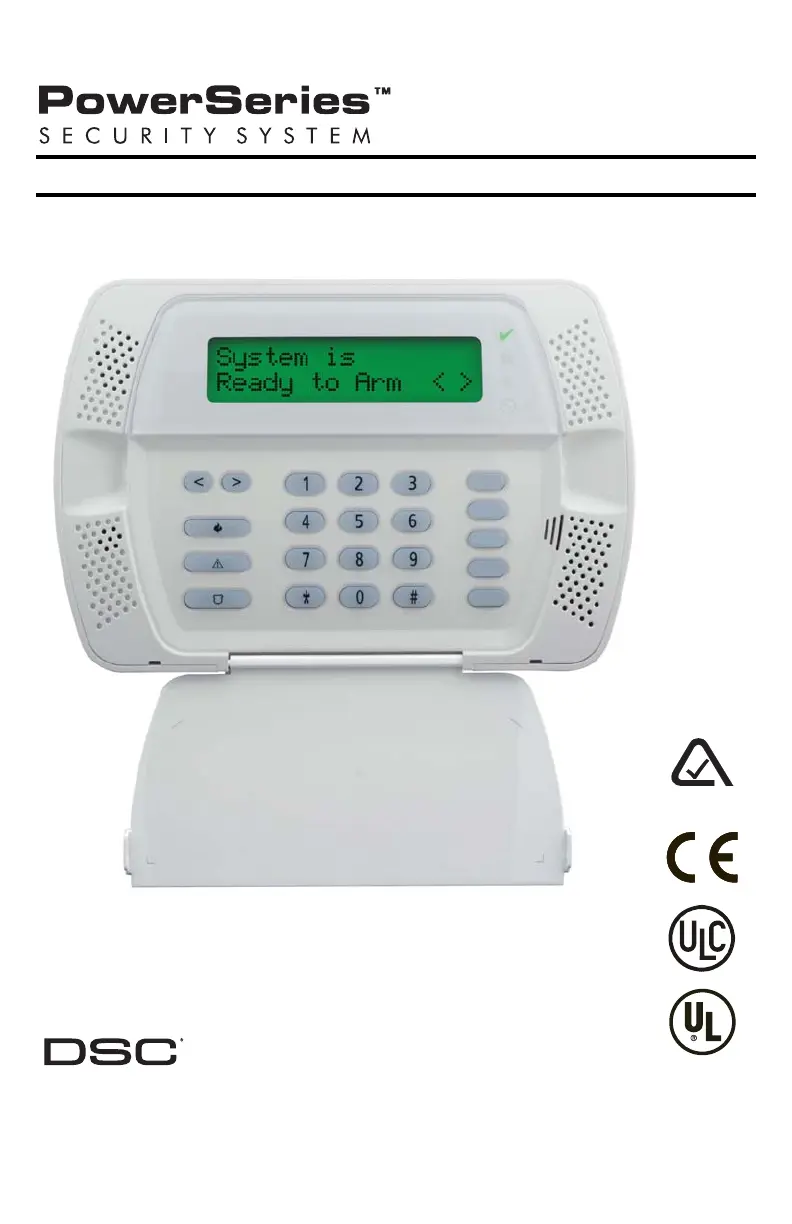
DSC PowerSeries - User Manual

DSC PowerSeries
20 pages
Print Icon
To Next Page IconTo Next Page
Loading...
User Guide
Self Contained Wireless Alarm System v1.0
WARNING: This manual contains information on limitations regarding product use and
function and information on the limitations as to liability of the manufacturer.
The entire manual should be carefully read.
N11427

Other manuals for DSC PowerSeries

Questions and Answers

  • N
    Nicholas JonesAug 15, 2025
    What to do if my DSC PowerSeries Security System shows 'Low Battery'?
    • T
      troyfrazierAug 16, 2025
      If your DSC Security System indicates a low battery, it could be because the main panel battery voltage is less than 7.2VDC. If the battery is new, allow 24 hours for it to charge. Check that the voltage measured across the AC terminals is 16-18 VAC, and replace the transformer if needed. Also, try disconnecting and then reconnecting the battery leads.
  • T
    Tracy ReedAug 18, 2025
    How to fix a 'Zone Fault' on my DSC PowerSeries Security System?
    • D
      Daniel SmithAug 19, 2025
      A 'Zone Fault' on your DSC Security System indicates either a hard-wired zone fault with a short circuit or that one or more wireless devices haven't checked in within the programmed time. * For a hard-wired zone fault: Remove the wire leads from the I/O and COM terminals and measure the resistance of the wire leads. Connect a 5.6K resistor (Green, Blue, Red) across the I/O and COM terminals and verify the trouble condition clears. * For wireless devices: Perform a Module Placement Test (Program Section [904]) to ensure the wireless device is in a good location. If the test results are bad, test the device in another location. If it tests good in a new location, the original location is bad. If the device continues to give bad results, replace it.
  • R
    Rodney FreemanAug 21, 2025
    What to do if my DSC Security System reports 'Wireless Device Low Battery'?
    • A
      Angela StevensAug 21, 2025
      If your DSC Security System reports 'Wireless Device Low Battery', it means one or more wireless devices has a low battery. Replace the battery in the indicated device. Verify the zone operation and ensure that the tamper and low battery condition is cleared and reported. Note that replacing batteries will cause a tamper. Replacing the cover will restore the tamper, causing the associated reporting codes to be sent to the Central Station.
  • B
    Benjamin JohnsonAug 25, 2025
    How to reset the clock on my DSC PowerSeries after 'Loss of Clock/Date'?
    • D
      Douglas RodriguezAug 25, 2025
      If your DSC Security System shows 'Loss of Clock/Date', it means the main panel internal clock is not set. To program the time and date, enter [?][6][Master Code], then press [1]. Enter the time and date in military format as HH:MM MM/DD/YY. For example, for 6:00 pm, Nov. 30, 2007, enter: [18] [00] [11] [30] [07].
  • L
    luke79Aug 27, 2025
    Why does my DSC PowerSeries say 'AC Failure'?
    • J
      John BarnettAug 27, 2025
      The DSC Security System displays 'AC Failure' when there is no AC power at the panel's AC input terminals. To resolve this, verify the voltage measured across the AC terminals is between 16-18VAC. If it's not, you may need to replace the transformer.
  • D
    Donna PowellAug 30, 2025
    What does 'General System Trouble' mean on my DSC PowerSeries Security System and how to fix it?
    • T
      thomaschristopherAug 30, 2025
      A 'General System Trouble' message on your DSC Security System indicates that the system has detected an RF Jam for 20 seconds or that communication with the wireless receiver has failed, causing a Hardware Fault. Check the event buffer to determine the specific trouble. If the buffer logs an RF Jam trouble, check for external 433MHZ signal sources. To disable RF Jam, enable Option [7] in program section [804] subsection [90]. If the buffer logs a Hardware fault, replace the panel.
  • D
    daniellegarciaSep 2, 2025
    What to do if my DSC Security System says 'Failure to Communicate'?
    • T
      teresa29Sep 2, 2025
      If your DSC Security System displays 'Failure to Communicate', it means the panel isn't communicating events to the central station. To troubleshoot: * Connect a headset to TIP and RING of the control panel to monitor for a continuous dial tone, reversed TIP and RING, or a recorded operator message. * Verify the correct phone number is programmed. * Dial the programmed number using a regular telephone to see if a [9] must be dialed or if 800 service is blocked. * Verify the format programmed is supported by the central station. * Verify that the account number and reporting codes are correctly programmed. For Contact ID and Pulse formats, program a HEX [A] to transmit a digit [0] in SIA format, or program a digit [0] to transmit a digit [0].
  • M
    mcguirechelseaSep 5, 2025
    What does 'Zone Tamper' mean on my DSC PowerSeries Security System and how can I resolve it?
    • V
      Virginia SmithSep 5, 2025
      A 'Zone Tamper' message on your DSC Security System indicates either an open circuit on one or more zones with double end-of-line resistors enabled or a tamper condition on one or more wireless devices. * For an open circuit: Remove the wire leads from the I/O and COM terminals and measure the resistance of the wire leads. Connect a 5.6K resistor (Green, Blue, Red) across the I/O and COM terminals and verify the trouble condition clears. * For wireless devices: Ensure the device cover is secure and that the device is correctly mounted for wall tamper operation. Violate, then restore the tamper; if the tamper condition persists, replace the wireless device.
  • A
    Angela WilliamsSep 9, 2025
    How to fix 'Telephone Line Trouble' on DSC PowerSeries?
    • F
      Frank RothSep 9, 2025
      The 'Telephone Line Trouble' on your DSC Security System means the phone line voltage at TIP, RING on the main panel is less than 3VDC. Measure the voltage across TIP and RING on the panel: it should be approximately 50VDC with no phone off-hook, and approximately 5VDC with any phone off-hook. Try wiring the incoming line directly to TIP and RING. If the trouble clears, check the wiring or the RJ-31x phone jack.
  • W
    williamsmichaelSep 12, 2025
    What does 'General System Tamper' mean on my DSC Security System?
    • N
      Nicholas DaySep 12, 2025
      A 'General System Tamper' message on your DSC Security System indicates that the cover tamper has been tripped. Ensure that the tamper button is installed into the back plate and that the keypad (cover) is secured to the backplate.

Summary

FCC Compliance and Industry Standards

Important Information and Requirements

Covers FCC Part 68, telephone connections, REN, and Industry Canada statements.

Safety and Maintenance Guidelines

Important Safety Instructions

General safety precautions for using the system.

Regular Maintenance and Troubleshooting

Guidance on keeping the alarm controller in optimum condition.

Warning and Environmental Guidelines

Installation and usage warnings, including environmental conditions.

About Your Security System

System Overview

Covers fire detection, testing, monitoring, maintenance, and general operation.

Controls and Indicators

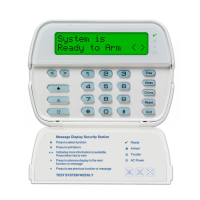
Keypad Layout and Functions

Identifies keypad controls, LCD, and indicators.

Language Selection

Procedure to change the system's display language.

Arming and Disarming Procedures

Arming Modes and Features

Details for Stay Arming, Night Arming, Away Arming, and Quick Exit.

Disarming and Error Handling

How to disarm the system and handle arming/disarming errors.

System Operations and Features

Emergency Functions and Alarms

Using emergency keys and understanding alarm sounds.

Programming and Special Features

Time/date programming, 2-way audio, and zone bypassing initiation.

Zone Bypassing Details

Zone Bypassing Procedures

Detailed steps for bypassing individual zones and programming bypass groups.

Trouble Conditions and System Status

Trouble Condition Indicators

Explains various trouble conditions and required actions.

Alarm Memory and Door Chime

How to view alarm events and control door chime function.

Access Code Management

Access Code Programming and Attributes

Programming user codes, attributes, and bypass settings.

User Functions and Settings

Code Attributes and System Functions

Bell squawk, erasing codes, and user function commands.

Keypad Adjustments

Changing brightness, contrast, and buzzer levels.

System Testing and Access

Event Buffer and System Testing

Viewing event buffer and performing sounder/display and walk tests.

Computer Access and Downloading

Enabling system access for installer downloading.

Reference Sheets

System and Contact Information

Fields for system information, service, and installer contacts.

Sensor; Zone Information

Zone Configuration Table

Table for recording sensor and zone information.

Smoke Detector Placement Guidelines

General Placement Recommendations

Guidelines and factors for locating smoke detectors in a home.

Fire Safety Planning

Household Fire Safety Audit and Escape Plans

Conducting fire safety audits and developing escape plans.

Important Warnings and Considerations

Installer Guidance and System Failures

Information for installers and potential system failure scenarios.

DSC PowerSeries Specifications

General IconGeneral
ModelPowerSeries
CategorySecurity System
CommunicationPSTN, IP
Power Supply16.5VAC
Backup Battery12V 7Ah
ProgrammingVia keypad
CompatibilityDSC peripherals and modules

Videos

How to Change Master and User Code on DSC Powerseries

Related product manuals