EasyManua.ls Logo

DSC TL280LE-LAT - User Manual

DSC TL280LE-LAT
72 pages
Print Icon
To Next Page IconTo Next Page
Loading...
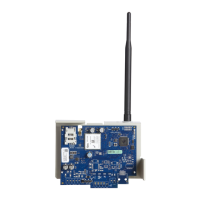
TL280LE(R) / TL280LE-EU /
TL280LE-LAT / TL280LE-AU
Internet and LTE/HSPA Dual-Path Alarm
Communicator
LE2080(R) / LE2080-EU / LE2080-
LAT / LE2080-AU
LTE/HSPA Alarm Communicator
3G2080(R)E
HSPA Cellular Alarm Communicator
TL2803G(R)E
Internet and HSPA Dual-Path Alarm Communicator
TL280(R)E
Internet Alarm Communicator
Installation Manual 5.X
Warning: This manual contains information on limitations regarding product use and function and information on the
limitations as to the liability of the manufacturer. The entire manual should be carefully read.
Please note that not all models and features listed are available in all markets.

Table of Contents

Questions and Answers

  • K
    Katherine WilliamsNov 26, 2025
    Why is the yellow LED flashing 7 times on my DSC Security System?
    • C
      Cynthia GonzalezNov 26, 2025
      If the yellow LED on your DSC Security System is flashing 7 times, it means the receiver is not available. First, ensure that the Ethernet path has Internet connectivity. If you're using a static IP address, confirm that the gateway and subnet mask are entered correctly. If the network has a firewall, ensure that the programmed outgoing ports are open (default UDP port 3060 and port 3065). Ensure that all the receivers are programmed for DHCP or have the proper IP address and port number. Ensure the cellular receiver APNs have been programmed with the access point name provided by the cellular provider. If Common Mode is used, and only one path is initialized while the other path is not successful, generate a manual test transmission over both paths or power cycle the communicator to recov...
  • K
    Kristen RobertsAug 25, 2025
    Why is the yellow LED on my DSC Security System solid?
    • L
      Lorraine YoungAug 25, 2025
      If the yellow LED on your DSC Security System is solid, it means there is no signal. Verify that cellular network service is active in your area. Also, make sure the antenna is securely connected to the radio. Check that the antenna stub cable is securely connected to the radio. If you're using an external antenna, ensure it's securely screwed onto the antenna cable connector and inspect the external antenna for any damage or shorts.
  • N
    Nicole RomeroAug 25, 2025
    How to fix yellow LED flashing 6 times on DSC TL280LE-LAT Security System?
    • K
      Katie LopezAug 26, 2025
      If the yellow LED on your DSC Security System flashes 6 times, it indicates an Ethernet trouble. Start by checking with your ISP to confirm that Internet service is active in your area. Ensure the Ethernet cable is securely inserted into both the RJ45 jack of the communicator and the hub/router/switch. Verify that the link light on the hub/router/switch is ON; if it's OFF, restart the hub/router/switch. If DHCP is in use, confirm that the unit has been assigned a valid IP address from the server. If the problem persists, try replacing the Ethernet cable and RJ45 connector.
  • E
    Ernest CunninghamAug 27, 2025
    What to do if my DSC TL280LE-LAT has no indication?
    • V
      victoria25Aug 27, 2025
      If your DSC Security System shows no indication (no lights, no response), the cause might be no power. Check the power connections between the panel and the communicator. Also, confirm that the PC-LINK cable is properly installed between the communicator and the panel.
  • A
    amanda73Aug 28, 2025
    What does it mean when all LEDs are flashing on my DSC TL280LE-LAT?
    • J
      Jordan GarzaAug 28, 2025
      If all the LEDs on your DSC Security System are flashing together, it indicates a boot loader failure. To resolve this, disconnect and then reconnect the power to the communicator module.
  • S
    Sara MendezSep 17, 2025
    What does it mean when the yellow LED flashes 9 times on my DSC Computer Hardware?
    • J
      jillevansSep 17, 2025
      If the yellow LED flashes 9 times, it indicates an FTC trouble. Restart the system, if trouble persists, contact the dealer.
  • I
    icollinsSep 14, 2025
    What does it mean when the red and yellow LEDs are flashing together on my DSC Computer Hardware?
    • G
      gina61Sep 14, 2025
      If the red and yellow LEDs are flashing together, the unit is still initializing. Please wait while the unit gets its programming and establishes a connection to all programmed receivers.
  • C
    cesarrhodesSep 15, 2025
    What does it mean when the yellow LED flashes 8 times on my DSC Computer Hardware?
    • C
      Cindy MurphySep 15, 2025
      When the yellow LED flashes 8 times, it indicates a receiver supervision trouble. This trouble is indicated when supervision is enabled and the unit is not able to successfully communicate with the receiver. If this trouble persists, contact the central station.
  • C
    Christopher LeeSep 6, 2025
    What to do if my DSC Computer Hardware shows no indication?
    • W
      williamhernandezSep 6, 2025
      If your DSC Computer Hardware shows no indication, the issue might be due to a lack of power. Check the power connections between the panel and the communicator. Also, confirm that the PC-LINK cable is properly installed between the communicator and the panel.
  • K
    Kenneth JensenSep 3, 2025
    Why are only the green LEDs flashing on my DSC TL280LE-LAT Security System?
    • D
      Daniel McguireSep 4, 2025
      If only the green LEDs are flashing on your DSC Security System, it means the hardware default jumper is installed and must be removed.

DSC TL280LE-LAT Specifications

General IconGeneral
BrandDSC
ModelTL280LE-LAT
CategorySecurity System
LanguageEnglish

Related product manuals