1.Turn on the device,the default is Video mode.
Please press the Mode button to switch to photo mode.
2.Zooming:
Keep pressing the or button to zoom in or zoom out the image.
the value of magnification level appears on the LCD screen.
3.Take a still photo.
- View your subject via the LCD screen.
-Adjust the focus by turning the focus wheel.
For night or insufficient light use,turn on the IR by pressing the IR
Up/Zoom in/Up Button.Increase the brightness by pressing the button
repeatedly.It has 7 levels of brightness(0〉1〉2〉3〉4〉5〉6〉7〉0...)The
brightness can be adjusted according to your needs.
- Press the Shot button to take a photo.
8
Recording Video
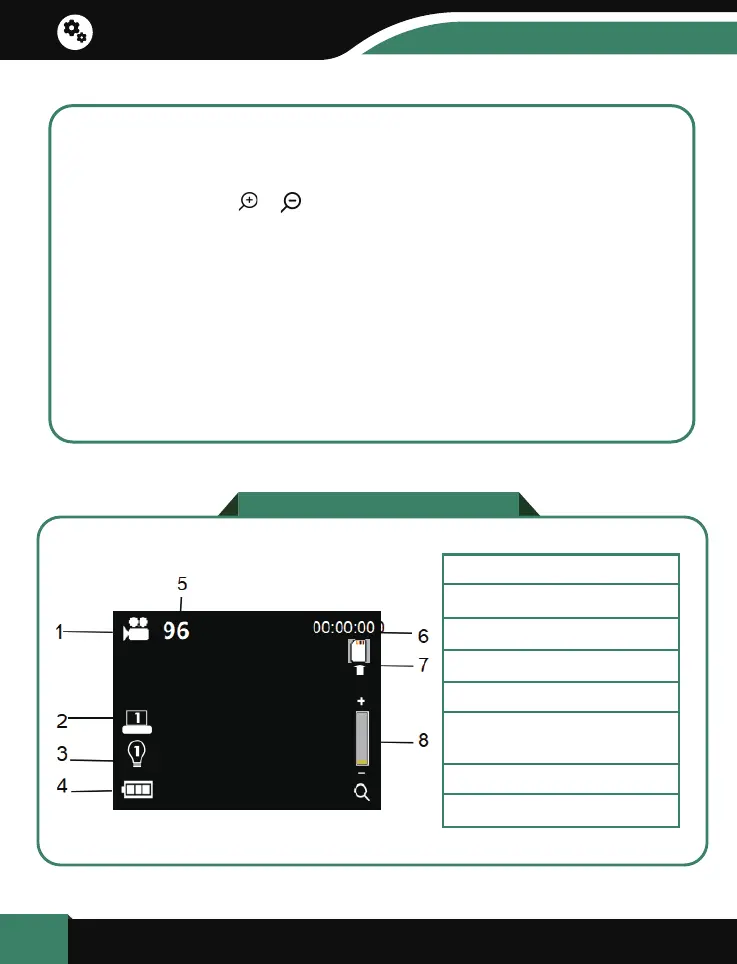
1.Video mode
2.Screen brightness gear
3.Infrared light gear
4.Battery status
5.Video Resolution
7.SD card prompt
8.Digital zoom indication
6.Number of pictures
that can be taken
Basic operation


 To Next Page