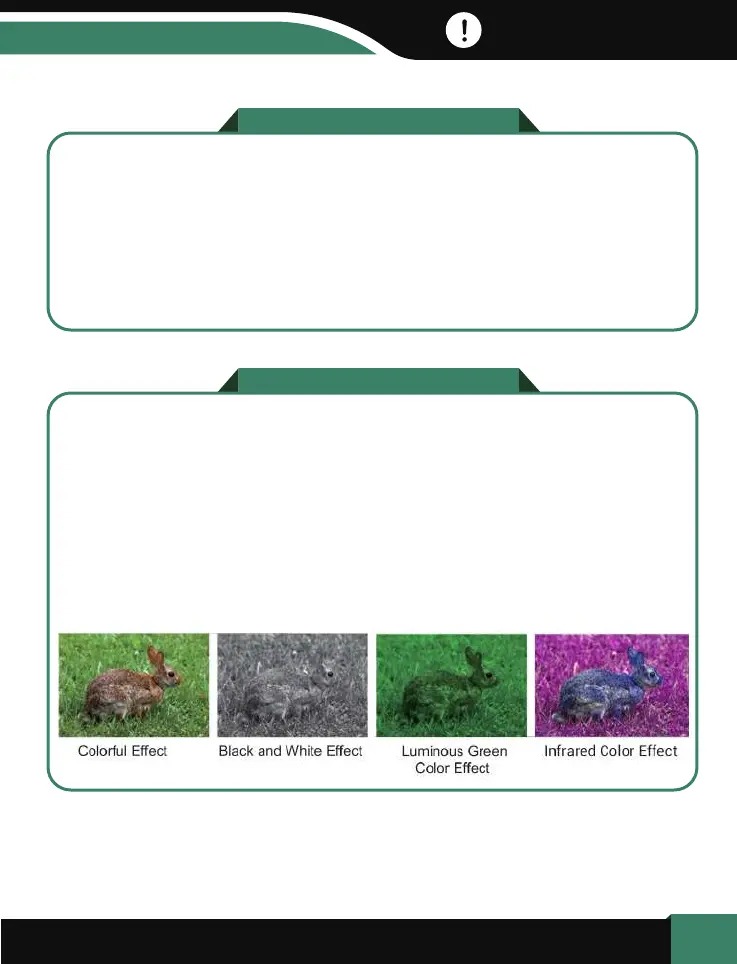
These 2 color effects are available in both normal mode and infrared night
vision mode.
Long press “Menu”- > Luminous Green Color Effect,
Long press “Menu”- > Infrared Color Effect,
Long press “Menu”- > Get back to normal color mode.
15
New and Special Color Effects:
Luminous Green Color Effect & Infrared Color Effect.
Steps:
Before cleaning the device, disconnect it from the power supply (remove
batteries)! Only use a dry cloth to clean the exterior of the device. To avoid
damaging the electronics, do not use any cleaning fluid. Clean the eyepieces
and/or lenses only with a soft, lint-free cloth, (e.g.microfibre cloth). To avoid
scratching the lenses, use only gentle pressure with the cleaning cloth.
Protect the device from dust and moisture. Store it in a bag or box. Remove
the batteries from the device if it is not used for a longer time
NOTES on Cleaning
NOTES on Cleaning


 To Next Page