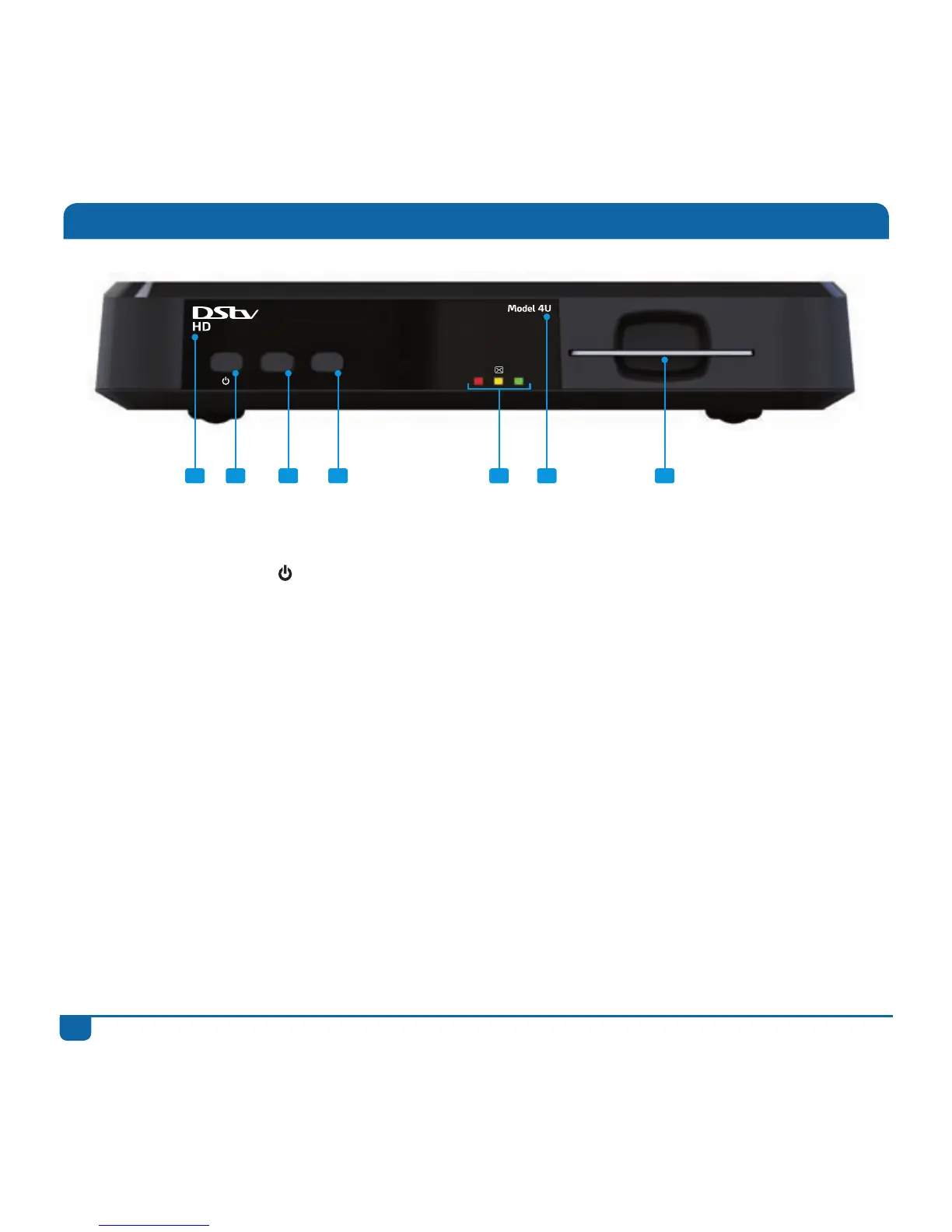
Front Panel
1 DStv HD This is the name of the decoder
2
Reset button
Press once to switch the decoder in and out of standby
Press and hold for a few seconds to reset (reboot) the decoder
3 P- button Goes to the previous channel
4 P+ button Goes to the next channel
5 Red, Amber,
Green LEDs
These LEDs are used to indicate various states that the decoder
may be in :
Flashing AMBER = unread mail message
GREEN blink = the decoder has received a command from the
remote
Solid RED = decoder is in standby
Solid AMBER = decoder is downloading software
Solid GREEN = decoder is tuned to an audio or video channel
Solid GREEN and RED = error
6 Model 4U This is the model number. Please remember to give us this
information when calling us with any technical queries
7 Smartcard slot Please ensure that the smartcard is securely inserted into the slot
1 2 3 7
Reset
P- P+
4 5 6


 To Next Page