Rugged Tablet
DT Research, Inc.
2000 Concourse Drive, San Jose, CA 95131
Copyright © 2022, DT Research, Inc. All Rights Reserved.
BOG092622 DT301YQ ENG
INTRODUCTION
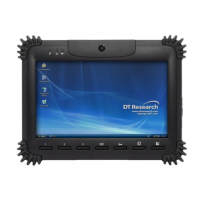
Thank you for acquiring the DT301Y/301Q, part of DT Research’s line of Rugged
Tablets. Featuring a slim yet robust enclosure, the DT301Y/301Q with 10.1” TFT
display is powered by the Intel® Core™ i or Qualcomm octa-core processor, oering
opmal combinaons of performance and power savings. The DT301Y/301Q is
available with Microso® Windows® or Android operang system. The soware
operang system features web browser, client/ server compung soware, media
player, accessories, and applicaons support.
PACKAGE CONTENTS
• One DT301Y/301Q with Baery Pack and Handstrap
• AC-DC Power Adapter with Power Cord
• Basic Operaon Guide
* If your DT301Y/301Q contains camera or barcode scanner, please refer to the
Tablet Modules Basic Operaon Guide for detailed operaon.
DT301Y/301Q
For the product take-back service informaon, please visit:
hp://www.dtresearch.com.tw/zh/About/csr.html
As an ENERGY STAR® Partner, DT Research Inc. follows the EPA’s product
qualicaon and cercaon process to ensure the products marked with
the ENERGY STAR® logo are ENERGY STAR® qualied for energy eciency.
The ENERGY STAR® program specicaons for computers were to promote
energy eciency and reduce air polluon through more energy-ecient
equipment in homes, oces, and factories. One way products achieve
this goal is by using the Microso Windows power management feature
to reduce power consumpon when the product is not in use. The power
management feature enables the computer to iniate a low-power or
“sleep” mode aer a period of user inacvity.
To take advantage of these potenal energy savings, users should use the
default power management sengs that are provided with ENERGY STAR
qualied computers. The default power management sengs on ENERGY
STAR® qualied computers are preset to behave in the following ways :
• Turn o display aer 10 minutes of user inacvity.
• Iniate a low power sleep mode for the computer aer 30 minutes of
user inacvity.
• Briey press the power buon will bring the computer out of sleep
mode.
Addional informaon on the ENERGY STAR® program, its environmental
benets and the potenal energy and nancial savings of the power
management feature can be found on the EPA ENERGY STAR® Power
Management Web site at hp://www.energystar.gov/powermanagement.

 Need help?
 General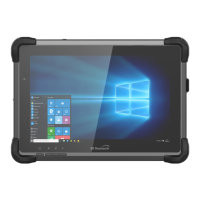






 To Next Page