Revision Date / Version: 2/13/2014 - 7
M2 (PRINTHEAD CABLE REPLACEMENT)
(Always POWER DOWN printer and UNPLUG before doing any repair work)
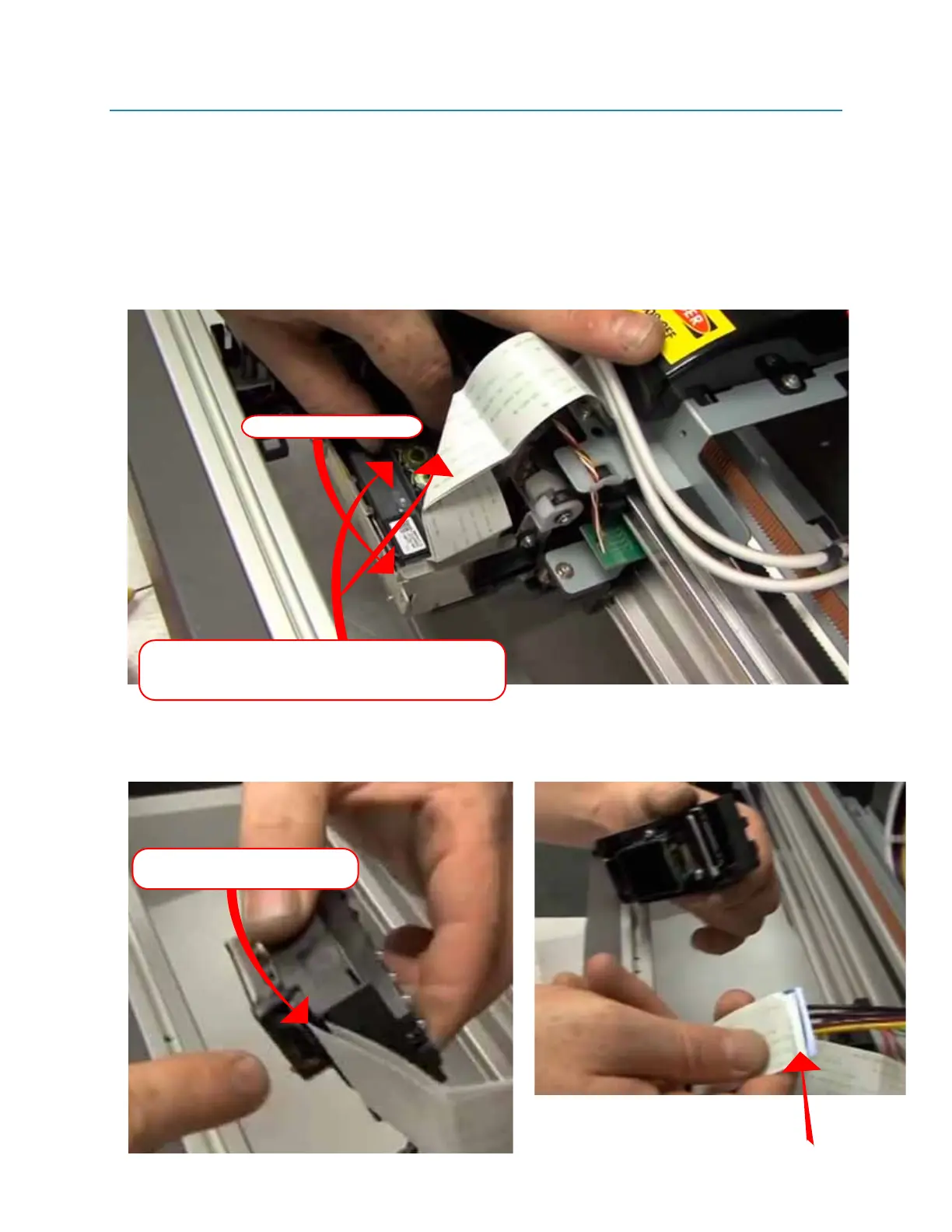
7. Gently pull the printhead out of the carriage. Be careful where you pull from, it’s best to use the
area indicated below . Sometimes it will require both hands to get the head out. Usually pushing
back, then lifting up, wiggling the head as you are lifting up.
Notice the
adjustment screw, this screw has been factory set to keep the printhead tilt correct. We
do not want to adjust this screw. It’s best to work around it when replacing the printhead.
8. Pull the FFC cables straight out, be careful not to damage the “Teeth” on the cables.
(Indicated in 1-F and 1-G)
Fig 1-E
Fig 1-F Fig 1-G
WARNING:
Becareful not to damage the “FACE” of your printhead while installing the new one. NEVER touch the face of
the printhead or lay it face down on anything.
Place your fingers in the areas indicated (along the
walls on bothe sides of dampers recievers) . It might
take both hands.
ADJUSTMENT SCREW
Pull FFC cables straight out, be
careful not to damage “teeth”
Pull FFC cables straight out, be
careful not to damage “teeth”


 To Next Page
 Loading...