EasyManua.ls Logo

Dual 1019 - Page 13

Dual 1019
15 pages
Print Icon
To Next Page IconTo Next Page
To Previous Page IconTo Previous Page
Loading...
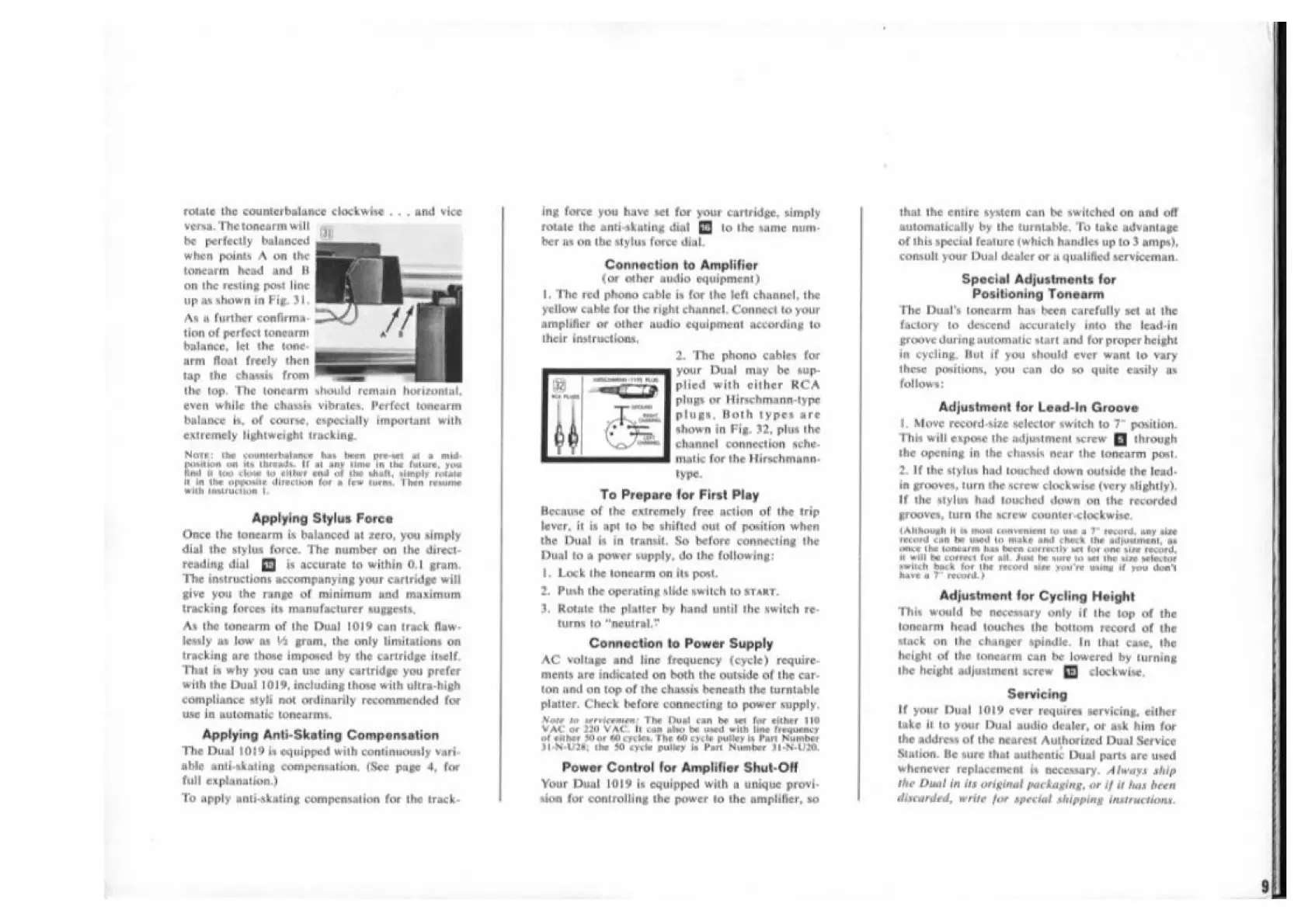
rotate
the
counterbalance
chekwise
..
.
and
vice
versa.
The
tonearm
will
a
be
perfectly
balanced
.o.
when
points
A
on
ihe
tonearm
head
ond
H
on
the
resting
post
line
|
up
it
shownin
Fig.
3),
a
Aa
a
further
confirma-
.
tion
of
perfect
tonearm
balance,
let
the
tone-
...
arm
floal
freely
then
tap
the
chassis
from
|
~
the
top.
The
teneanm
should
remain
horizontal,
even
While
the
chassis
vibrates,
Perfect
tonearm
bolance
is,
of
course, capecially
important
with
extremely
lightweight
tracking.
Nore:
the
coumierbalance
has
heen
preeet
of
ao
mid-
Pouliot
on
its
threads,
if
ai
any
fine
in
the
fulure,
you
Find
ji
dam
clate
ict
cither
end
of
the
ehalt,
simply
rotate
ion
the
Opeoeie
direction
for
a
few
tures,
Then
remure
wilh
imeiructicm
|
Applying
Stylus
Force
Once
the
toncarm
is
balanced
at
fero,
you
simply
dial
the
stylus
force.
The
number
on
the
direct-
reading
dial
§)
is
accurate
to
within
0.1
gram.
The
instructions
accompanying
your
cartridge
will
give
you
the
range
of
minimum
and
maximum
tracking
forces
iis
manufacturer
suggests,
As
the
tonearm
of
the
Dual
10/9
can
track
flaw-
lewaly
os
low
ox
44
grom,
the
only
limitations
on
tracking
are
those
imposed
by
the
cartridge
itself,
That
ia
why
you
can
use
any
cartridge
you
prefer
with
the
Dual
1019,
including
thove
with
ultra-high
compliance
styli
not
ordinanly
recommended
for
ie
in
automatic
tonearrrs.
Applying
Anti-Skating
Compensation
The
Dual
1019
in
equipped
with
continuously
vari-
able
anti-skating
compensation.
(Sec
page
4,
for
full
explanation.)
To
apply
anti-skating
compensation
for
the
track-
ing
force
you
have
set
for
your
cartridge,
simply
rotate
the
anti-skuting
dial
[J
to
the
same
num-
ber
ns
on
the
stylus
force
dial.
Connection
to
Amplifier
(or
other
audio
equipment)
[,
The
red
phono
cable
is
for
the
left
channel,
the
yellow
cable
for
the
right
channel.
Connect
to
your
amplifier
or
other
audio
equipment
according
to
their
instructions,
2.
The
phono
cables
for
your
Duel
may
be
sup-
plied
with
cither
RCA
plugs
or
Hirschmann-type
plugs.
Both
types
are
shown
in
Fig.
72,
plua
the
channel
connection
sche-
matic
for
the
Hirschmann:
type.
To
Prepare
for
First
Play
Because
of
the
extremely
free
action
of
the
trip
lever,
it
ia
apt
to
be
shifted
out
of
position
when
the
Dual
is
in
transl,
So
before
connecting
the
Dual
to
a
power
supply,
do
the
following:
|.
Lock
the
tonearm
on
its
post.
2,
Push
the
operating
slide
awitch
to
sTaMr,
31,
Rotate
the
platter
by
hand
until
the
switch
re-
tims
to
“newtral,"
Connection
to
Power
Supply
AC
voltage
and
line
frequency
(cyele)
require-
menis
are
indicated
on
both
the
outside
of
the
car-
ton
and
on
top
of
the
chassis
beneath
the
turntable
platter.
Check
before
connecting
to
power
supply,
Vow
i
ereicwenens
The
Dual
can
be
on
for
either
110
WAC
of
2200
VAC.
lt
com
alo
be
used
with
line
frequency
of
either
or
0
cycles,
The
60
cyche
pulley
in
Part
Number
Vi-N-
L286;
the
30
cycle
pulley
is
Part
Nuevber
31-N-L/00,
Power
Control
for
Amplifier
Shul-Of
Your
Dual
1019
is
equipped
with
a
unique
provi-
ion
for
controlling
the
power
to
the
amplifier,
so
that
the
entire
system
can
be
switched
on
and
off
automatically
by
the
turniable,
To
toke
advaniage
of
this
special
feature
(which
handles
up
to
3
amps),
comuht
your
Dual
dealer
or
i
qualified
serviceman.
Special
Adjustments
for
Positioning
Tonearm
The
Dual’s
tonearm
has
been
carefully
set
at
the
factory
to
descend
accurately
into
the
lead-in
groove
during
automatic
sturt
and
for
proper
height
in
cycling,
Mot
if
you
should
ever
want
to
vary
these
positions,
you
can
do
so
quite
casily
as
follows:
Adjustment
for
Lead-In
Groove
|.
Move
record-size
selector
ewitch
to
position.
This
will
expose
the
adjustment
screw
through
the
opening
im
the
chassis
near
the
tonearm
post.
2.
If
the
stylus
had
touched
down
outside
the
bead-
in
grooves,
turn
the
screw
clockwise
(very
lightly),
If
the
stylus
had
touched
down
on
the
recorded
grooves,
turn
the
screw
counter-clockwise,
(Alhough
i
i
moet
cenreniont
0
ie
a
record,
any
aise
record
con
be
ued
to
make
an!
check
the
opmieneni,
ae
mice
the
tonearm
has
heen
correctly
ett
for
one
sive
record,
1
will
be
comet
for
all.
Just
he
sure
to
ett
the
size
sebector
awitch
beck
for
the
record
sine
you're
wing
if
you
don't
have
a
noceul.
}
Adjustment
for
Cycling
Height
This
would
be
necessary
only
if
the
top
of
the
honcarm
head
touches
the
bottom
record
of
the
wack
on
the
changer
spindle.
In
that
case,
the
height
of
the
tonearm
can
be
lowered
by
turning
the
height
adjustment
screw
[fj
clockwise,
Servicing
If
your
Dual
1019
ever
requires
servicing,
either
lake
tt
to
your
Dual
audio
dealer,
or
ask
him
for
(he
address
of
the
nearest
Authorized
Dual
Service
Station.
Be
sure
that
authentic
Dual
parts
are
weed
whenever
replacement
ia
necessary,
Always
ship
(he
Dual
in
ie
original
packaging,
or
if
it
has
been
diarded,
write
far
special
shipping
instructions,

Other manuals for Dual 1019

Related product manuals