18
E
fig. 11.3
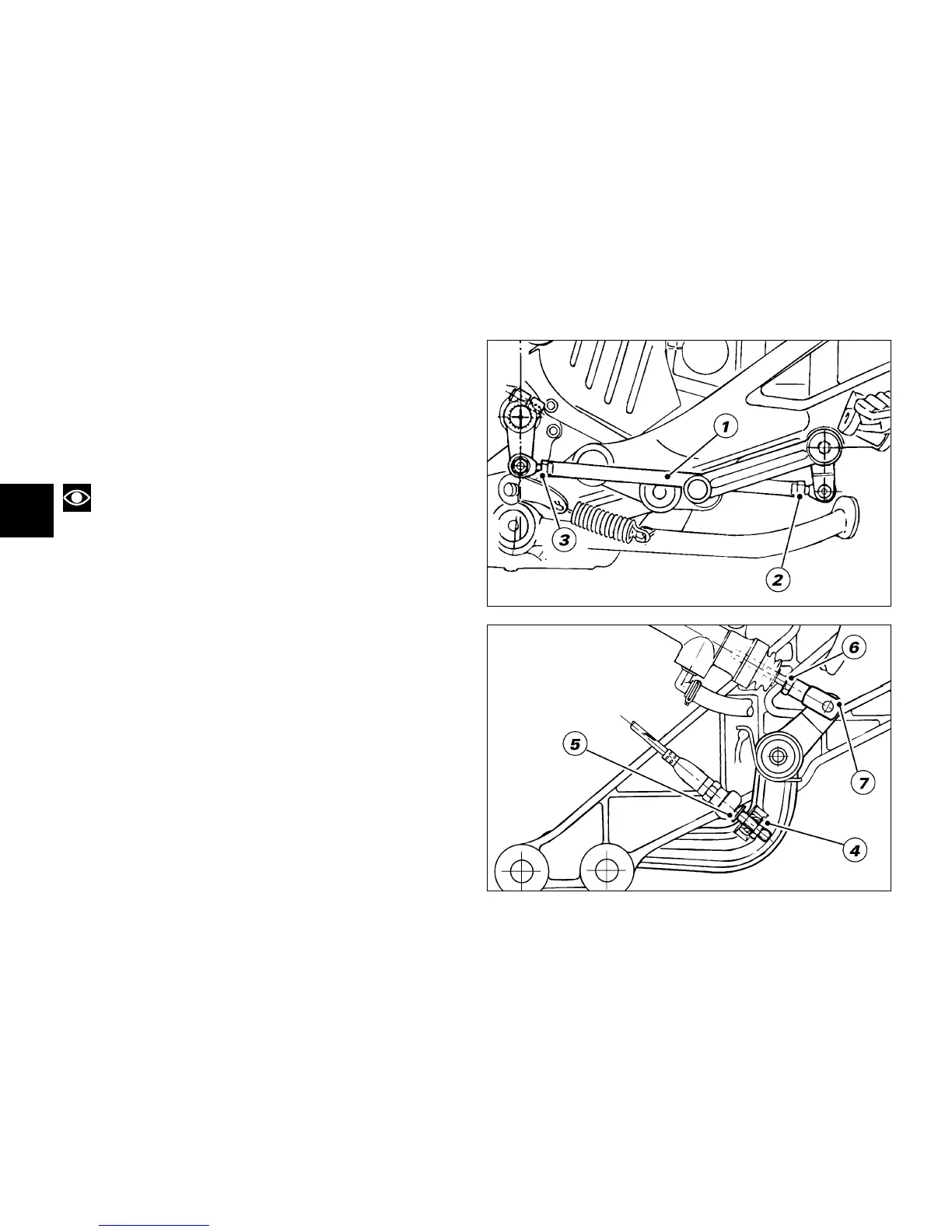
Setting the gear change and rear brake pedals
(fig. 11.2)
The gear change and rear brake pedals can be adjusted
to suit the preferred riding position of each rider.
To set the gear change pedal,
lock linkage (1) and loosen the check nuts (2) and (3).
Note
Nut (2) has a left-hand thread.
Rotate linkage (1) until setting pedal in the desired
position.
Tighten both check nuts onto linkage.
To set the rear brake pedal,
loosen check nut (4).
Turn pedal travel adjusting screw (5) until pedal is in the
desired position.
Tighten check nut (4).
Work pedal by hand to make sure it has 1.5 - 2
mm/0.059-0.078 in. free play before brake begins to bite.
If not so, set the length of cylinder linkage as follows.
Loosen the check nut (6) on cylinder linkage.
Tighten linkage into fork (7) to increase play, or unscrew
linkage to reduce it.
Tighten check nut (6) and check pedal free play again.
fig. 11.2










 To Next Page