19
E
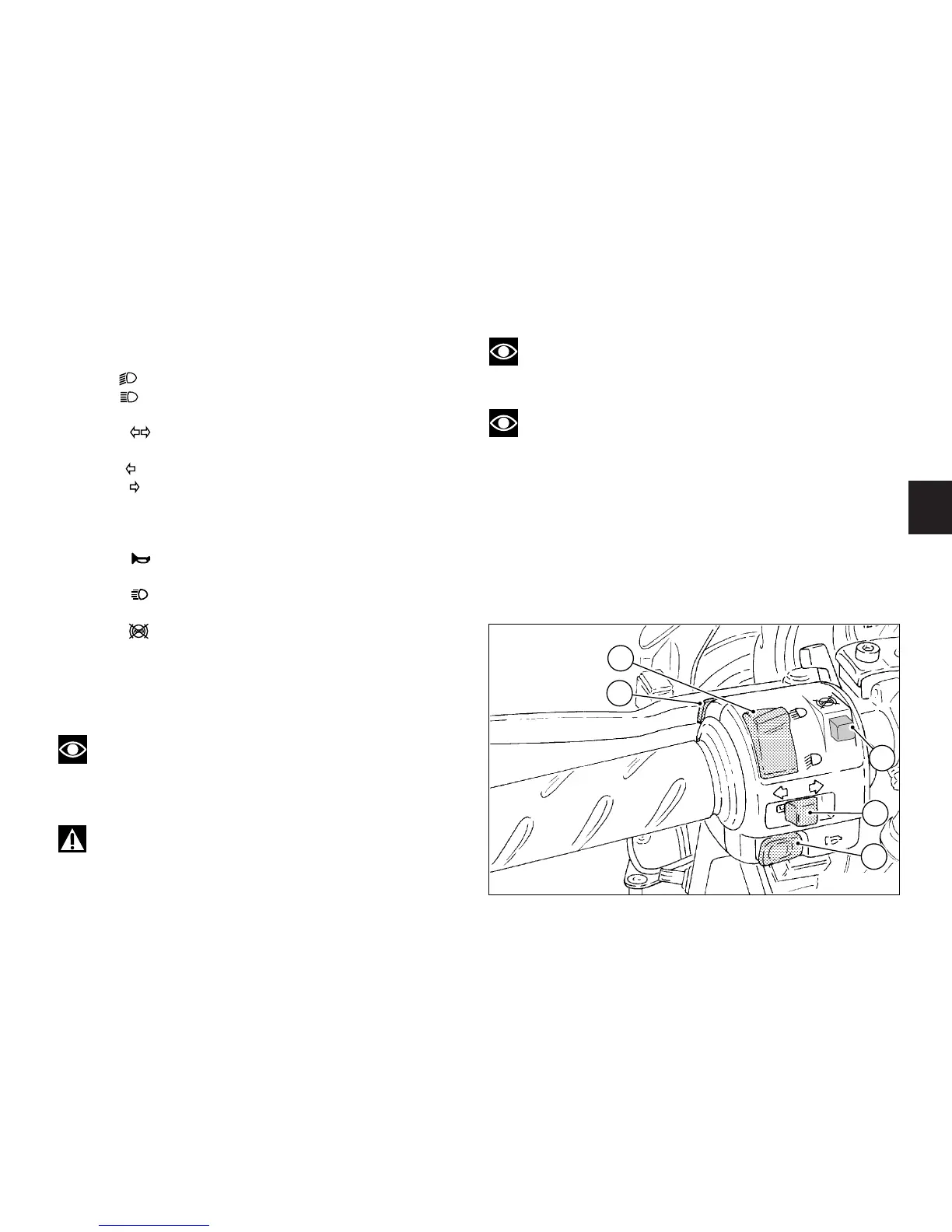
Left switch (fig. 11)
1) Dip switch, light dip switch, two positions:
position = low beam on;
position = high beam on.
2) Switch = 3-position turn indicator:
centre position = OFF;
position = left turn;
position = right turn.
To cancel turn indicators, push in once switch returns to
central position.
3) Button = warning horn.
4) Button = passing.
5) Button = ABS off.
To turn off the ABS, hold down the button for over 3
seconds until the orange ABS light on the instrument
panel starts to flash.
Release the ABS button.
Note
When the button is held down for over 5 seconds
or is released before the ABS light comes on, the ABS
stays on.
Warning
Perform this operation when the vehicle is stopped
(key turned to ON).
fig. 11
Note
The orange light will keep flashing as a reminder
that the ABS system is off.
Note
The ABS is reset automatically when the key is
turned to OFF. The next time the key is turned to ON,
the ABS will be on.











 To Next Page