OPERATING INSTRUCTIONS (continued)
INSTRUCTION MANUAL: DHP7 PAGE 9
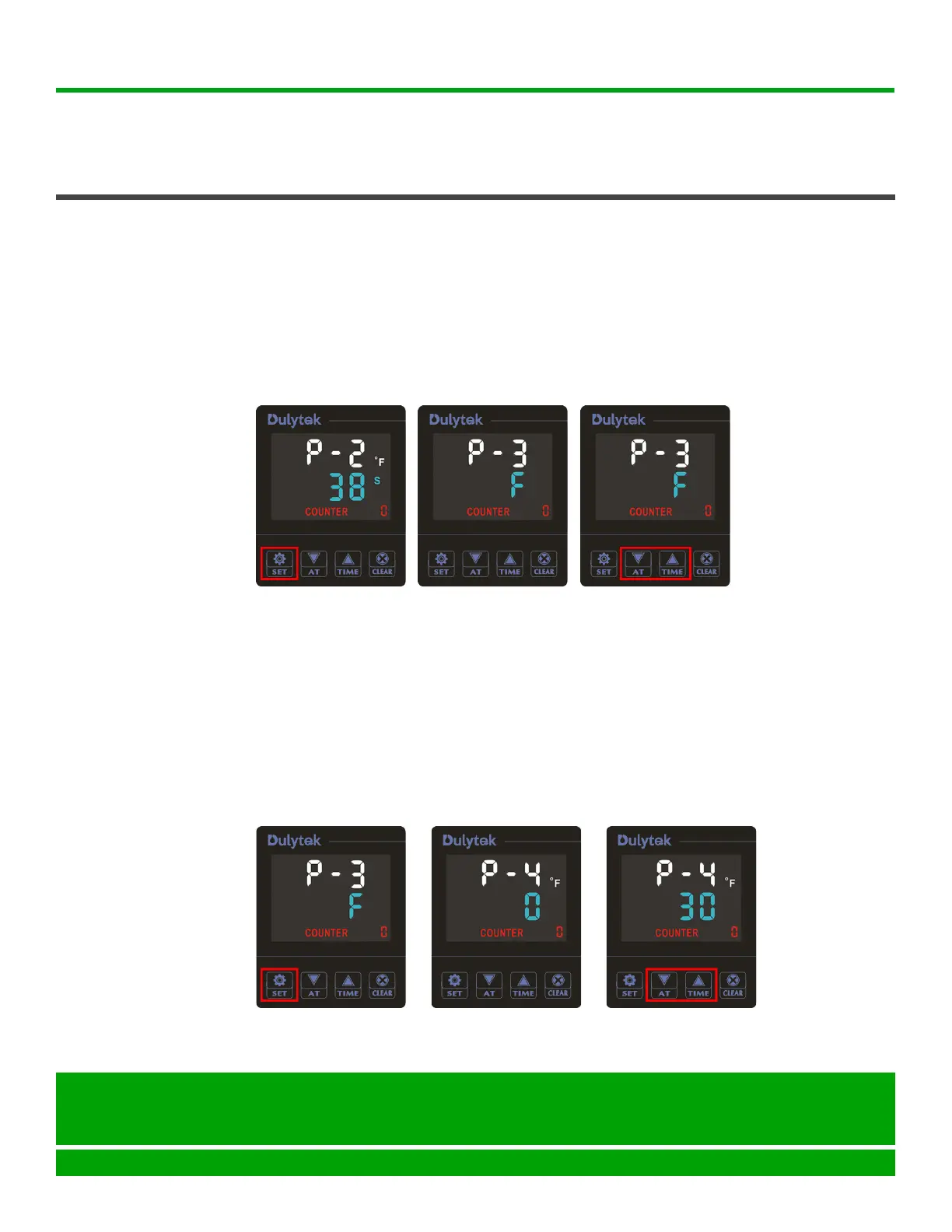
5. PressSETbuttonagain(Figure7)togotothetemperaturescale
selectionmode.Now,youshouldsee“P-3”onthedisplay(Figure8).
Tip: Depending on your machine’s default settings, you may either see
“F” or “C” on the display, indicating the currently selected temperature
scale(°F or °C).
6. Press UP or DOWN buttons to select either °F or °C(Figure9)ORskip
thisstepifyouaresatisedwiththecurrentselection.
SETTING
CONTROL
PANEL
(continued)
Dulytek Equipment
www.dulytek.com Email: help@dulytek.com
© 2018 Dulytek
All rights reserved
7. PressSETbuttonagain(Figure10)togotopowersavemodesettings.
Youshouldnowsee“P-4”shownonthedisplay(Figure11).Tip:This
settingcontrolsanautomaticturningothepressafteracertainperiodof
inactivity. To resume or “wake up” the press from power save mode, just
touch any button on the control panel.
8. PressUPorDOWNbuttonstoselecttheshutotimeinminutes(0to
120range)(Figure12).Tip:Ifyouwanttoturnothepowersavemode
altogether, select “0”.
Figure 7 Figure 8 Figure 9
Figure 10 Figure 11 Figure 12


 To Next Page