You can set the press temperature and timer using the control panel .
Please follow the steps below to record the desired settings.
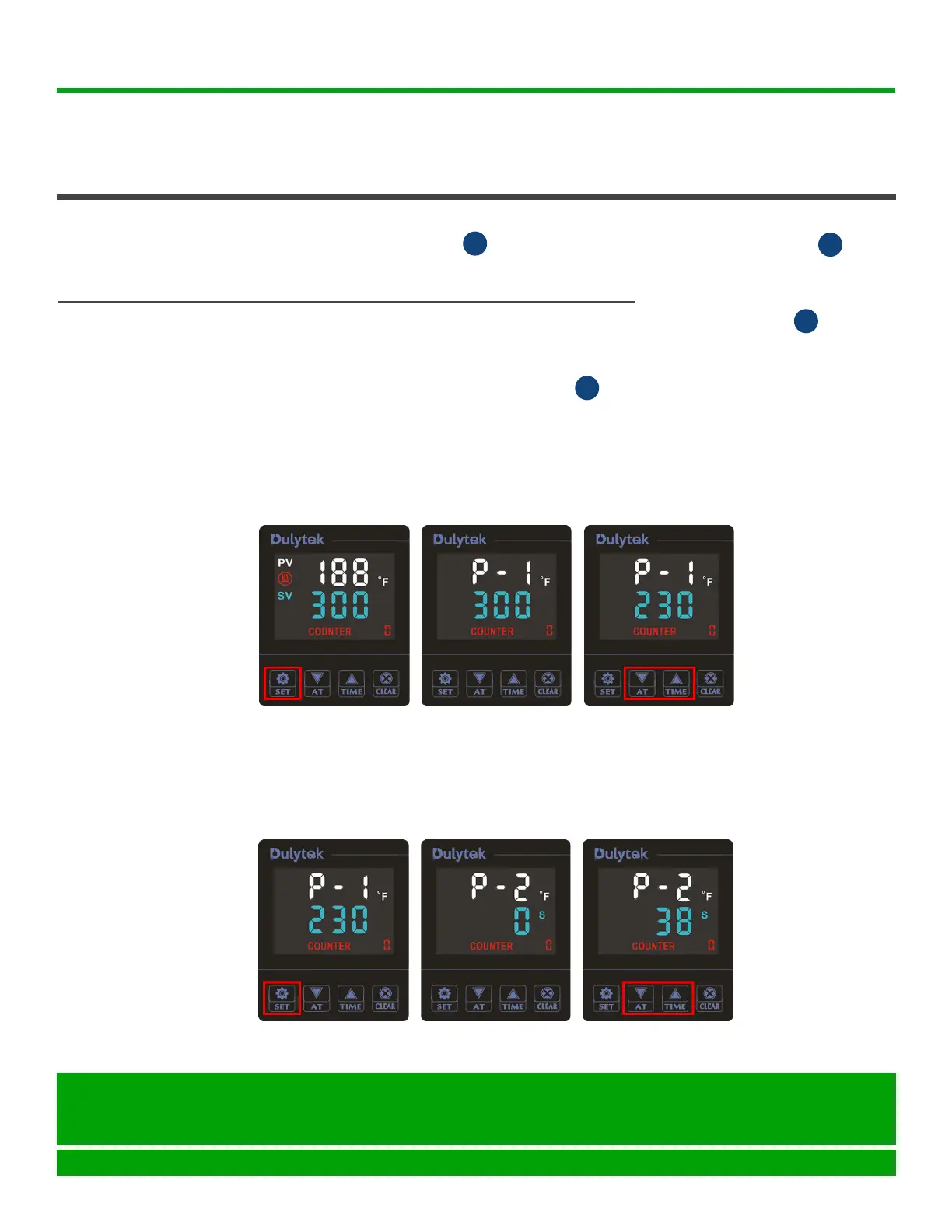
1. PressSETbuttononthecontrolpanel(Figure1)togotothe
temperature setting mode. You should now see “P - 1” on the display
(Figure2).
2. Press UP or DOWN button to select the desired temperature (Figure3).
Tip: Enter the temperature either in °F or °C; you will be able to select the
temperature scale later.
1. Flip the ON / OFF switch to turn the press on. The control panel
and the switch become lit.
STARTING
PRESS
OPERATING INSTRUCTIONS (continued)
INSTRUCTION MANUAL: DHP7 PAGE 8
Dulytek Equipment
www.dulytek.com Email: help@dulytek.com
© 2018 Dulytek
All rights reserved
I
E
SETTING
CONTROL
PANEL
E
E
3. PressSETbuttonagain(Figure4)togotothetimersettingsmode.Now,
youshouldsee“P-2”onthedisplay(Figure5).
4. PressUPorDOWNbuttontoselectthedesiredtimeinseconds(Figure
6).
Figure 1 Figure 2 Figure 3
Figure 4 Figure 5 Figure 6


 To Next Page