1. Waituntiltheplatensheatuptothedesiredtemperature(Fig.11).Tip:
Onceheatingisnished,theheatingiconsareturnedo.
2. Place the prepared material in the center of the bottom platen .
OPERATING INSTRUCTIONS (continued)
INSTRUCTION MANUAL: DM800 PAGE 9
SETTING
CONTROL
PANEL
(continued)
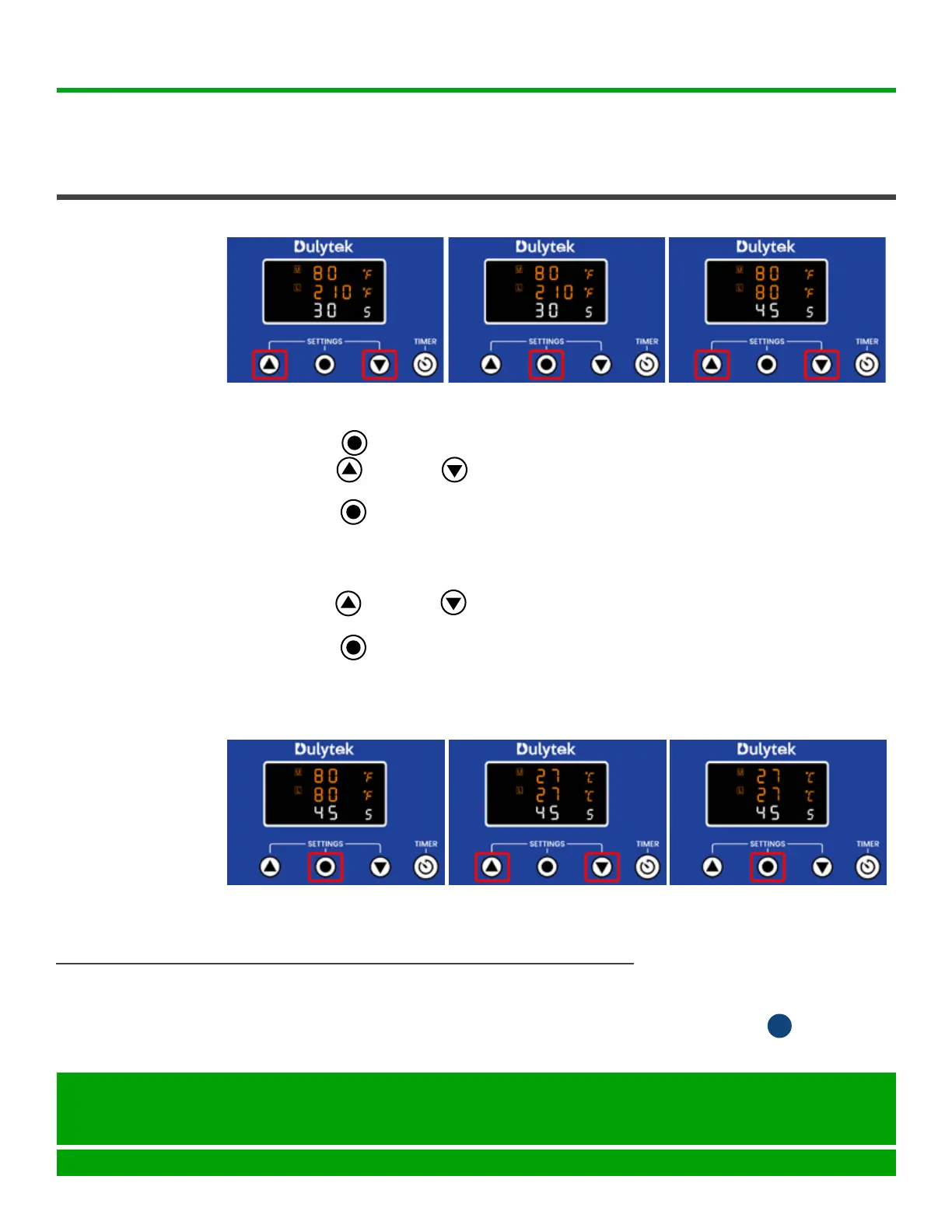
5. PressSetbuttonagain(Fig.5)togointothetimersettingmode.
6. Press Up or Down buttons to select the desired time in seconds
(Fig.6).
7. PressSetbuttontogotothetemperaturescaleselectionmode(Fig.7).
Tip: Depending on your machine’s default settings, you may either see “F”
or“C”onthedisplayindicatingthecurrentlyselectedtemperaturescale(°F
or°C).
8. PressUporDownbuttonstoselecteither°For°C(Fig.8)ORskip
thisstepifyouaresatisedwiththecurrentselection.
9. PressSetbuttononcemore(Fig.9)torecordallcontrolpanel’s
settings. The platens start heating, and the heating icons are now displayed
onthescreen(Fig.10).
D
Fig. 4
Fig. 5 Fig. 6
Fig. 7
Fig. 8 Fig. 9
PRESSING
Seattle, WA 98105
United States
help@dulytek.com
www.dulytek.com
© Dulytek
All rights reserved



 To Next Page