7
English
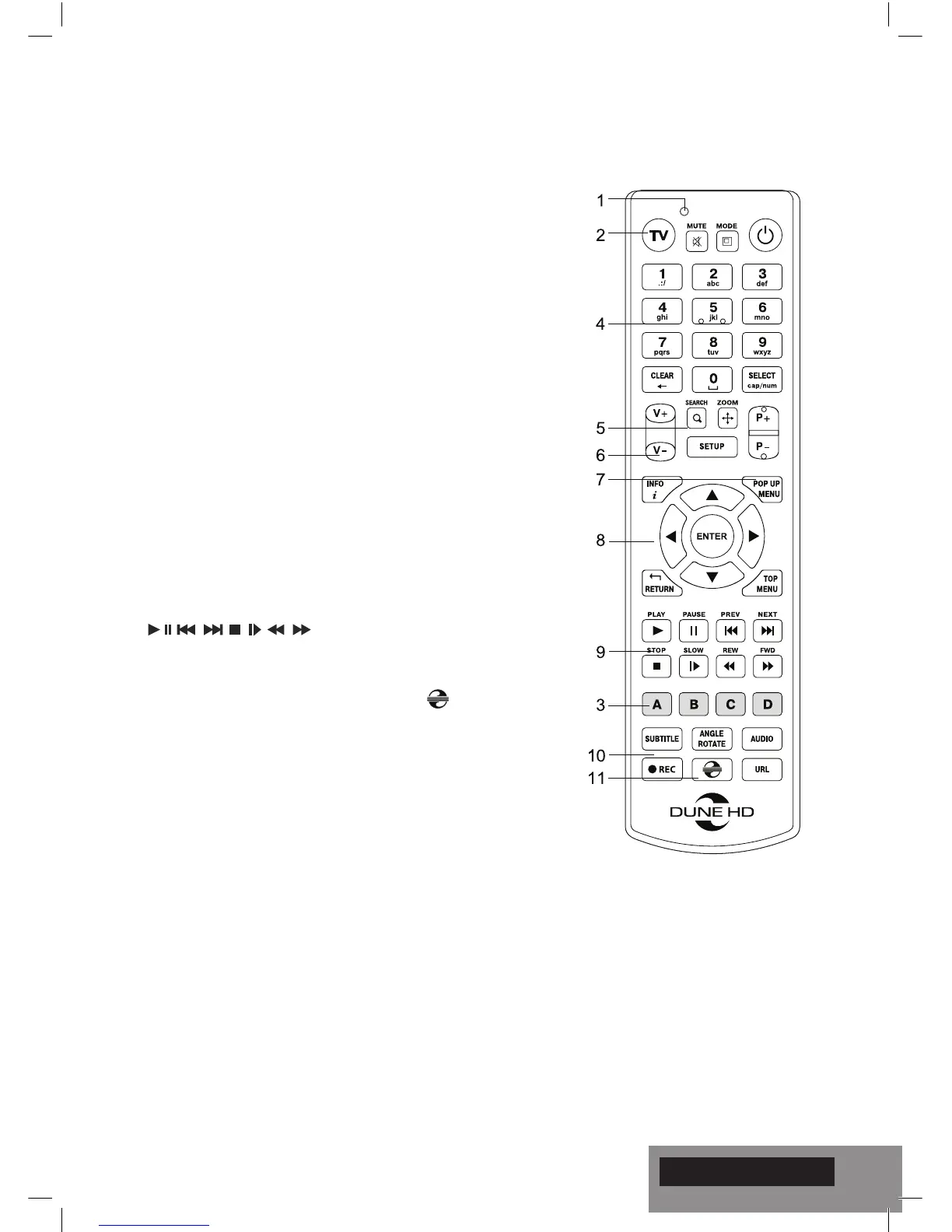
1. Command indicator — ashes in response to RC button press-
ing.
2. TV — switch to TV mode. MUTE — turn the sound on/off.
MODE — switch the video output mode; control some other play-
er functions. POWER — toggle the standby mode.
3. A (Red), B (Green), C (Yellow), D (Blue) — control some player
functions.
4. 0–9 — enter numbers and text; control some other player functions.
5. SEARCH — jump to a specied playback position. ZOOM —
change the zoom factor for the video content being played.
SETUP — enter/leave the setup menu; adjust playback settings
during p layback.
6. V+/V- (volume up / volume down) — adjust the volume.
7. P+/P- (page up / page down) — scroll up and down in various
lists; control some other player functions.
8. Arrows ◄ ► ▲ ▼, ENTER, RETURN, TOP MENU, POP UP
MENU, INFO — main buttons for controlling the player (navigate
across the items on the screen, open/use the currently selected
item, go back to the previous screen, go to main menu, show
popup menu with actions, show information, control some other
player functions).
9. — control the playback.
10. SUBTITLE, ANGLE/ROTATE, AUDIO, REC, DUNE, URL —
control the playback and some other player functions.
11. REC — start/stop TV channel recording, — launch Dune
HDPortal, URL — open Web Browser with concrete URL
NOTES:
● Use alkaline AAA batteries.
● Observe polarity when inserting batteries.
● Direct the remote control to the player. There must be no obstacles
between the RC and the player.
● If RC functions only at short distances or stops functioning, make
sure to replace the batteries.
● Some RC buttons may have several functions depending on the
current player mode.
● Some RC buttons may be available only in certain player modes or
only during playback of a certain content.
Remote Control


 To Next Page