9-5565-01
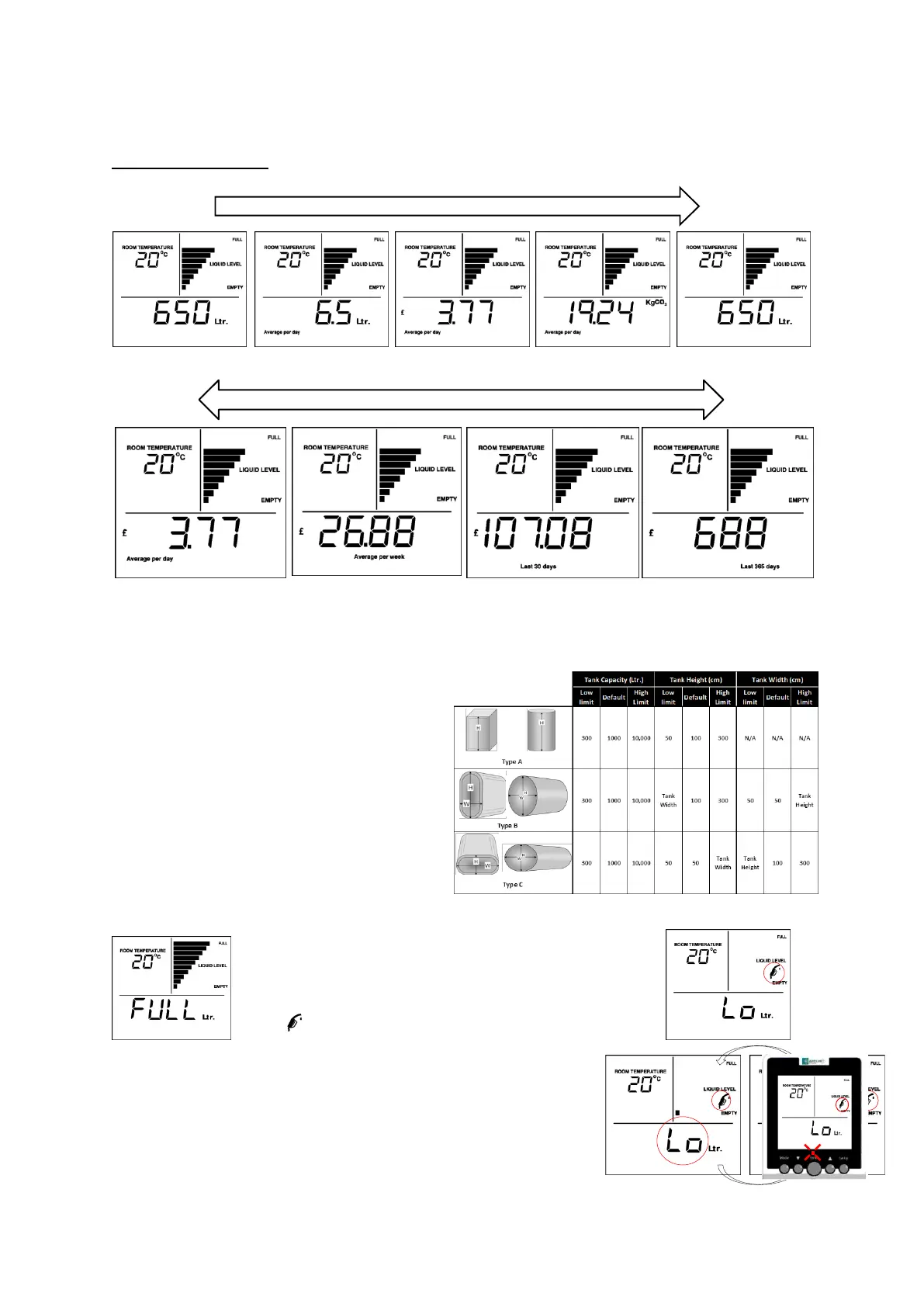
Fuel cost: Avg./day Fuel cost: Avg./week Fuel cost: Last 30 days Fuel cost: Last 365 days
Press r and s
screen. Depending on how long it has been unplugged the screen will revert to normal after a period from a few hours up to a maximum
of 1 week.
HISTORICAL information screens showing ‘Fuel usage – Litres’, ‘Fuel usage – Cost’ and ‘Fuel Usage – Carbon’. Presssing MODE and
r/s accesses these screens.
‘MODE’ presses
CURRENT – fuel remaining HISTORICAL – Fuel: Avg./day HISTORICAL – Cost: Avg./day HISTORICAL – Carbon: Avg./day CURRENT – fuel remaining
The Apollo Smart Monitor will automatically return to the CURRENT information screen after 30s with no key presses within the
HISTORICAL information screens.
5. APOLLO SMART - TANK SETUP
To calculate the volume in your tank the Apollo Smart Monitor
needs to know the shape of your tank. There are three basic
shapes as illustrated. Identify the shape that is closest to the
shape of your tank. Each Apollo Smart Monitor is supplied with
the default settings as shown. The Apollo Smart Monitor must
then be configured to your own tank’s dimensions (see
installation guide). Minimum and maximum allowable values for
tank dimensions are shown in this table.
6. APOLLO SMART LEVEL ALARMS/INDICATIONS
When the level in your tank is below 12 cm from the top of the tank, i.e. bottom
of the Apollo Smart Transmitter, the main display will show ‘FULL’. This will
occur when there are 10 bars showing on the bar-graph.
When the tank level falls to within 14cm of the bottom of the tank the ‘bowser’
symbol will flash.
When the tank level is such that there is below 10% of the usable volume of oil left in the tank,
the CURRENT information screen alternates between showing the ‘Ltr.’ (or % or DTE) and ‘LO’.
If the level then drops such that there is below 5% of usable oil left:
’LO’ is displayed constantly on the CURRENT information screens.
The buzzer sounds 5 times an hour at the top of the hour, i.e. 10:00, 11:00, 12:00, 13:00,
14:00...
The RED light flashes. This continues until there is an oil delivery and the level rises.



 To Next Page