9
EN
WATCHING TVINTRODUCTION
CONNECTION
INITIAL SETTING
OPTIONAL SETTING
TROUBLESHOOTING
INFORMATION
External Device Connection
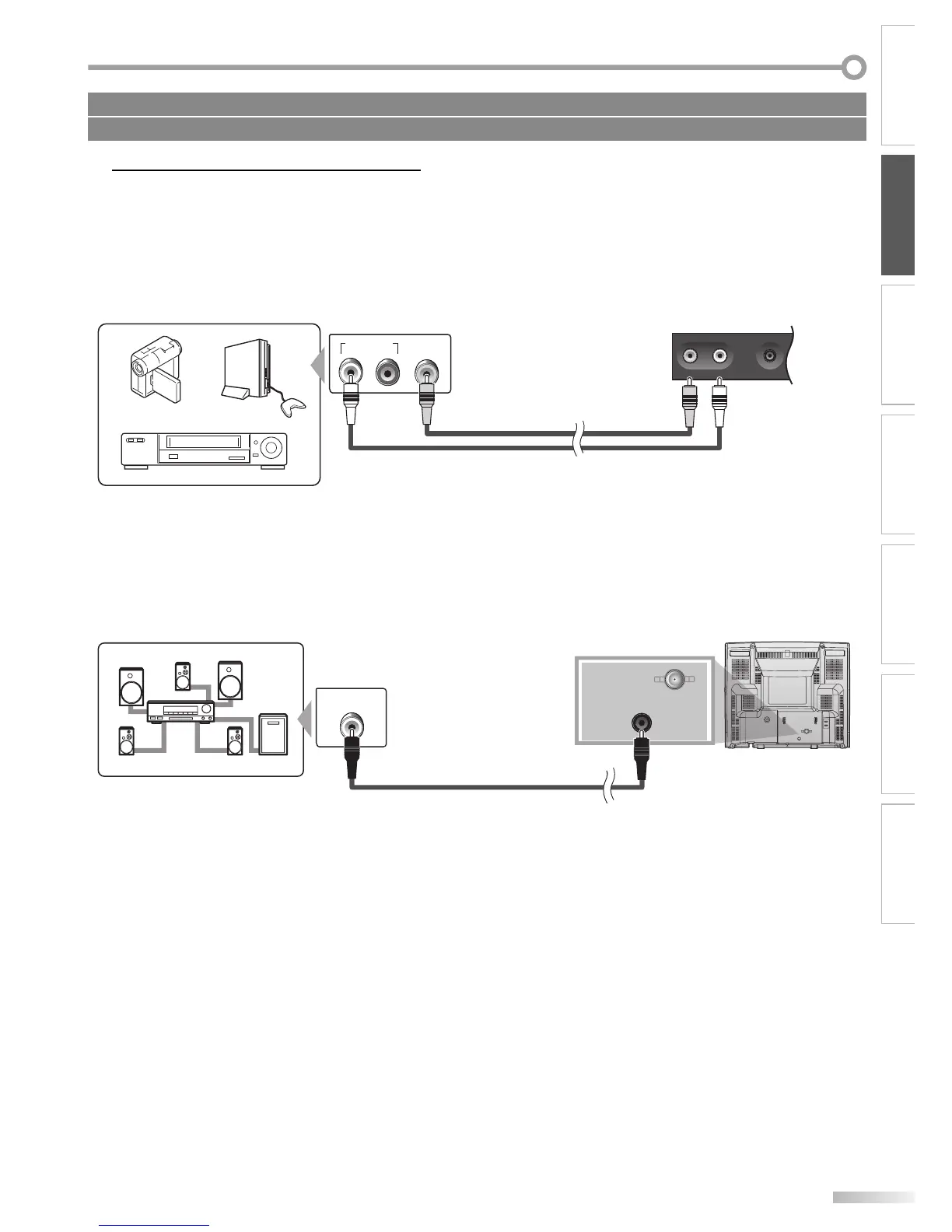
[Video Cable Connection]
Video connection offers standard picture quality for video devices connected to the unit.
Make the connection as illustrated below.
e.g.)
camcorder video game
VCR
AUDIO OUT
RL
VIDEO
OUT
front of this unit
EARPHONE
VIDEO AUDIO
RCA audio cable
RCA video cable
[Digital Audio Output Connection (for digital broadcasting only)]
If you connect this unit to an external digital audio device, you can enjoy multi-channel audio like 5.1ch digital
broadcasting sound.
Dolby Digital decoder
e.g.)
rear of this unit
ANT. IN
COAXIAL
DIGITAL AUDIO
COAXIAL IN
digital audio coaxial cable
5
Cables not included.
Please purchase the necessary cables at your local store.


 To Next Page