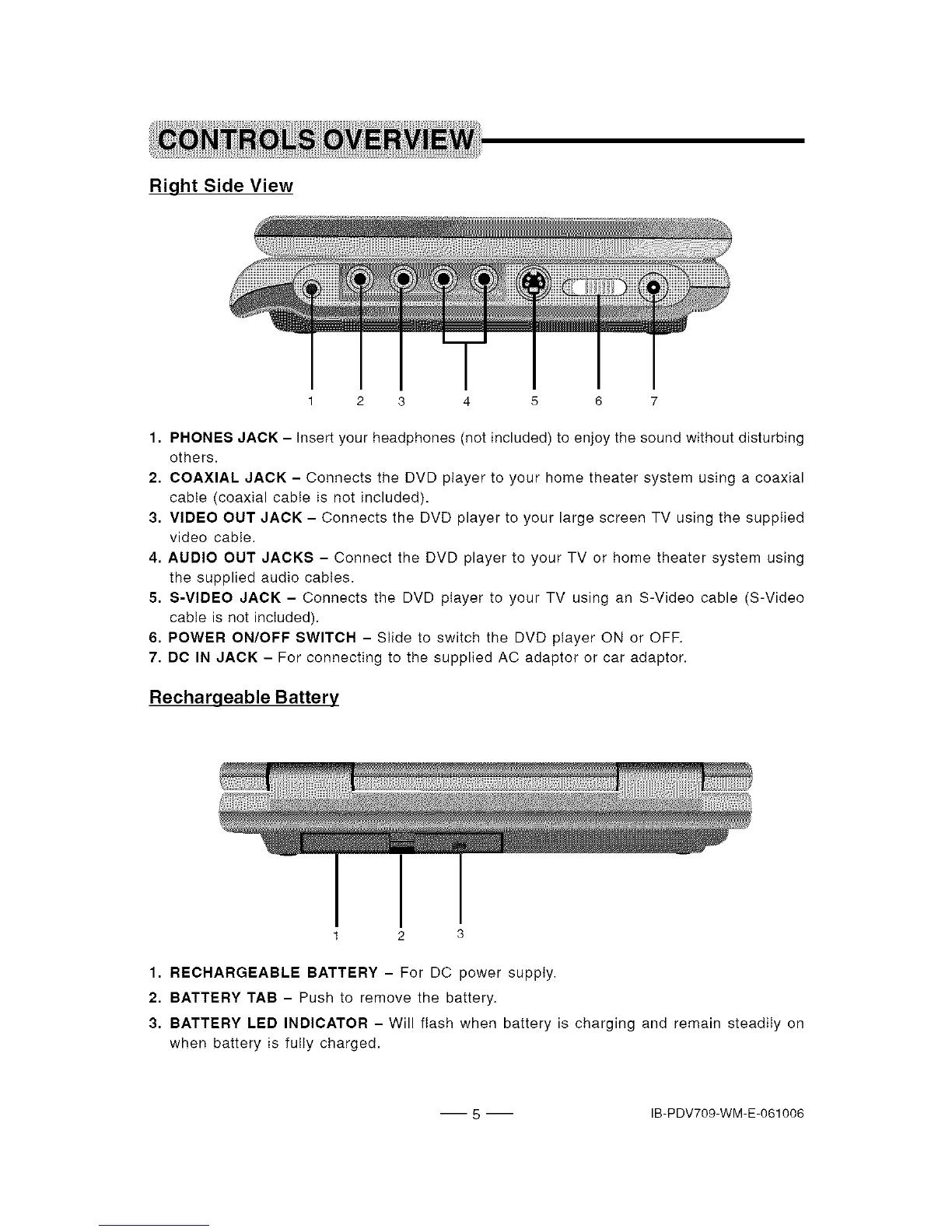
Right Side View
1 2 3 4 5 6 7
1. PHONES JACK - Insert your headphones (not included) to enjoy the sound without disturbing
others.
2, COAXIAL JACK - Connects the DVD player to your home theater system using a coaxial
cable (coaxial cable is not included).
3. VIDEO OUT JACK - Connects the DVD player to your large screen TV using the supplied
video cable.
4. AUDIO OUT JACKS - Connect the DVD player to your TV or home theater system using
the supplied audio cables.
5. S-VIDEO JACK - Connects the DVD player to your TV using an S-Video cable (S-Video
cable is not included).
6. POWER ON/OFF SWITCH - Slide to switch the DVD player ON or OFF.
7. DC IN JACK - For connecting to the supplied AC adaptor or car adaptor.
Recharqeable Battery
1 3
1. RECHARGEABLE BATTERY - For DC power supply.
2. BATTERY TAB - Push to remove the battery.
3. BATTERY LED INDICATOR - Will flash when battery is charging and remain steadily on
when battery is fuiiy charged.
5 IB-PDV709-WM-E-061006


 To Next Page