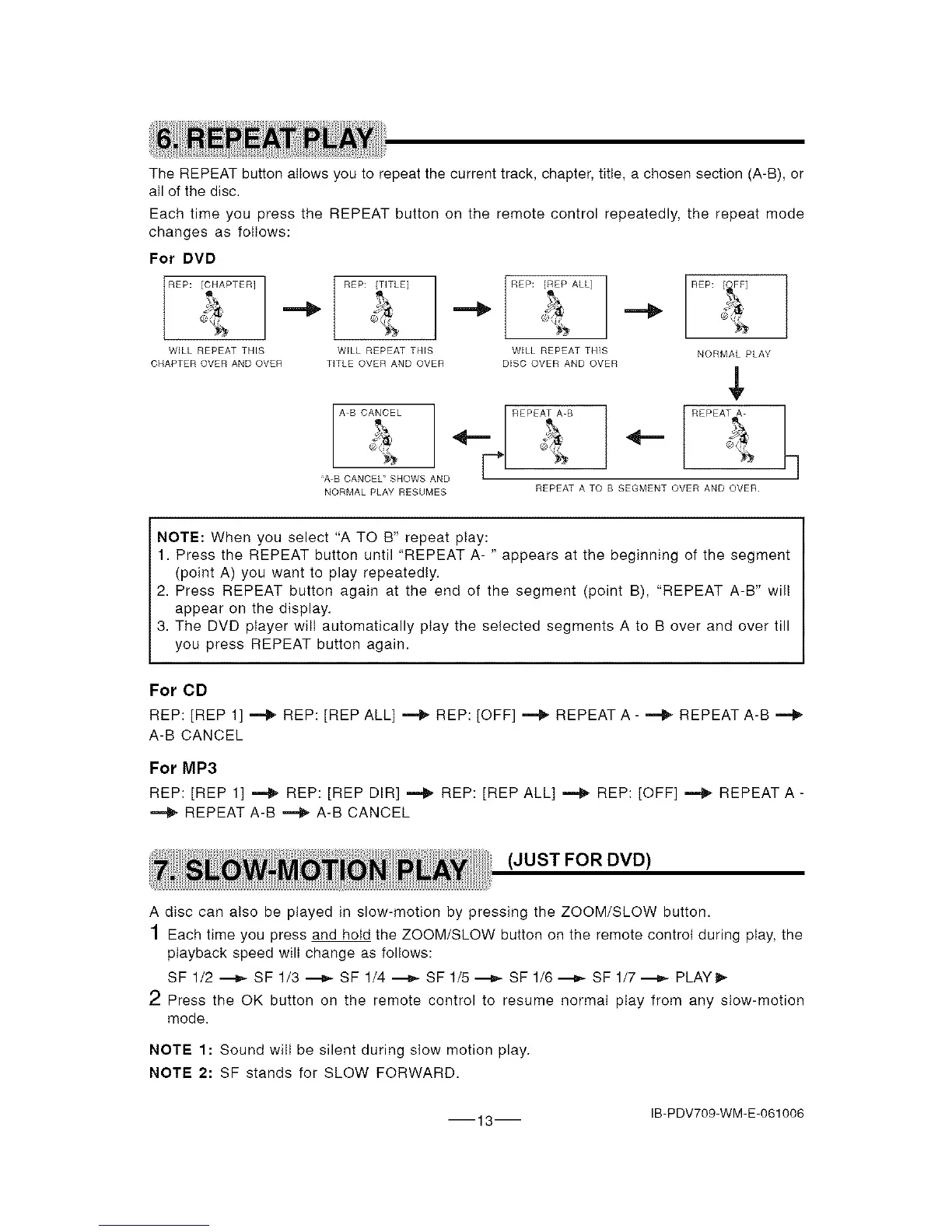
TheREPEATbuttonallowsyoutorepeatthecurrenttrack,chapter,title,achosensection(A-B),or
alIofthedisc.
EachtimeyoupresstheREPEATbuttonontheremotecontrolrepeatedly,therepeatmode
changesasfollows:
For DVD
REP: [CHAPTER] REP: [TITLE]
WILL REPEAT THIS WILL REPEAT THIS
CHAPTER OVER AND OVER TITLE OVER AND OVER
REP: [REP ALL] REP:
WILL REPEAT THIS
DISC OVER AND OVER
r
A B CANCEL _/ REPEAT A B
"A B CANCEL" SHOWS AND
NORMAL PLAY RESUMES
NORMAL PLAY
REPEAT A
REPEAT A TO B SEGMENT OVER AND OVER.
NOTE: When you select "A TO B" repeat play:
1. Press the REPEAT button until "REPEAT A- " appears at the beginning of the segment
(point A) you want to play repeatedly.
2. Press REPEAT button again at the end of the segment (point B), "REPEAT A-B" wilt
appear on the display.
3. The DVD player wilI automatically play the selected segments A to B over and over till
you press REPEAT button again.
For CD
REP: [REP 1] _ REP: [REP ALL] _ REP: [OFF] _ REPEAT A- _ REPEAT A-B
A-B CANCEL
For MR3
REP: [REP 1] _ REP: [REP DIR] _ REP: [REP ALL] _ REP: [OFF] _ REPEAT A -
REPEAT A-B _ A-B CANCEL
(JUST FOR DVD)
A disc can also be played in slow-motion by pressing the ZOOM/SLOW button.
1 Each time you press and hold the ZOOM/SLOW button on the remote control during play, the
playback speed will change as follows:
SF 1/2 _ SF 1/3 _ SF 1/4 _ SF 1/5 ._- SF 1/6 ._J,,- SF 1/7 ._- PLAY _,-
2 Press the OK button on the remote control to resume normal play from any stow-motion
mode.
NOTE 1: Sound will be silent during slow motion play.
NOTE 2: SF stands for SLOW FORWARD.
IB-PDV709-WM-E-061006
13


 To Next Page