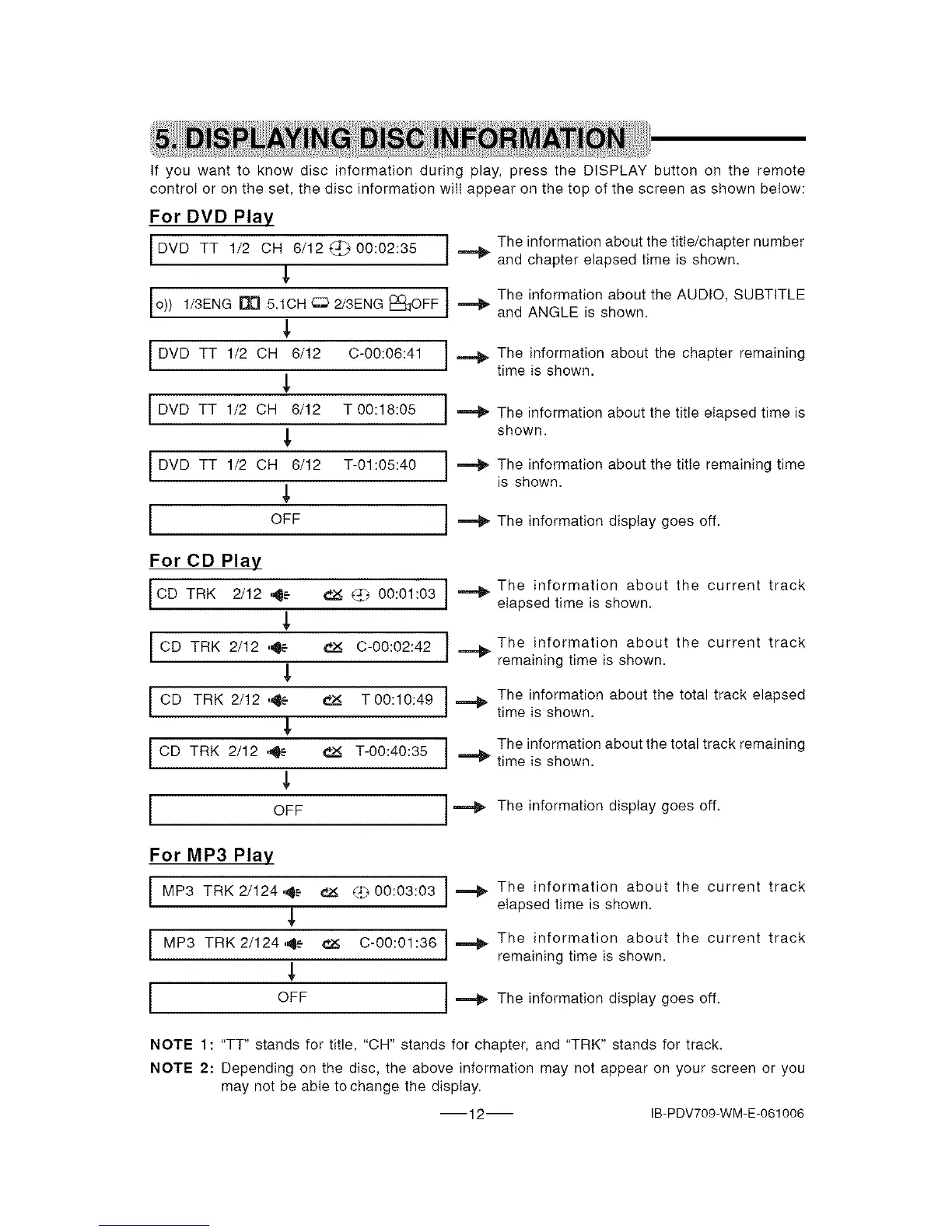
Ifyouwanttoknowdiscinformationduringplay,presstheDISPLAYbuttonontheremote
controlorontheset,thediscinformationwiitappearonthetopofthescreenasshownbelow:
For DVD Play
I DVD TT 1/2 CH 6/12 (_ 00:02:35
o)) 1/3ENG 5.1CH 2/3ENG
Drl
OFF
DVD TT 1/2 CH 6/12 C-00:06:41
,L
/DVD TT 1/2 OH 6/12 T00:18:05 I
J
k
[DVD TT 1/2 OH 6/12 7-01:05:40 J ,==._
OFF
I The information about the title/chapter number
and chapter elapsed time is shown.
The information about the AUDIO, SUBTITLEand ANGLE is shown.
._ he information about the chapter remaining
time is shown.
The information about the title elapsed time is
shown.
The information about the title remaining time
is shown.
._ The information display goes off.
For CD Play
CD TRK 2/12 ,4e
CD TRK 2/12 ,4e-"
I CD TRK 2/12 '4e
CD TRK 2/12 ,4e
OFF
_ 00:01:03
€2_ C-00:02:42
T 00:10:49
T-00:40:35
._ The information about the current track
elapsed time is shown.
J _ The information about the current track
remaining time is shown.
._ he information about the total track elapsed
time is shown.
The information about the total track remainingtime is shown.
._ The information display goes off.
For MP3 Play
I MP3 TRK 2/124,4e _ <_ 00:03:03
MP3 TRK2/1244e _ C-00:01:36
OFF
._ he information about the current track
elapsed time is shown.
] .=,_ The information about the current track
remaining time is shown.
,_ The information display goes off.
NOTE 1: "TT" stands for title, "CH" stands for chapter, and "TRK" stands for track.
NOTE 2: Depending on the disc, the above information may not appear on your screen or you
may not be able tochange the display.
12 IB-PDV709-WM-E-061006


 To Next Page