9
Cleaning and Maintenance
Emptying and cleaning the dust container
It is important to look after your vacuum cleaner to prolong its working life and to
keep it working optimally. We recommend that if the vacuum is used regularly,
that the sponge lter is cleaned at least once a month to ensure optimal
performance and prolong the longevity of the device.
It is important to empty the dust container regularly, particularly when the dust
inside reaches the MAX indicator on the container.
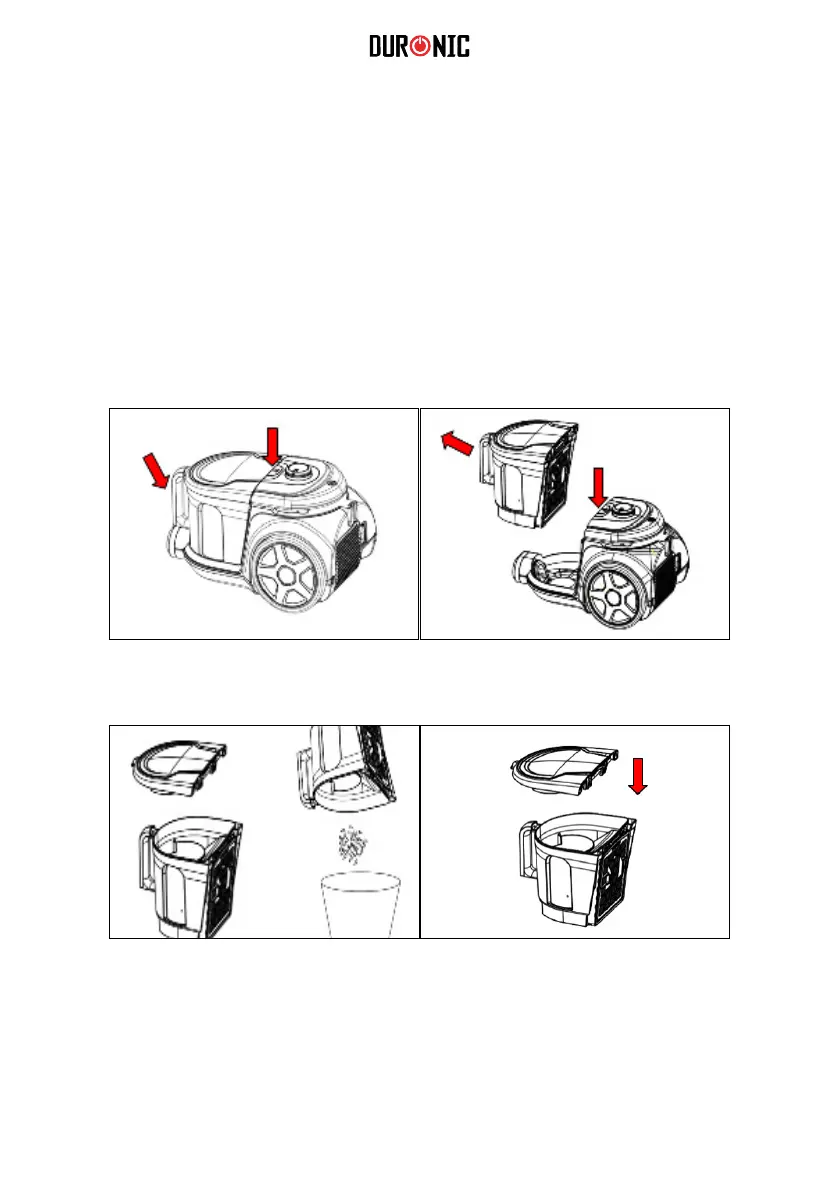
Hold the dust container with one hand
and push the release button with the
other hand.
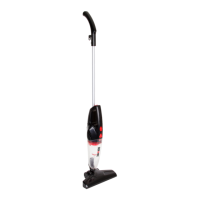
Take the dust container to the rubbish
bin and hold the container over it.
Push the release button to open and
remove the bottom of the dust container.
Tip the dust container upside down to
empty the contents directly into the bin.
Close the dust container by securing the
lid back on top of the cup.
Put the dust container back onto the
vacuum and click back into place.
Take the dust container out of the
machine.
1
3
2
4


 To Next Page