The DVC-4000 camera is a high-performance digital video camera designed for scientific and industrial applications. It is based on the Kodak KAI-4021 interline CCD, offering a resolution of 2048 x 2048 pixels with 7.4 µm square pixels, high quantum efficiency, and low noise. The camera is available in both standard and cooled configurations and offers a choice of Gigabit Ethernet or CameraLink interface. It comes bundled with the DVC software, which includes the DVCView imaging application for end-users and a Software Developer's Kit (SDK) for developers.
Function Description:
The DVC-4000 camera provides versatile imaging capabilities with various operational modes and speed options. It features two independent data channels: one for high-speed readout (40 MHz pixel rate) and another for low-noise readout (20 MHz pixel rate). Each channel uses its own 12-bit analog-to-digital converter, providing 12-bit digital image data via the CameraLink interface. The camera supports binning and region of interest (ROI) functions at both speeds. Cooled versions incorporate proprietary timing to eliminate "diode glow" during long exposures.
Operational Modes:
The DVC-4000 has five primary operating modes, all initiated by a trigger signal (external TTL, software-controlled CameraLink, or software command):
- Continuous, overlapped exposure mode with electronic shuttering: In this "video" mode, the previous exposure is read out while the current one is underway. Electronic shuttering controls exposure time without affecting the frame rate. The maximum exposure time is one frame time, dependent on pixel rate, ROI, and binning settings.
- Exposure range (full-resolution, no binning or ROI): 20MHz Readout: 111.5 microseconds to 235 milliseconds; 40MHz Readout: 58.5 microseconds to 125 milliseconds.
- Continuous, overlapped, extended-exposure mode: Similar to the above, but exposure times can range from one frame-time to several seconds. This mode maximizes frame rate for longer exposures. Readout frame rate decreases with increased exposure time.
- Exposure range (full-resolution, no binning or ROI): 20MHz Readout: 235 milliseconds to 7480 seconds; 40MHz Readout: 125 milliseconds to 3925 seconds.
- Continuous, non-overlapped exposure mode: Exposure and readout periods are separate and do not overlap. This allows a wider range of exposures, though frame rate decreases with increasing exposure time.
- Exposure range (full-resolution, no binning or ROI): 20MHz Readout: 111.5 microseconds to 7480 seconds; 40MHz Readout: 58.5 microseconds to 3925 seconds.
- Edge-triggered exposure (single frame capture) mode: Initiates a single exposure upon a trigger edge, with exposure time set by software. After readout, the camera returns to an armed state.
- Exposure range (full-resolution, no binning or ROI): 20MHz Readout: 111.5 microseconds to 7480 seconds; 40MHz Readout: 58.5 microseconds to 3925 seconds.
- Bulb (pulse-width exposure) mode: Exposure duration is controlled by the external trigger signal's pulse width. Exposure begins on the leading edge and ends on the trailing edge of the trigger.
- Exposure range: 10 microseconds minimum. Maximum limited by dark current and application.
Important Technical Specifications:
- CCD: KAI-4021 progressive scan interline CCD
- Active Pixels: 2048 x 2048
- Pixel Size: 7.4 µm x 7.4 µm (square format)
- Imager Size: 21.43mm (diagonal)
- Aspect Ratio: 1:1
- Peak QE: >55%
- Full Well: 38,000e- @ 20 MHz; 20,000e- @ 40 MHz
- Digital Video I/O: 12 Bit Camera Link
- A/D Converter 1: 20 MHz @ 12 bits
- A/D Converter 2: 40 MHz @ 12 bits
- Read Noise: 12 e- @ 20 MHz
- Binning (selected examples):
- 1x1 (2048x2048): 4 (20MHz), 8 (40MHz)
- 2x2 (1024x1024): 8 (20MHz), 15 (40MHz)
- 4x4 (512x512): 14 (20MHz), 25 (40MHz)
- 4x20 (512x100): 40 (20MHz), 55 (40MHz)
- ROI (selected examples):
- 1024x1024: 8 (20MHz), 15 (40MHz)
- 512x512: 15 (20MHz), 26 (40MHz)
- 256x256: 25 (20MHz), 39 (40MHz)
- Electrical Input Voltage: 110/220 VAC 50/60 Hz
- Power: <5 Watts
- Mechanical Size:
- 4000M: 3.25" (H) x 3.25" (W) x 1.73" (L)
- W/T1 Cooler: 3.25" (H) x 3.25" (W) x 2.56" (L)
- W/T2 Cooler: 3.90" (H) x 3.90" (W) x 2.57" (L)
- Weight:
- 4000M: 18 ozs. (505 grams)
- W/T1 Cooler: 30 ozs. (900 grams)
- W/T2 Cooler: 38 ozs. (1077 grams)
- Lens Mount: F-mount (C-mount optional)
- Camera Mount: 1/4" x 20 Standard Tripod mount
- Camera Connector: Camera Link...MDR-26
- Power Connector: DB-9M
- Gain Control Range: 35 dB
- Offset Control (black): 0% to 6% in 256 steps
- Exposure Range: 60 µs to 1 hour (software module, standard)
Usage Features:
- Operating Speed: The DVC-4000 can operate at 20 MHz for maximum dynamic range (approx. 38,000 electrons) and minimum noise, or 40 MHz for highest capture frame rates at the expense of slightly higher noise and lower dynamic range (approx. 20,000 electrons).
- Binning: Supports arbitrary on-chip binning (2x, 3x, 4x, 5x...21x,...) vertically and (2x, 3x, 4x) horizontally to increase dynamic range, sensitivity, or frame rate. Vertical binning increases frame rate, while horizontal binning does not. Increased binning factors can lead to higher CCD temperatures and dark current.
- Region of Interest (ROI): Supports arbitrary on-chip vertical ROI. Unwanted lines outside the ROI are "dumped" to increase readout rate. Simultaneous binning and ROI are fully supported. Small ROIs can increase dark current.
- Triggering: Operational modes are initiated by a trigger signal from external TTL, CameraLink control line, or software command. External TTL trigger signal must be active-low.
- CCD Phenomena:
- Blooming: Occurs when signal levels greatly exceed saturation, causing charge spillover in vertical transfer regions. Anti-blooming control is provided, but extreme signal levels or high vertical binning factors (exceeding horizontal register capacity) can still cause blooming.
- Smear: Inherent to interline CCD sensors, caused by photons striking the CCD during charge transfer. Typically noticeable during very short exposures with high light intensity. Kodak interline CCDs exhibit very low smear levels under normal conditions.
Maintenance Features:
- Warranty: No user-serviceable parts inside the camera. Removing the rear cover without express authorization voids the warranty.
- Cleaning Guidelines:
- Lens/Optical Assembly: Follow manufacturer's recommendations. Do not remove the protective lens mount cap until ready to mount the camera to an optical system.
- Standard (non-cooled) Cameras: Avoid completely removing the lens mounting ring to prevent debris accumulation on the CCD faceplate. Fingerprints or contact with the CCD faceplate may void the warranty.
- TE-Cooled Cameras: CCD is in a sealed, gas-filled chamber with an anti-reflective glass window. Do not loosen or remove the inner glass window; doing so voids the warranty and can cause condensation/frost damage if power is applied.
- Infra-red Filter (Standard and TE-Cooled Cameras):
- The IR filter is mounted inside the lens mounting ring and blocks near-IR light.
- Cleaning: Examine under strong light to identify dust or smudges. For dust, use a clean, dry camel hair lens cleaning brush. For smudges, use a lint-free cotton swab dipped in ethyl or isopropyl alcohol (saturated, not dripping). Draw the swab once across the surface, rotate 180 degrees, and draw again. Repeat if necessary.
- Caution: The filter is a high-quality, coated optical component; improper cleaning (scratches, chemical contamination) may void the warranty. Flammable solvents require proper ventilation and caution against heat/flame.
- Infra-red Filter Removal/Installation: The IR filter can be removed for greater near-IR sensitivity.
- Procedure: Loosen lens mount lock ring with the supplied wrench. Unscrew lens mount/filter assembly ring from the camera body. Hold the lens cap with pins upward, lower the lens filter assembly onto the pins. Rotate the lens ring anti-clockwise to remove it. Remove the filter with lens tissue and store it. Replace the lens ring clockwise.
- Caution: This procedure will lose focus calibration, requiring readjustment after reassembly. Take precautions to avoid debris on the CCD faceplate.
- CCD Faceplate Cleaning:
- Only clean if dirt/debris is a noticeable problem and lens cleaning doesn't resolve it.
- Caution: The CCD sensor is at risk of damage when exposed. DVC strongly recommends returning the camera to the factory for professional cleaning to avoid damaging the CCD faceplate. Scratches, chemical contamination, or improper cleaning may void the warranty.
- For dust, use a clean, dry camel hair lens cleaning brush. If very dusty or in doubt, contact DVC customer service.
- For smudges, follow the same alcohol swab procedure as for the IR filter.
- Flammable solvents require proper ventilation and caution against heat/flame.
Power Supply Connector Pin Assignments (DB-9 Male):
- Pin 1: +5 VDC, 250mA
- Pin 2: +4.8VDC, 1250mA
- Pin 3: -15 VDC, 250mA
- Pin 4: Reserved
- Pin 5: +15 VDC, 250mA
- Pin 6: GND
- Pin 7: Reserved
- Pin 8: GND
- Pin 9: Reserved
Auxiliary Connector Pin Signal List:
- Pin 1: ENL (Output) - "Enable Line," active-high TTL signal during valid pixel period.
- Pin 2: DIFF_RESET_OUT (Output) - Active-low TTL signal, buffered version of CameraLink CC1 signal (software-controlled trigger). Labeled INPUT_1 on older DVC cameras.
- Pin 3: TTL_RESET (Input) - TTL input for triggering exposures, identical to CameraLink CC1. Labeled VRST_INT on older DVC cameras.
- Pin 4: GND - Electrical ground.
- Pin 5: ENF (Output) - "Enable Frame," TTL output high during active readout lines.
- Pin 6: STROBE/INT-PULSE (Output) - TTL output, high during sensor exposure time in certain modes (for external flash synchronization). Can be configured as a programmable output.

 Need help?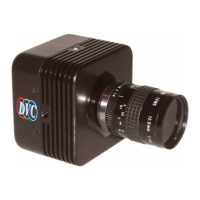

 To Next Page
 General