5
3 Installation and Connection
3.1 Video/Audio Connection
We support HDMI, Component, S-Video, Composite video output for connecting to the TV and each output
needed to change settings on the TViX HD.
The highest quality components are as follows: HDMI > Component >S-Video > Composite.
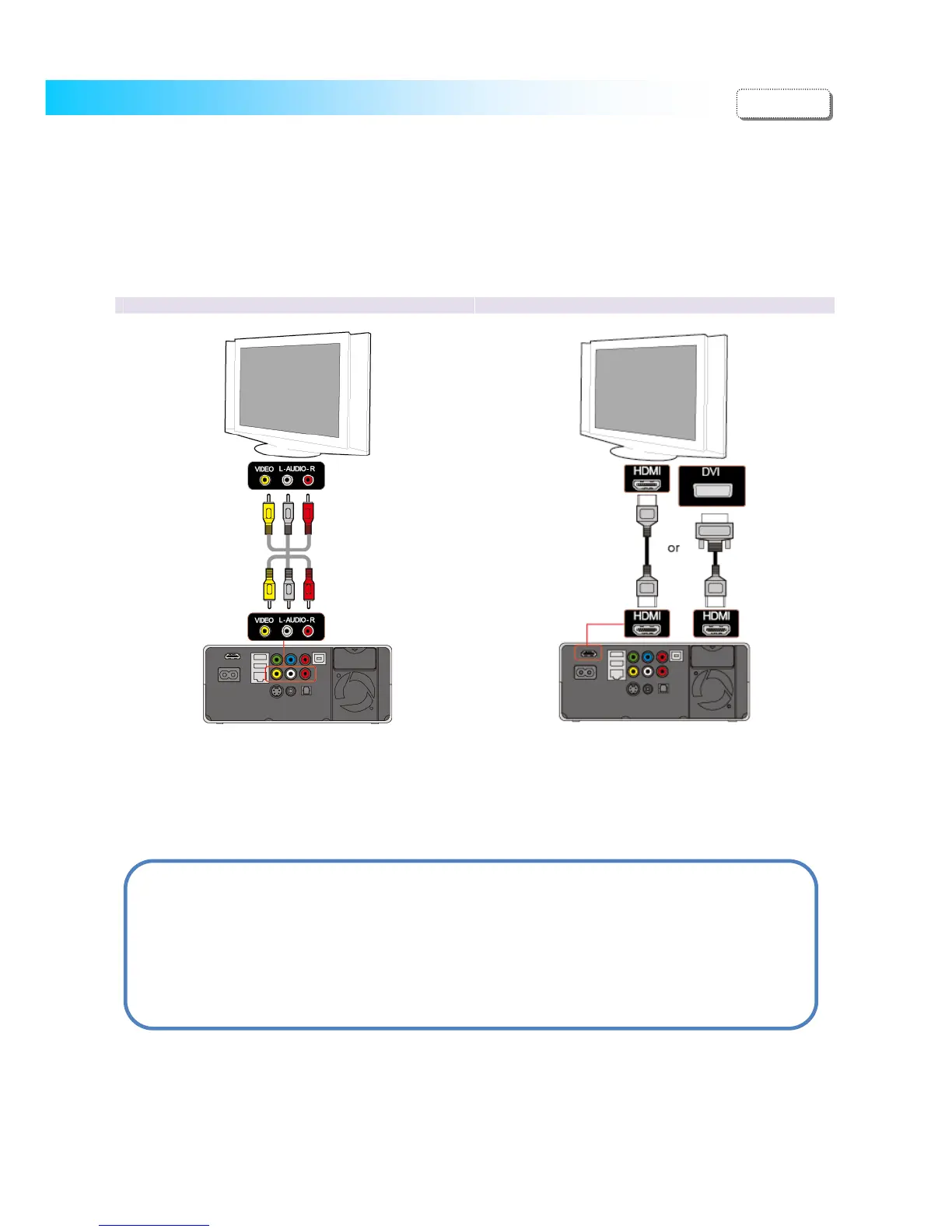
Ordinary (Composite) TV Output Connection to HDMI Output (HDMI-D
I)
Connect the TViX HD and your TV using the yellow
video, red/White audio cable.
Turn on the TViX HD and TV. Select an appropriate
video input mode on your TV until you get the initial
TViX HD screen.
Simply connect your TViX HD to the HDMI port on
the TV. TViX plays back high definition video (up to
1920x1080P).
With HDMI to HDMI cable, you don’t need to connect
additional audio cable
CAUTION
After you connect the video cable to your TV, press the TV Out button repeatedly on your remote
control until you get the initial TViX screen.
* The component or S-Video cable is not included in the TViX and must be purchased separately.
ENGLISH


 To Next Page