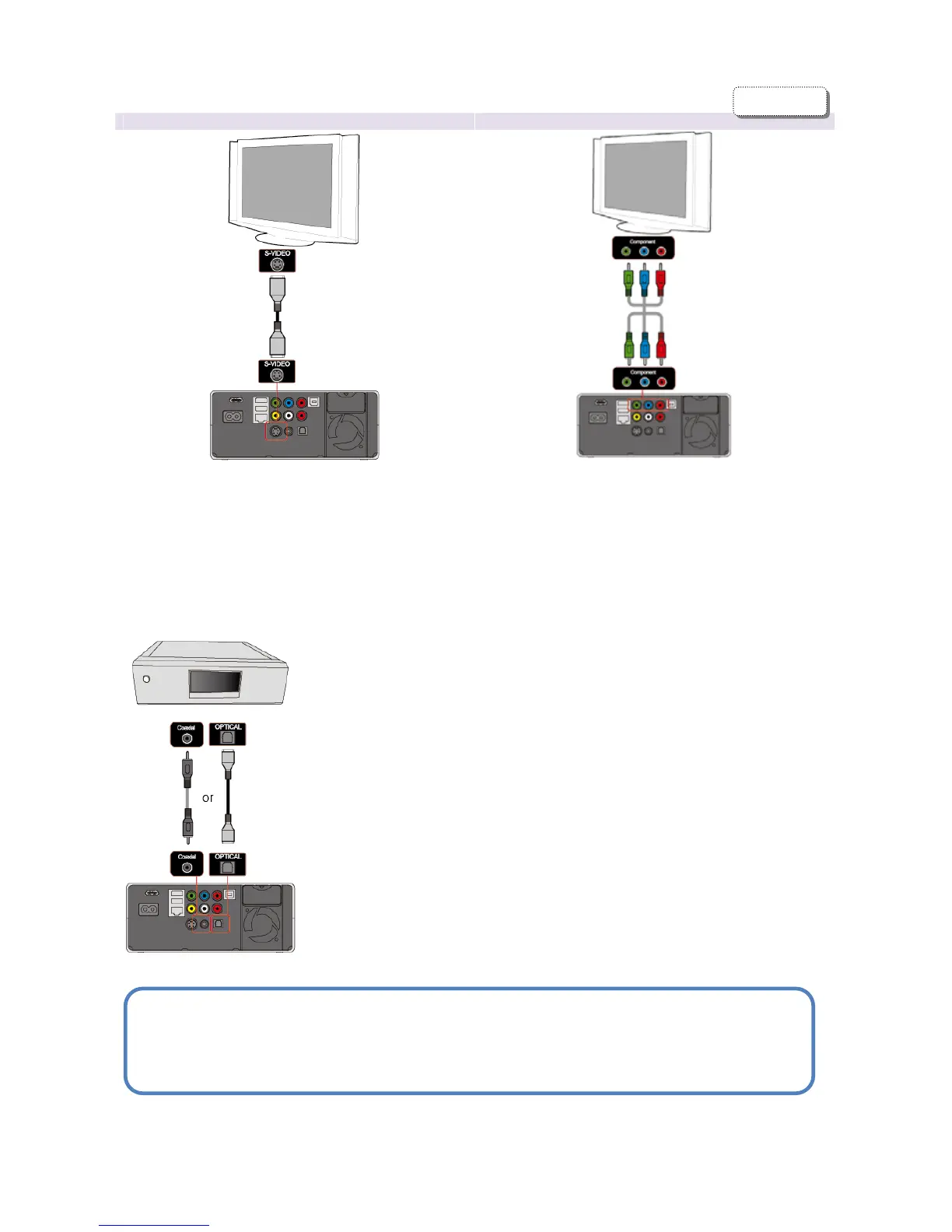
ideo Output Connection to Component Output
Connect the TViX HD and your TV using the S-Video
cable. Turn on the TViX HD and TV. Select an
appropriate video input mode on your TV until you
get the initial TViX HD screen. Additional cables
required for audio.
(The S-Video cable is not included and has to be
purchased separately.)
Connect the TViX HD and your TV with the
component cables.
Turn on the TViX HD and TV. Select an appropriate
video input mode on your TV (in this case, the
Component input mode). Additional cables required
for audio.
5.1CH Amplifier (Digital)
If you have a multi-channel decoder/amplifier with an optical/coaxial
input, you can enjoy 5.1 CH high quality sound through the coaxial or
optical cables.
The illustration on the left shows where to connect the coaxial cable.
Optical cable connection is done in a similar method.
(These cables are not included in the package and must be
purchased separately.)
CAUTION
If no sound is heard after connecting the Optical or Coaxial Cable, you have to change the audio
setup of TViX to Digital.
ENGLISH


 To Next Page